
Snom M80 IP65 Protected DECT Handset

Frequently Asked Questions

First, ensure the handset is fully charged and within range of the base station. Check that the base station’s DECT LED is solid or blinking, indicating it’s ready to accept registrations. On the M80, navigate to Settings > Registration > Register and follow the prompts to put the handset into pairing mode while the base is in registration mode. If the issue persists, a Toronto-based VoIP support provider can usually resolve this remotely.
Confirm the handset isn’t muted (the mute key on the side or the on-screen indicator). Check the volume level using the side keys during a call. Verify that the base station has a successful SIP registration; if the VoIP line is down, audio won’t pass. If these are fine, try a different handset registered to the same base to isolate the issue.
Inspect the charging contacts on the handset and charger for dirt, cleaning them gently. Try a different power outlet. If the handset remains unresponsive, hold the power key for a few seconds. If it still won’t turn on, the battery may need replacement, but opening the unit could void warranty—contact support before proceeding.
Reposition the base station higher, away from metal and concrete. Ensure antennas are vertical. If range remains poor, add a DECT repeater or another base. Also, keep Wi-Fi routers at least a meter away. Should the problem continue, a Toronto-based VoIP support company can survey the site and recommend optimal base placement.
The alarm key is configurable and normally requires setup in the provisioning file or on the base station’s web interface. Verify that the alarm action (e.g., send an emergency message or dial a number) is defined. If it’s correctly configured but still unresponsive, the feature might be disabled by the phone system administrator—check with them first.
Make sure the Bluetooth headset is in pairing mode and within 3 meters of the M80. On the handset, enable Bluetooth and scan for devices. If pairing fails, check the headset’s battery and compatibility. Interference from Wi-Fi can cause audio drops—try moving away from other wireless devices.
The M80 is a DECT handset that requires a Snom DECT base station, such as the M300, M700, or M900, to work. It cannot connect directly to Wi-Fi or a generic VoIP server. Once registered to a Snom base, the base handles the SIP registration to your VoIP provider, making the M80 compatible with most SIP-based systems, including those commonly used by Canadian businesses like 3CX, FreePBX, or BroadSoft.
The vibration alarm is typically enabled in the handset’s sound profiles or through the provisioning template. On the handset, go to Settings > Sounds > Silent Alert / Vibration and enable it for specific events like incoming calls or messages. For advanced patterns, the setting is often controlled by your IT admin via the base station’s provisioning file.
Yes, the M80’s large temperature range and IP65 rating make it suitable for outdoor use in cold weather, but you should avoid prolonged exposure beyond its specified limits (check the manual for exact numbers). The handset itself is protected, but battery life may shorten in deep cold. If workers need extended outdoor use, keep a spare charged battery indoors.
Many Snom DECT base stations support Power over Ethernet (PoE), so you can power the base with a single network cable. The handset itself charges on its own desktop charger, which is not PoE. As long as the base gets PoE from your switch, the handset communicates wirelessly, giving you a clean setup without extra power adapters at the base location.
IP Phones

Snom M80 IP65 Protected DECT Handset
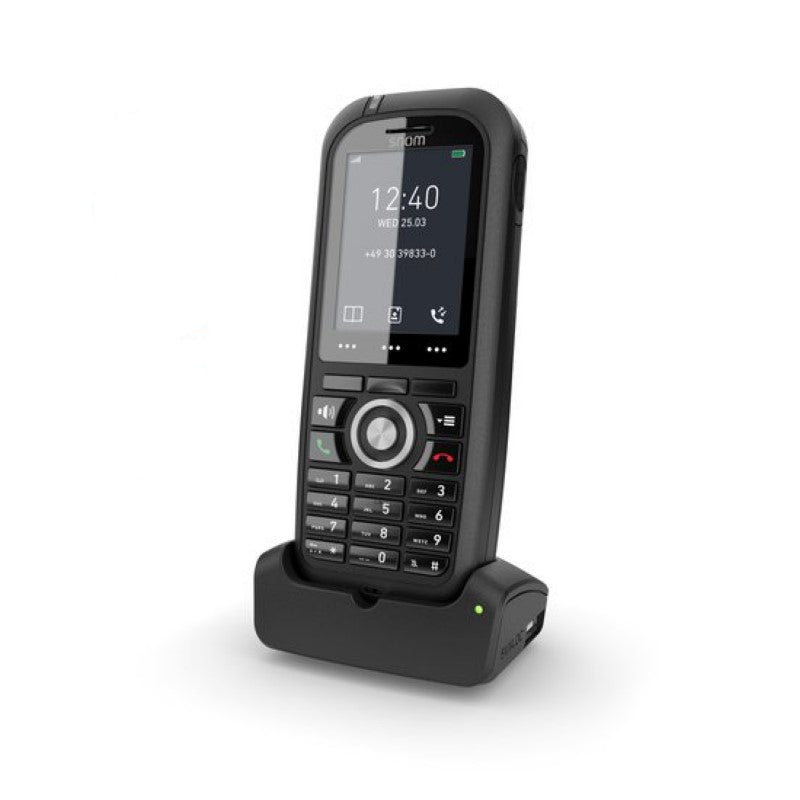
The Snom M80 is the perfect all-rounder for indoor and outdoor use. It's extremely light and compact, thanks to its special heavy-duty jacket (IP 65 and MIL-STD 810g certified), making it robust and durable. Key Features: • IP65 protected handset • Ruggedized and robust design • HD audio support • Alarm key • Integrated Bluetooth LE • Large temperature range • Integrated belt clip • HAC compliant • Compatible to existing base stations (1) • Vibration alarm • Multi-colour LED • 200 hours stand by • MIL-STD-810g 516.6 tested Additional Information: Weight: 0.8 lb Dimensions: 8 × 4 × 4 in Phone Type: DECT Handset Technical Specifications: User Interface: Display: 5 cm (2“) diagonal, 240 x 320 pixels, 262k TFT color LCD with backlight Backlit keypad with 24 keys: Standard ITU telephone keypad, 12 keys, 4×3, with star and pound/hash key Three context-sensitive function keys Five navigation keys (left, right, up, down, OK) Off-hook key, cancel key Menu key Three side keys (volume up/down, mute) Alarm key on the top of the handset 28 keys in total The Snom M80 is suitable for office use and more complicated locations such as warehouses, construction sites, or outdoor areas exposed to the elements.

About This Product

The Snom M80 is a ruggedized DECT handset purpose-built for environments where a standard office phone would quickly succumb to dust, moisture, or accidental drops. With IP65 protection and MIL-STD-810g shock resistance, it excels in warehouses, construction sites, manufacturing floors, and outdoor areas exposed to the elements. It pairs with Snom’s M-series DECT base stations, so it slots into an existing Snom VoIP deployment or becomes the go-to handset for field workers who need clear voice communication despite rough conditions.

The M80’s compact design and integrated belt clip make it easy to wear throughout a shift, and its large temperature range means it can handle Canadian winters as well as hot, dusty summers. Keep in mind that, as a DECT handset, coverage is limited to the range of the base station; planning for adequate base placement in large facilities is essential. It’s not a standalone device—you’ll need a compatible Snom base to make calls. The small 2-inch screen is perfectly readable but won’t display rich UC presence or detailed call center metrics, so it’s best paired with a desk phone or softphone for workers who split their time between a desk and the field.

For a carpeted office or a call center environment, the M80’s toughness is overkill, and a less costly Snom desk phone or an entry-level DECT handset likely makes more sense. Conversely, if users need a full-featured desk phone with large color displays, video, and extensive programmable keys, this handset will feel underpowered. The M80 is a focused tool: durable, loud, and dependable for voice in harsh places.
Services We Provide
  • Professional Installation & Configuration
  • Ongoing Maintenance & Support
  • Troubleshooting & Repairs
  • System Upgrades & Updates



