
Snom M85 Ruggedized Handset

Frequently Asked Questions

First, bring the handset close to the base station—ideally right next to it. On the base, put it into registration or subscription mode (usually by pressing the DECT pairing button or through the web interface). Then on the M85, go to the connectivity or registration menu and start the subscription. If it still fails, check that the base is powered and not already at its handset limit. A quick power cycle of the base often clears a stuck registration process; this is safe and won't erase your settings.
Check that the charging contacts on the handset and in the cradle are clean—wipe them gently with a dry cloth. Turn off Bluetooth when you're not using a wireless headset, as it draws extra power. Also, if the handset is constantly searching for signal at the edge of DECT range, it will drain faster; move the base or add a repeater to improve coverage. If the battery still depletes quickly, the pack may be aging, but try these steps first.
First, seat the battery firmly; remove and reinsert it to make sure the contacts align. Then place the handset in the charging cradle for at least 30 minutes—a deeply discharged battery needs that time to show any sign of life. If the cradle's LED indicates charging but the screen stays dark, try a different power adapter for the cradle, as a weak adapter can prevent proper charging. Do not attempt to open or disassemble the handset.
This is usually a DECT range or interference issue. Move closer to the base station and away from large metal objects or dense concrete walls. If you work in an area with many wireless devices, try changing the DECT channel on the base's web interface (this is a non-destructive setting). Also, ensure the base is mounted high and clear of metal racks; poor placement causes most audio glitches.
This feature must be enabled and calibrated in the base station's handset profile, not on the handset itself. Log into the base's web interface, find the M85's DECT settings, and check that the no-movement or man-down option is turned on and the tilt sensitivity and timeout are set. Also, the handset must be worn vertically—clipped to a belt or harness—for the sensor to detect a fall. Test after any configuration change to confirm.
No, the M85 uses Snom's DECT protocol and will only pair with a Snom M300 or M700 base station. It cannot subscribe to third-party DECT systems even if they use the same frequency band. If you're replacing an older cordless system, you'll need a compatible Snom base to integrate with your VoIP platform.
First, ensure the headset is fully inserted—the jack may be stiff on a ruggedised device. Check the audio path: open the handset's audio settings and confirm that the jack is selected as the output, not the speakerphone or earpiece. Also, try a simple wired headset known to work with other phones; some locking industrial headsets use a slightly different plug profile, though standard 3.5 mm TRRS usually works. If the issue persists, a Toronto-based VoIP support provider can usually resolve this remotely.
There isn't a sensitivity adjustment for the physical cord—accidental pulls happen if the cord is snagged. Re-route the cord so it hangs freely and isn't tangled with clothing or tools. The alarm behaviour can be set in the base configuration: you can change it from an immediate alarm to a pre-alarm with a delay, giving you time to cancel a false trigger. If the cord needs replacement, contact your equipment supplier.
Press the menu key, navigate to Settings > Audio > Ringtone, and select one of the available tones. You can assign different ringtones to different call types (internal vs external) in the base station's handset configuration. The M85's ringtones are intentionally loud and distinct for industrial environments; if you need an even louder alert, pair it with a Bluetooth headset that supports in-ear ringing. If the issue persists, a Toronto-based VoIP support provider can usually resolve this remotely.
IP Phones

Snom M85 Ruggedized Handset
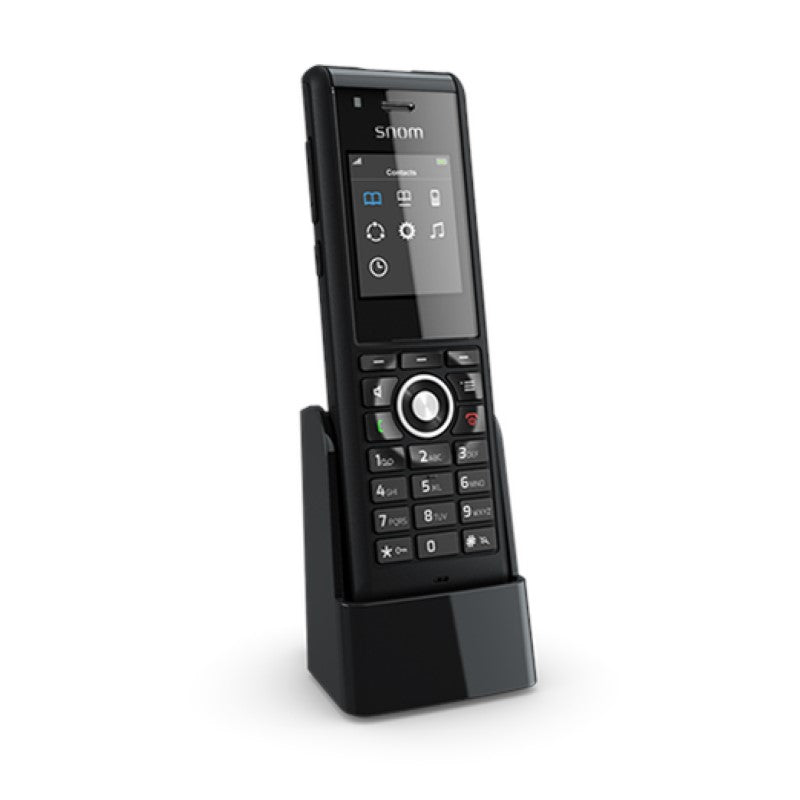
The M85 industrial handset is designed for demanding day-to-day workplace requirements. It boasts cutting-edge occupational safety features, including an integrated dead man’s sensor and alarm function. Compatible with M300 and M700 Base Stations, it offers robust DECT technology with IP65 protection rating. Key Features: • Shockproof, waterproof, and dustproof • Range of alarms to increase workplace safety (push-button, no-movement, man-down, and pull-cord) • Bluetooth connectivity • 3.5 mm jack for audio output • Perfect for outdoor use Additional Information: Weight: 1 lb Dimensions: 7 × 6 × 3 in Phone Type: DECT Handset Technical Specifications: User Interface: • Display: 5 cm (2“) diagonal, 176 x 220 pixels, 262k TFT color LCD with backlight • Backlit keypad with 24 keys: standard ITU telephone keypad, context-sensitive function keys, navigation keys, off-hook key, cancel key, menu key, and three side keys for volume control • Comfortable and intuitive menu structure • Selection of ring tones • Multicolor LED indication of missed calls/new voice messages, low battery • Speakerphone and mute microphone For a full list of specifications, please refer to the Product Datasheet.

About This Product

The Snom M85 is built for workplaces where a standard cordless handset wouldn't last a day. It's designed for outdoor logistics yards, manufacturing floors, construction sites, and any role that puts a lone worker in harsh conditions. The handset pairs with a Snom M300 or M700 DECT base station—already in place or added as part of a new deployment—to give field teams a direct voice link back to the office or dispatch. The real value here is the combination of ruggedness and integrated safety alarms, which let you run a single device for communication and personal alerting without adding separate lone-worker hardware.

There are tradeoffs to understand. This isn't a smartphone; it doesn't run apps or handle email, and the colour display is compact. The safety features are deep and configurable, but they need to be set up properly through the base station's web interface—alarms for no-movement, man-down, or pull-cord won't work out of the box. The DECT range is typical for the technology: solid in open air, but large steel-framed buildings or sprawling outdoor yards will likely require careful base-station placement, possibly with repeaters, to avoid dead spots.

If you only need a durable handset for a rough warehouse without the alarm functions, a simpler ruggedised DECT phone might do the job for less. The M85 earns its keep in environments where a missed check-in or a sudden fall is a genuine safety risk and where the handset will be exposed to dust, water splashes, and drops. Bluetooth and the 3.5 mm jack add flexibility for headsets, but they're audio accessories, not paths for data, so don't expect to connect to a mobile phone's data service through the handset.

In a Canadian context, the IP65 rating is a real asset for hard winters or muddy spring construction seasons—you can wipe the handset clean and it'll keep working. For GTA businesses, many hosted VoIP providers are familiar with Snom equipment and can remotely manage base stations and handset profiles. Just ensure your DECT coverage is mapped to the worksite before rolling out a large fleet, because missing a safety-alarm signal because of a dead zone defeats the purpose.
Services We Provide
  • Professional Installation & Configuration
  • Ongoing Maintenance & Support
  • Troubleshooting & Repairs
  • System Upgrades & Updates



