
Snom M900 DECT Multicell Base Station

Frequently Asked Questions

First, ensure the base station is powered on and connected to your network via Ethernet. Check that the handsets are within range and that the DECT sync settings are correct—if you have multiple base stations, they must be synchronized via LAN or DECT. If the issue persists, verify that the handsets are properly paired with the M900 by following the pairing procedure in the user manual.
Yes, if you're using Power over Ethernet, the switch or injector must provide at least 802.3af PoE. Try connecting the included power adapter instead to rule out insufficient PoE power. Also, check that the Ethernet cable is securely connected and not damaged.
Over-the-air updates are managed through the M900's web interface. Log in, navigate to the firmware update section, and upload the latest handset firmware file. The base station will then push the update to all registered handsets automatically. Ensure all handsets are on and within range during the update.
This usually means the DECT synchronization between base stations isn't working properly. Verify that all base stations are connected to the same LAN and that LAN synchronization is enabled in the settings. Also, check that the base stations are placed with overlapping coverage areas to allow seamless handover.
The M900 works with most SIP-based VoIP providers, including many Canadian carriers. However, you should confirm that your provider supports SIP registration and that the base station's codec settings (like G.711 or G.722) match your provider's requirements. For best results, test with a single handset first.
First, check the signal strength on your handset—if it's low, move closer to the base station or consider adding a repeater. Also, ensure there's no interference from other wireless devices (like Wi-Fi routers) operating near the DECT frequency. If the problem persists, verify that wideband audio is enabled on both the handset and the base station.
Connect each new M900 base station to your LAN and power it on. Access the web interface of the first base station and use the DECT manager to pair the new unit. Ensure all base stations are set to the same DECT synchronization mode (LAN or over-the-air) for seamless operation.
Disconnect power and Ethernet, wait 30 seconds, then reconnect power only (using the adapter) to see if the device powers on. If it does, the PoE source may be the issue. If it still doesn't boot, try a different power outlet or adapter. If the problem continues, the unit may need service.
Yes, the M900 supports wall mounting using the provided bracket. For best coverage, mount it in a central location at a height of about 2-3 meters, away from large metal objects and other wireless transmitters. Avoid placing it near Wi-Fi access points to reduce interference.
Enable TLS encryption in the M900's settings for the SIP signaling, and ensure your handsets support DECT authentication and encryption (most modern Snom handsets do). This will protect your calls from interception. Also, use strong passwords for the base station's web interface.
IP Phones

Snom M900 DECT Multicell Base Station
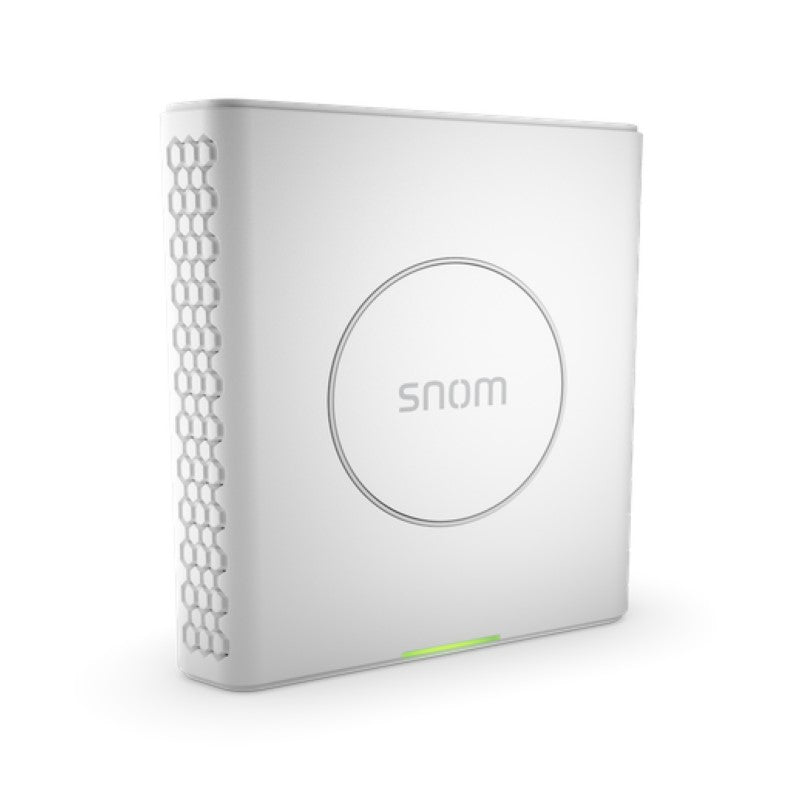
The M900 base station represents a new chapter in professional and modern multi-cell DECT technology. Its user-friendly design, paired with new features like an integrated DECT manager and DECT and LAN synchronization, sets it apart from existing models. The integrated DECT manager ensures seamless handovers between individual base stations across floors or buildings, providing constant availability. Key Features: • Supports up to 1,000 base stations • Compatible with up to 4,000 handsets • Integrated DECT and LAN synchronization for efficient network management • No need for a separate DECT manager • Over-the-air software updates for handsets • Repeater support • Power over Ethernet (PoE) and power adapter options available • TLS encryption for secure communication • Supports DSP modules and wall mounting Additional Information: • Weight: 1 lb • Dimensions: 7 × 7 × 3 in • Phone Type: DECT Technical Specifications: • Frequency bands: 1880-1900 MHz (EU) and 1920-1930 MHz (US) • Output power: up to 250 mW (EU) and 100 mW (US) • Protocols: DECT, DECT 6.0 • Seamless handover and roaming using DECT or LAN synchronization • Wideband audio and authentication/encryption of base and handset

About This Product

The Snom M900 DECT Multicell Base Station is designed for medium to large businesses, such as office buildings, warehouses, or retail chains, that need reliable cordless telephony across multiple floors or separate buildings. It replaces the need for a separate DECT manager by integrating that functionality directly into the base station, making it a streamlined choice for organizations that want a scalable system without extra hardware. The M900 supports up to 1,000 base stations and 4,000 handsets, so it can easily grow with your business, but for a single small office with just a few handsets, it may be overkill—a simpler single-cell DECT base station would be more cost-effective. Pair it with Snom DECT handsets and a compatible VoIP PBX for a complete solution; it works well with common Canadian carriers' SIP trunking, though you should verify compatibility with your specific provider. A key tradeoff is that while the M900 supports PoE, you'll need a PoE switch for each base station, which can add to deployment costs, and the device's DECT range may require careful placement or additional repeaters in large spaces with many obstacles.
Services We Provide
  • Professional Installation & Configuration
  • Ongoing Maintenance & Support
  • Troubleshooting & Repairs
  • System Upgrades & Updates



