
Yealink AX86R | A Ruggedized Wi-Fi IP Phone for Clear Communications-1301221

Frequently Asked Questions

First, confirm that the phone is connected to your Wi-Fi network and has a valid IP address. Then verify the SIP server address, extension number, and password in the phone's account settings. If those are correct, check that your PBX allows registrations from the phone's subnet. If the issue persists, a Toronto-based VoIP support provider can usually resolve this remotely.
Ensure the phone is within range of a strong Wi-Fi signal—try moving closer to an access point. Check that your network supports seamless roaming (802.11k/v/r) if you move between APs. Also, reduce interference by keeping the phone away from metal surfaces or other electronics. Restarting the phone and the access point can help stabilize the connection.
First, try adjusting the volume and ensure the handset's earpiece is clean. If using a Bluetooth headset, disconnect and test with the handset speaker to isolate the issue. Also, check that the phone's firmware is up to date, as audio codec improvements are sometimes released. Poor Wi-Fi signal can also cause audio artifacts, so verify signal strength in the phone's Wi-Fi settings.
Make sure the charging cradle contacts are clean and the power adapter is plugged into a working outlet. Use only the included 5V 2A adapter. If the phone gets hot or the battery indicator behaves oddly, try a soft reset by powering off and removing the battery for 30 seconds. If the problem continues, the battery may need replacement—contact support before attempting any repair.
First, ensure your VoIP PBX supports PTT or intercom functionality and that the feature is enabled for your extension. On the phone, go to the PTT settings and configure the target group or channel. If using a server-based PTT solution, confirm that the phone is provisioned with the correct server address. A quick test with another AX86R user can help isolate whether the issue is on the phone or the server side.
Yes, you can adjust the sensitivity and time delay for these alarms in the phone's settings menu. Look for 'Emergency' or 'Alarm' options. If the phone is in a pocket or bag, it may interpret movement differently—try carrying it on a belt clip. If false alarms persist, consider disabling the feature temporarily and consult your safety manager for proper configuration.
Put your Bluetooth headset into pairing mode. On the phone, go to Bluetooth settings, turn on Bluetooth, and search for devices. Select your headset from the list and confirm pairing. Once paired, you can choose to route audio to the headset during calls. If the headset doesn't appear, ensure it's compatible and within a few feet of the phone.
Use Yealink's auto-provisioning via a central server (e.g., FTP, HTTP, or TFTP). Configure the provisioning server URL in the phone's network settings or via DHCP option 66. Place your configuration files on the server with the correct MAC address naming. Yealink's Redirection and Provisioning Service (RPS) can also simplify deployment if your PBX supports it.
No, the AX86R is a pure VoIP phone that requires a SIP-compatible PBX or VoIP service. It does not have an FXO port for analog lines. If you need to connect to a traditional phone line, you would need an analog telephone adapter (ATA) in addition to this phone.
IP Phones

Yealink AX86R | A Ruggedized Wi-Fi IP Phone for Clear Communications-1301221
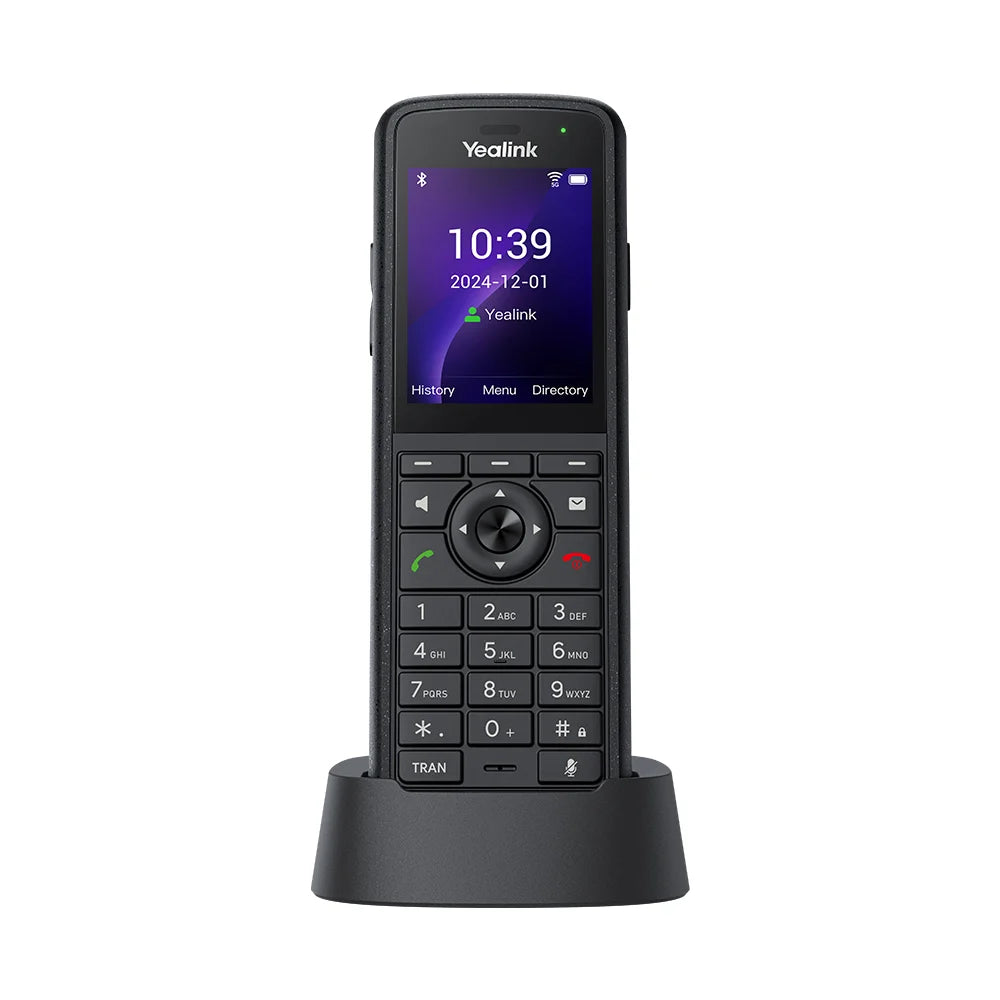
The Yealink AX86R is an enterprise-grade, portable Wi-Fi IP phone built to handle the toughest work environments. With an industry-leading IP67 rating, it is fully protected against dust, water, and repeated drops, making it ideal for healthcare, manufacturing, retail, and logistics teams. Key features: • Dual-Band Wi-Fi 6 (802.11ax) for faster speeds, greater capacity, and reduced latency • Seamless Roaming (802.11k/v/r) to ensure uninterrupted calls as users move between access points • Built-in Bluetooth 5.0 for connecting wireless Bluetooth headsets • Push-to-Talk (PTT) key for instant communication with team members • Optima HD Voice & Acoustic Shield for crystal-clear conversations • Extended Battery Life: up to 13 hours of talk time and 300 hours of standby time on a single charge The AX86R also features an anti-bacterial coating, hygienic design, and emergency alarms, including Man-Down Alarm and No-Movement Alarm. The device includes: * Yealink AX86R Handset * Charging Cradle * Rechargeable Battery (3100mAh Li-ion) * Power Adapter (5 V 2A) * Belt Clip * Quick Start Guide (QSG) For a full list of specifications, please refer to the Yealink AX86R Datasheet (PDF).

About This Product

The Yealink AX86R is purpose-built for workers who need reliable voice communication in demanding environments—think hospital wards, warehouse floors, manufacturing plants, and retail stockrooms. Its rugged IP67-rated design shrugs off dust, water, and drops that would destroy a standard desk phone, making it a natural fit for teams that are constantly on the move or working in harsh conditions. Unlike a fixed handset, this Wi-Fi phone goes with the user, so it pairs well with a modern VoIP PBX that supports mobility features like seamless roaming and push-to-talk.

The AX86R is a strong replacement for older analog or DECT cordless phones, and it can even take the place of a two-way radio for instant team communication via its dedicated PTT key. However, its effectiveness depends heavily on your wireless infrastructure: you'll want a Wi-Fi 6 network with proper roaming support (802.11k/v/r) to avoid call drops as people move between access points. Battery life is solid at up to 13 hours of talk time, but heavy users should plan to recharge during a shift or keep a spare battery handy.

For a typical Toronto-area office with cubicles and conference rooms, the AX86R is overkill—a standard desk phone or softphone would be more cost-effective. It's also not ideal for call-center agents who need dozens of programmable line keys. Where it truly shines is in environments where a phone must survive being knocked off a belt, used with gloved hands, or cleaned with disinfectants regularly. Canadian businesses in logistics, healthcare, or cold storage will find its anti-bacterial coating and emergency alarms (man-down and no-movement) especially valuable for compliance and safety.
Services We Provide
  • Professional Installation & Configuration
  • Ongoing Maintenance & Support
  • Troubleshooting & Repairs
  • System Upgrades & Updates



