
Yealink SIP-T31P Entry-level 2-line PoE IP Phone-1301043

Frequently Asked Questions

Start by verifying the SIP server address, username, and password in the phone’s web interface or handset menu. Then confirm the phone’s IP address is on the correct subnet and can reach the internet; a quick ping test from a PC on the same network can help. If the date and time are way off, correct the NTP server setting—an incorrect clock can cause TLS-based registrations to fail. Should the issue continue, a Toronto-based VoIP support provider can usually trace the registration logs remotely.
First check that the Ethernet port on your switch or injector is actually providing PoE—some ports are only data. Try a different patch cable and a different switch port known to power other devices. If the phone still won’t start, the switch may need a PoE budget adjustment, or you may need the optional 5V power adapter sold separately.
Verify that the handset cord is firmly plugged into the phone base. Temporarily try switching to speakerphone; if that produces a dial tone, the handset or its cord may be faulty. Also confirm the phone is registered to a SIP account by looking for the account icon on the display. A missing registration will prevent any dial tone until the SIP credentials are corrected.
Echo is often caused by audio feedback when the speaker and microphone levels are high or the phone is too close to a reflective surface. Lower the handset or speaker volume slightly and ensure the phone isn’t facing a bare wall. If the issue persists, check if your network uses a non-standard jitter buffer setting; consult your VoIP provider for recommended values.
Confirm the phone has obtained an IP address by pressing the OK button and checking the status. Then make sure your computer is on the same VLAN and subnet. If the phone’s IP is correct, try clearing your browser cache or using an incognito window, as cached credentials can block access. Also ensure your network doesn’t restrict HTTP/HTTPS traffic between clients.
Most hosted PBX services will send you an auto‑provisioning link or configuration file. Enter the provisioning URL in the phone’s web interface under Settings > Auto Provision, and trigger a provision. Alternatively, you can manually enter the SIP server, user ID, and password on the Account page. After entering, the phone should register within a minute; a green indicator on the account line confirms success.
One‑way audio normally points to a NAT or firewall issue. First, check that your router has SIP ALG disabled—this feature often corrupts the audio stream. Next, confirm the phone and the PBX are set to use the same RTP port range and that those ports are open through your firewall. Rebooting the router and phone after the change can clear stale connections.
The default credentials are usually admin for both username and password. If that fails, someone may have changed them. Try the phone’s recovery password (often found via Yealink’s password recovery tool using the MAC address). Do not perform a factory reset yet; confirm the exact password needed by checking any provisioning records. A support provider can assist without wiping the configuration.
Place the phone at least a foot away from corners and surfaces that can bounce sound. The T31P’s Smart Noise Filtering works best when it isn’t up against a wall. Also try reducing the microphone volume slightly in the phone’s audio settings. If the room has a lot of hard surfaces, a small desk mat under the phone can dampen reverb.
IP Phones

Yealink SIP-T31P Entry-level 2-line PoE IP Phone-1301043
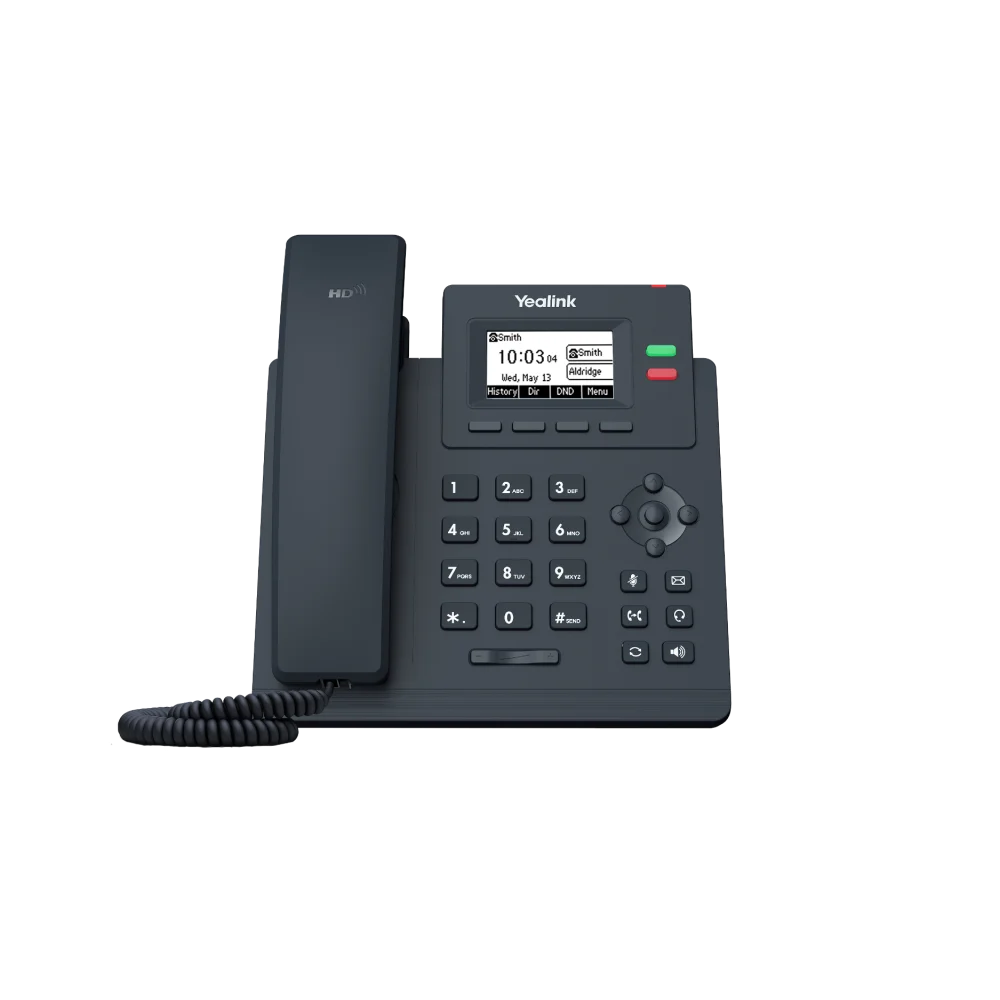
The Yealink SIP-T31P is a modern, reliable, and cost-effective entry-level IP phone designed for businesses looking for an affordable and easy-to-use voice communication solution. Perfect for common areas, lobbies, or basic desk setups, the T31P delivers a clear, professional voice experience. Key Features: • High Definition (HD) sound quality thanks to Yealink HD Voice and intelligent Smart Noise Filtering technology • 2.3" 132x64-pixel graphical LCD with backlight for an intuitive and clear visual experience • Power over Ethernet (PoE): built-in PoE support simplifies installation, allowing power and data to be delivered through a single network cable • Dual-Account Support: supports up to 2 SIP accounts, ideal for a single user or a shared line • 5-Way Conferencing: boost collaboration with local 5-way conferencing support • Flexible Setup: features an adjustable multi-angle stand for ideal desktop viewing and is wall mountable for space-saving installations What's Included in the Package: • Yealink SIP-T31P IP Phone Unit • Handset with Handset Cord • Desk Stand (Adjustable, two-angle) • Ethernet Cable • Quick Start Guide (QSG) Note: The external Yealink 5V 0.6A power adapter is sold separately and not included by default.

About This Product

The T31P is an honest, no-nonsense desk phone built for the sort of places where you need a reliable line but don’t want to think about hardware. It fits lobbies, break rooms, retail counters, or any shared desk where a single extension is enough. For a Toronto small office deploying a hosted VoIP system, a pair of T31P handsets can cover reception and a common area without stretching the budget.

It pairs naturally with any standards‑based SIP platform—on‑premise FreePBX boxes, cloud services from Canadian carriers, or Microsoft Teams via a gateway. PoE is built in, so one cable handles everything if you have a PoE switch, which simplifies cabling in older GTA office suites where every drop matters. The two‑line limit and 2.3‑inch screen are the main trade‑offs: this is not a phone for an executive juggling four calls, and you won’t get a sidecar for BLF keys. For a person who answers, transfers occasionally, and maybe hosts a small conference call, it’s entirely sufficient.

A buyer should know that the external power adapter is sold separately. If your switch doesn’t provide PoE, factor in the cost of a 5V adapter, or better yet, plan to upgrade the switch. The phone’s noise filtering works well in mildly busy environments, but in a loud open office, the handset’s own volume won’t overpower serious background noise. Deployment wise, the T31P is overkill for a warehouse paging station where a simpler SIP speaker would be better, and underpowered for a high‑volume sales desk that needs multiple lines and a headset jack with EHS support.
Services We Provide
  • Professional Installation & Configuration
  • Ongoing Maintenance & Support
  • Troubleshooting & Repairs
  • System Upgrades & Updates



