
Yealink SIP-T74U IP Phone | 16-Line, 4.3" Color Screen, TEE Security, Gigabit-1301222

Frequently Asked Questions

Start by verifying the SIP server address and credentials entered in the phone's account settings. Common mistakes include an extra space or incorrect port number. If the network uses a firewall, ensure UDP port 5060 (or your configured port) is open. A Toronto-based VoIP support provider can usually resolve the rest remotely if the basics check out.
First, confirm that your Ethernet cable is plugged into a switch port that provides Power over Ethernet (PoE). If not, you'll need the optional external power adapter (not included). Try a different cable or port to rule out a bad connection. If you're using PoE and the phone still shows no power, check if the switch has a PoE budget allocation issue.
Check that your network is not saturated—running a high-bandwidth download during calls can cause jitter. Also confirm the handset cord is fully inserted and not damaged. On the phone, try adjusting the volume and ensure wideband codecs like G.722 are enabled (if supported by your provider). If the issue persists, a simple power cycle of the phone and switch often clears temporary glitches.
Try disconnecting the Ethernet cable and the power (if using a separate adapter) for 30 seconds, then reconnect only the power source. If the screen remains off, press and hold the OK button for 10 seconds to see if the phone boots. If still no display, the issue may be a hardware fault—contact your reseller or Yealink support for a replacement.
First, make sure those keys are actually configured with a function in the phone's settings or via provisioning. If you're using expansion modules, verify that the EXP55 is properly connected and detected (check the LCD for a module icon). A factory reset is not recommended as a first step—contact support to verify key mapping before taking that step.
Check that the provisioning server URL and credentials are correct in the phone's web interface or via the keypad. Also verify that the phone can reach the server—try pinging the server's IP from the phone's network test menu. Common issues include firewall rules blocking HTTP/HTTPS requests or a wrong file path. If your provider uses a redirect server, ensure you've entered the correct address.
No, the SIP-T74U is a pure SIP (VoIP) phone and does not have analog or FXO ports. It requires a SIP-based service from a provider such as Rogers, Telus, or a hosted PBX. If you need analog line support, look at a different model or add an ATA (analog telephone adapter).
You can configure up to 16 SIP accounts via the phone's web interface under the 'Account' menu. Each account needs its own SIP server, username, and password from your provider. Once configured, you can assign different lines to physical keys or use the LCD softkeys to switch between accounts. For more than a few lines, an expansion module is recommended.
No, the Yealink SIP-T74U does not come with built-in Bluetooth. It supports USB headsets via the two USB 2.0 ports on the side, as well as standard RJ-9 wired headsets. For wireless headset options, you can use a USB Bluetooth adapter (if compatible with Yealink's USB dongle list), but this is not guaranteed—check with the headset manufacturer first.
This can happen when the phone is not properly registered or temporarily loses network connectivity. Check that the SIP account status is 'Registered' and that the network cable is secure. Also, disable any call forwarding or DND features unintentionally active. If the issue repeats, review your provisioning server's sync interval—a mismatch can cause phantom entries.
IP Phones

Yealink SIP-T74U IP Phone | 16-Line, 4.3" Color Screen, TEE Security, Gigabit-1301222
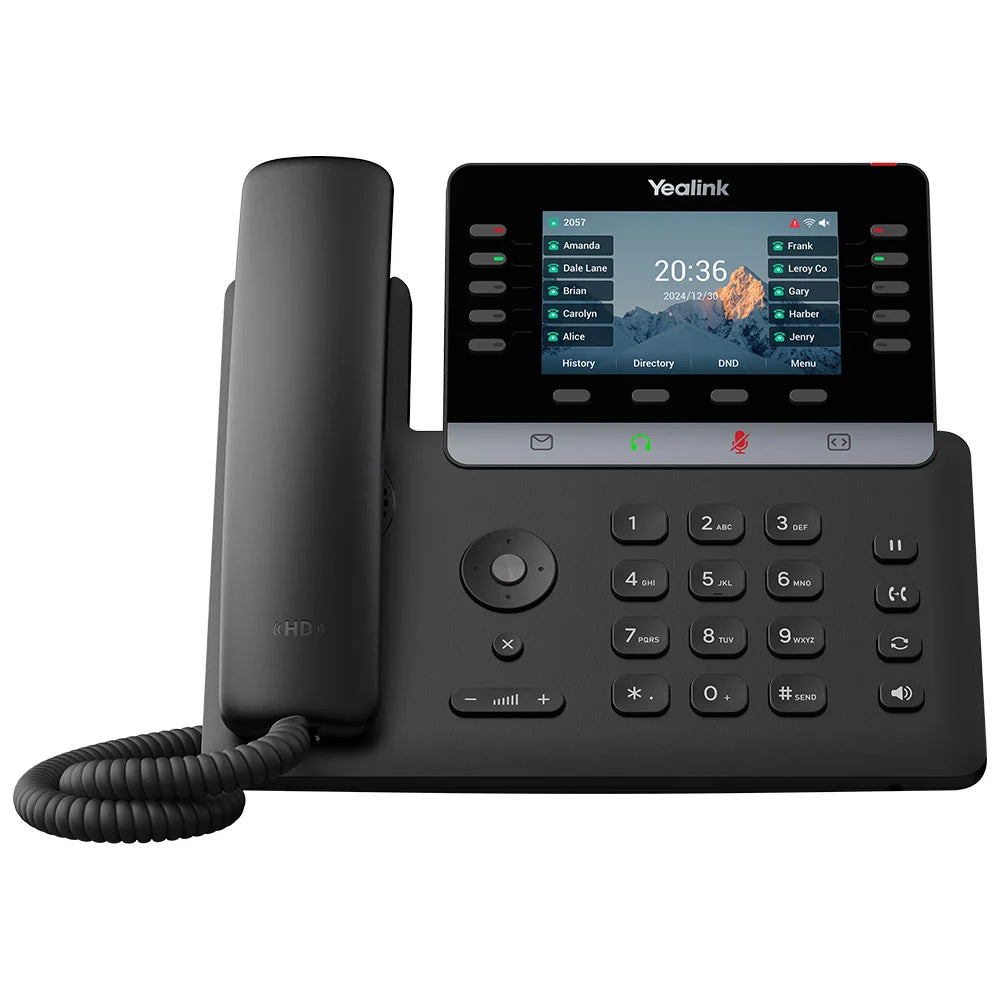
The Yealink SIP-T74U is a high-end business phone designed for professionals and managers who require a large screen, high line capacity, and absolute network security. It features: • Large 4.3" Color LCD • TEE Hardware Encryption for secure data protection • Linux 6.1 Platform for robust stability and long-term security support Experience distraction-free, high-definition calls with: • Ultra-HD Voice and wideband technology for superior acoustic performance • Optimized Acoustic Shield for intelligent noise filtering Designed for power users who handle complex call flows, the T74U supports: • High Account Capacity: up to 16 SIP accounts • Programmable Keys: 10 physical line keys and 40 DSS keys across 4 pages • Dual USB 2.0 Ports for flexibility and scalability • Massive Scalability: up to three cascaded EXP55 Expansion Modules The package includes: • Yealink SIP-T74U IP Phone Unit • Handset with Handset Cord • Desk Stand (Adjustable, two-angle) • Ethernet Cable • Quick Start Guide (QSG) *Note: The external power adapter is sold separately (not included by default)

About This Product

The Yealink SIP-T74U is a premium desk phone built for professionals who manage high call volumes and need a large, clear display alongside robust security. It fits naturally in a corporate office environment—think a senior manager, a team lead, or a power user handling multiple concurrent calls across several lines. With 16 SIP account capacity and up to 40 programmable DSS keys (via four pages), this phone excels in roles that require quick access to contacts, extensions, or speed-dial numbers without flipping through menus. The 4.3-inch colour screen makes call queues and menus easy to read, and the TEE hardware encryption adds a layer of data protection that matters for businesses handling sensitive client information.

Where the T74U truly shines is in a wired, gigabit network with Power over Ethernet (PoE)—though PoE support isn't stated, most Yealink high-end models support it, so check your switch. The phone does not include an external power adapter by default, so if your desk lacks PoE, you'll need to purchase one separately. It pairs naturally with Yealink’s EXP55 expansion modules (up to three daisy-chained) for users who need dozens of line appearances or BLF keys, making it a strong choice for receptionists or call center supervisors. On the flip side, the T74U is overkill for a basic single-line user or a small office where a simpler model like the T31P would do the job just as well and cost less. The Linux 6.1 platform helps ensure long-term firmware support, but the phone’s feature set is tailored to high-density deployments, not casual use.

For Canadian businesses, the T74U works with any SIP-compatible provider, including Rogers Business, Telus, or cloud PBX platforms commonly used in the GTA. Just confirm that your carrier supports the codecs and encryption modes you need—TEE is a hardware-level security feature that may require specific provisioning. Overall, this is a future-proof desk phone for the person whose workflow demands a lot from their handset, but it’s not a budget-friendly choice for light users.
Services We Provide
  • Professional Installation & Configuration
  • Ongoing Maintenance & Support
  • Troubleshooting & Repairs
  • System Upgrades & Updates



