
Yealink SP92 Speakerphone with Dongle USB-C/A – 1308169
AIM Telecom provides troubleshooting and configuration support for this product to businesses across Toronto and the GTA. Contact us to confirm whether the issue can be handled by phone or requires on-site service.
Get Support Call 416-312-4819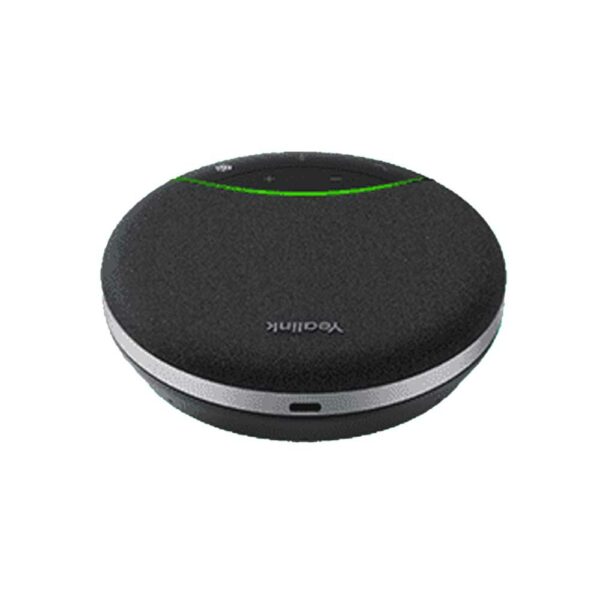
Common issues and fixes
Reviewed troubleshooting steps are not yet available for this model.
Ask AIM Telecom about this productAbout this product
• Yealink SP92 is a high-quality speakerphone equipped with AI noise reduction technology, featuring a 50mm speaker for a wider sound field and virtual bass technology to enhance audio quality.
• Key features include:
• AI Noise Cancellation
• Brilliant Audio Quality
• Multiple Connection Options (plug-and-play design)
• Ultra-long Battery Life
• Lightweight and Compact Design
• Compatible with multiple UC platforms for long-term connectivity and engagement
• Key features include:
• AI Noise Cancellation
• Brilliant Audio Quality
• Multiple Connection Options (plug-and-play design)
• Ultra-long Battery Life
• Lightweight and Compact Design
• Compatible with multiple UC platforms for long-term connectivity and engagement
More product details
The Yealink SP92 is a portable speakerphone built for professionals who take frequent voice and video calls from a laptop or mobile device. It fits naturally into a home office, a small huddle room, or any flexible workspace where built-in audio doesn’t cut it. Its battery-powered, compact design means you can move it from desk to meeting nook without hunting for a power outlet.
Pair it with any major softphone or UC platform—Zoom, Microsoft Teams, and others—and it becomes a straightforward upgrade from your laptop’s speakers and mic. The bundled USB dongle accepts both USB-C and USB-A connections, so plug-and-play setup works across modern and legacy hardware alike. If you’ve been relying on a wired headset or the laptop’s internal audio for calls, the SP92 offers a more natural speakerphone experience without cords getting in the way.
Like any small speakerphone, it has its limits. The 50 mm speaker and virtual bass processing produce clear audio for a one-to-four person group, but it’s not meant to replace a full-room conference system. In a noisy open-plan office, AI noise cancellation helps, but close-range background chatter will still come through. And while battery life is generous, count on charging it overnight if you average five to six hours of talk time daily.
For Canadian businesses that blend remote and in-office work, a device like this lowers the friction of jumping onto a quick call. It’s overkill for someone who’s perfectly happy with a headset, and underpowered for a large boardroom, but for the typical desk worker who needs clear, flexible speakerphone audio without a dedicated phone on the desk, it hits a sweet spot.
Pair it with any major softphone or UC platform—Zoom, Microsoft Teams, and others—and it becomes a straightforward upgrade from your laptop’s speakers and mic. The bundled USB dongle accepts both USB-C and USB-A connections, so plug-and-play setup works across modern and legacy hardware alike. If you’ve been relying on a wired headset or the laptop’s internal audio for calls, the SP92 offers a more natural speakerphone experience without cords getting in the way.
Like any small speakerphone, it has its limits. The 50 mm speaker and virtual bass processing produce clear audio for a one-to-four person group, but it’s not meant to replace a full-room conference system. In a noisy open-plan office, AI noise cancellation helps, but close-range background chatter will still come through. And while battery life is generous, count on charging it overnight if you average five to six hours of talk time daily.
For Canadian businesses that blend remote and in-office work, a device like this lowers the friction of jumping onto a quick call. It’s overkill for someone who’s perfectly happy with a headset, and underpowered for a large boardroom, but for the typical desk worker who needs clear, flexible speakerphone audio without a dedicated phone on the desk, it hits a sweet spot.