
Yealink W56H IP DECT Handset-1302002
Frequently Asked Questions
Make sure the handset is within range of the base and the base is powered on. On the W56H, go to the registration menu and verify the base's DECT PIN hasn't been changed from the default unless intentional. If you're using a W60B, log into its web interface and confirm the handset is authorized and the maximum handset limit hasn't been reached.
Place the handset back in the charging cradle and ensure the charger is plugged into a working outlet. If the battery was fully drained, leave it to charge for at least 15 minutes before trying again. Check that the battery contacts inside the handset and charger are clean and free of debris.
Move closer to the DECT base station to rule out range issues. On a managed VoIP network, check that QoS is prioritized for the base station's MAC address or IP on your router. A quick test is to disable Wi-Fi on a nearby laptop temporarily—strong 2.4 GHz interference can disrupt DECT signals.
No, the W56H is designed exclusively for Yealink DECT bases, typically the W60B, W70B, or compatible models. Using it with another manufacturer's base won't work because the DECT pairing and provisioning protocols are proprietary. You'll need a Yealink base station for full functionality.
The base might still be searching for the handset's previous registration if the base was reset or reconfigured. Try re-registering the handset by putting the base into registration mode (often via the base's web interface or a physical button) and then initiating registration on the handset's menu. Ensure there's no large metal obstruction between the two.
Check the handset's display and keypad settings under the phone's menu. The illuminated keypad should light up on keypress only when the handset is active off the charger. If it never lights up, the backlight feature might be disabled—look for a keypad light or backlight timer option. If the setting is enabled and still no light, try power cycling the handset.
Plug any standard 3.5 mm headset into the jack on the side of the handset. During a call, press the headset key (or use the on-screen soft key) to switch audio to the headset. You can set the headset as the default audio path from the phone's audio settings if you always use one.
Bright screen backlight and long keypad illumination timers can reduce battery life. Go to the display settings and reduce the backlight timeout or dim the brightness. Also, if the handset is frequently out of range and searching for a signal, it will drain faster—keep the handset within the base's coverage area, and the battery should reach the rated talk time.
IP Phones
Yealink W56H IP DECT Handset-1302002
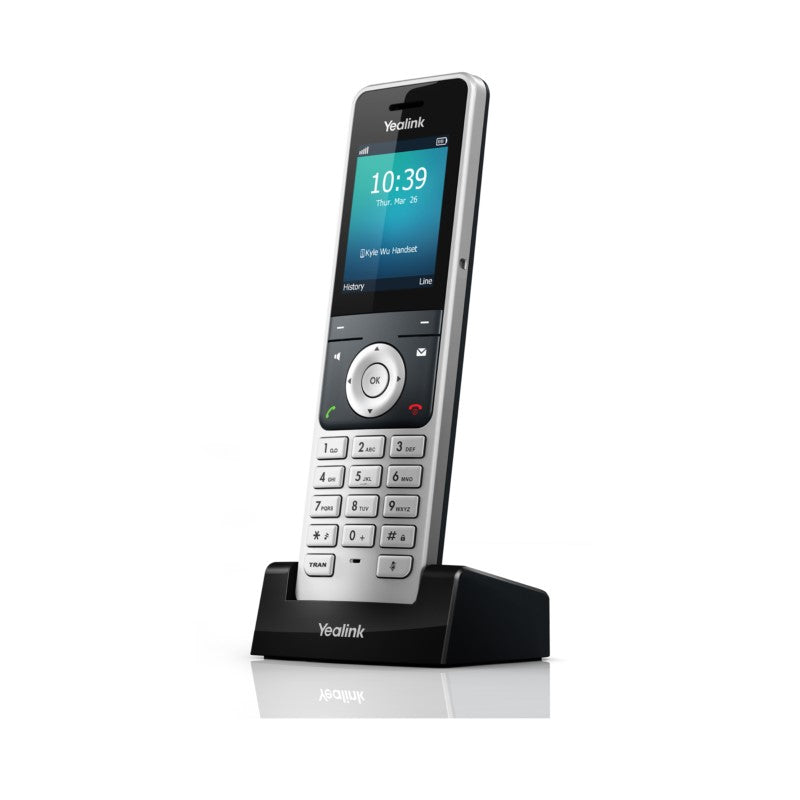
The Yealink W56H is a next-generation wireless handset designed for business use, offering excellent battery life and high compatibility. Key features include: • Exceptional handsfree talking • 2.4″ 240 x 320 color screen with intuitive user interface • Headset connection via 3.5 mm jack • Up to 30 hours talk time • Up to 400 hours standby time • Elegant keypad design with illumination and keypad lock This state-of-the-art VoIP wireless telephone features a modern look and an attractive design, providing users with the convenience of wireless communication and professional business features.
About This Product
The Yealink W56H handset is built for businesses that already rely on or are planning to deploy a Yealink DECT base—typically the W60B or compatible multi-cell system. It suits offices, retail floors, and light industrial settings where staff need to roam while staying connected to the VoIP phone system. The handset itself is not a standalone SIP device; it acts as a cordless extension, which keeps per-handset cost predictable but also means the purchase only makes sense if you have the base and licenses in place.
In terms of everyday use, the W56H delivers solid wireless voice quality and battery life that can cover long shifts without a midday charge. For Canadian businesses running hosted VoIP services from providers like Telus, Rogers, or independent operators, the handset integrates cleanly as long as the base is properly provisioned. The 3.5 mm headset jack is a practical inclusion for agents who prefer a wired headset without adding USB or Bluetooth complexity, but users who need wideband audio over a wireless headset may find the lack of built-in Bluetooth a limitation.
This handset is a good fit for front-desk staff, warehouse leads, or clinic receptionists who move within a confined site. For call centers with heavy, all-day headset use in a single location, a wired IP phone with full duplex speakerphone might still be the more appropriate tool. The W56H is not meant for cordless coverage across multiple floors in a large building unless paired with additional base stations or repeaters—something to plan for in multi-story Toronto office buildings or campus-style deployments.
In terms of everyday use, the W56H delivers solid wireless voice quality and battery life that can cover long shifts without a midday charge. For Canadian businesses running hosted VoIP services from providers like Telus, Rogers, or independent operators, the handset integrates cleanly as long as the base is properly provisioned. The 3.5 mm headset jack is a practical inclusion for agents who prefer a wired headset without adding USB or Bluetooth complexity, but users who need wideband audio over a wireless headset may find the lack of built-in Bluetooth a limitation.
This handset is a good fit for front-desk staff, warehouse leads, or clinic receptionists who move within a confined site. For call centers with heavy, all-day headset use in a single location, a wired IP phone with full duplex speakerphone might still be the more appropriate tool. The W56H is not meant for cordless coverage across multiple floors in a large building unless paired with additional base stations or repeaters—something to plan for in multi-story Toronto office buildings or campus-style deployments.
Services We Provide
- Professional Installation & Configuration
- Ongoing Maintenance & Support
- Troubleshooting & Repairs
- System Upgrades & Updates



