
Yealink W59R Ruggedized DECT Handset-1302006

Frequently Asked Questions

Confirm the handset is within range of a powered-on W80 base station—DECT range indoors is typically 50 metres but walls reduce this sharply. Ensure the base's DECT radio is enabled in its web interface and that the handset hasn't accidentally been deregistered. If the issue persists, a Toronto-based VoIP support provider can usually troubleshoot this remotely by checking base logs.
Check if Bluetooth is enabled and actively paired to a headset, as this can cut standby time from 360 hours to 200 hours. Also verify that the handset firmware is current, as older versions sometimes mismanage power saving. If you've charged it with a non-Yealink power adapter, inadequate current delivery may prevent a full charge.
Poor DECT signal quality is the most common cause. Walk closer to the base station—if quality improves, you likely have a coverage hole. Also check for sources of DECT interference like nearby Wi‑Fi access points operating on 2.4 GHz or microwave ovens, which can disrupt the narrowband DECT channels.
First, ensure the Bluetooth headset is set as the audio device in the handset's settings—some models require manual selection even after pairing. Turn both off, then on again, and reconnect. Also test the headset with a mobile phone to rule out a headset fault. If the handset firmware hasn't been updated, a newer version may improve compatibility with certain headset profiles.
It should hand over seamlessly if you have a properly configured W80 Multi-Cell System with overlapping coverage. Dropped calls suggest a gap where neither base station can sustain a link. Walk the area with the handset's signal meter visible to identify dead spots—you may need an additional base station antenna. Inter-floor transitions can be problematic if the building's construction materials heavily attenuate DECT signals.
This typically indicates the handset has lost its DECT link to the base, not an external network problem. It can happen if you wander too far or if the base station briefly loses power or reboots. When you see it, move back into range and the handset should automatically reconnect. If it persists, check the base station's status lights and network connectivity.
No, the W59R is designed exclusively for Yealink's own DECT systems, specifically the W80 Multi-Cell series and compatible single-cell bases that support the same protocol. It relies on Yealink's proprietary pairing and provisioning, so it will not register to generic DECT bases or other manufacturers' systems. Attempting to pair it will result in registration failure.
The alarm must be configured through the handset's menu or the base station's provisioning template. Navigate to Settings > Alarm and enable the push-button alarm, then define the emergency number it dials—typically an internal safety extension or monitoring service. Test the alarm in a controlled environment first to ensure the call routes correctly and that the alarm tone triggers as expected.
First, check if the keypad lock is enabled—press and hold the '*' key for a couple of seconds to unlock it. If that doesn't help, power the handset off, remove and reinsert the battery, then power it back on. This often clears a temporary software glitch without affecting settings.
If the handset can't connect after an update, the firmware may not have been applied correctly. Try power-cycling the handset and base station together. If the problem continues, do not attempt another update or factory reset yourself—contact your IT administrator or support provider. A Toronto-based VoIP support provider can usually resolve this remotely by re-provisioning the handset safely.
IP Phones

Yealink W59R Ruggedized DECT Handset-1302006
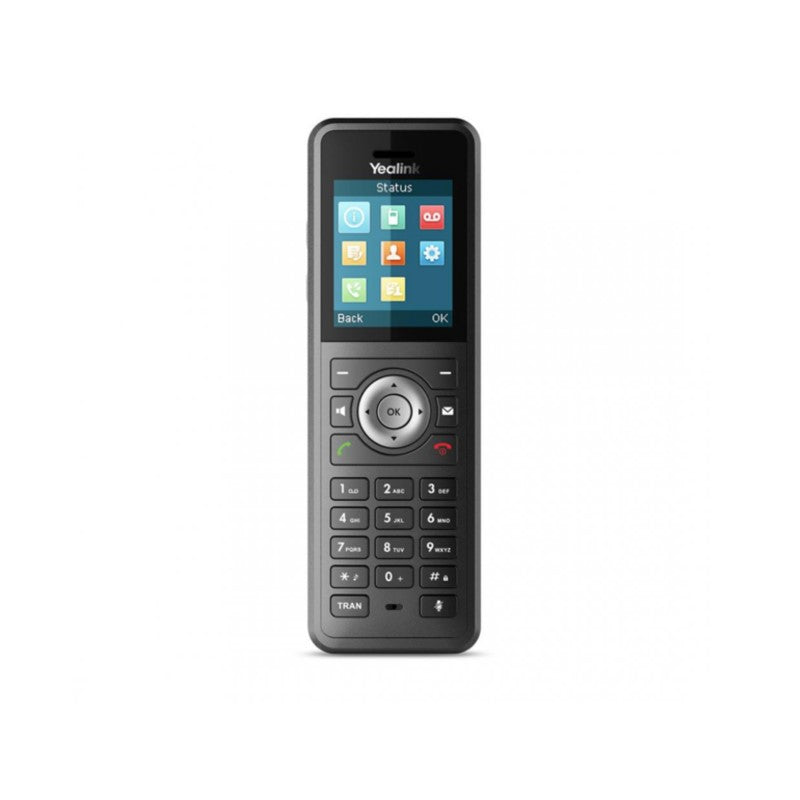
Yealink W59R, a certified IP67 ruggedized DECT handset, is designed for use in harsh environments. It combines wireless communication with rich Voice-over-IP phone features and seamlessly integrates with the Yealink W80 Multi-Cell System for effortless roaming and handover. Key Features: • Seamless handover and roaming • Rugged DECT handset with IP67 protection rating • Scratch resistant, disinfectant resistant • 1.8'' 128×160 TFT color screen with intuitive user interface • HD voice and FNR (Flexible Noise Reduction) • Built-in Bluetooth • Vibration alarm • Alarm functions for occupational safety: push-button alarm, no-movement alarm, mandown alarm and running alarm • Up to 28 hours of talk time (18 hours with Bluetooth headset), up to 360 hours of standby time (200 hours with Bluetooth headset) • Keypad backlight and keypad lock Fully compatible with Yealink W80 Multi-Cell System for seamless roaming and handover. For a full list of specifications, please refer to the product datasheet (pdf).

About This Product

The Yealink W59R is built for workplaces where a typical office phone would quickly fail. It targets environments like manufacturing floors, outdoor yards, and healthcare facilities where dust, moisture, and accidental drops are part of daily operations. The IP67 rating means it can handle temporary submersion and is sealed against fine particles, making it a practical choice for food processing plants or busy hospital corridors that undergo frequent deep cleaning. It's not a device for carpeted offices; its value lies in withstanding physical abuse that would destroy consumer-grade handsets.

This handset depends on the Yealink W80 Multi-Cell DECT system to function—it is not a standalone SIP phone. That dependency is a key consideration: you need an existing or planned W80 infrastructure. In a single-site warehouse, a W80 base station with a few antennas provides solid coverage, but multi-building campuses will need careful base station placement to avoid dead zones. The handset itself shines in roles requiring mobility and voice clarity: the combination of HD voice and flexible noise reduction helps cut through background machinery hum or wind noise outdoors.

One trade-off is screen size. The 1.8-inch color display is functional for call info and menu navigation but isn't meant for rich data applications. If your workflow requires looking up inventory databases or viewing photos, a smartphone with a rugged case might be more suitable. For pure voice tasks, though, the W59R's dedicated hardware buttons and tactile feedback work better when wearing gloves than any touchscreen. Its battery life—up to 28 hours talk time—means it can survive extended shifts without mid-day charging.

In Canadian contexts, this device suits logistics hubs across the GTA or remote mining sites in Northern Ontario, where reliability matters more than frills. It's overkill for a reception desk, but exactly right for a loading dock in January. Compatibility with local carriers is not a concern because DECT operates in unlicensed spectrum; the handset links only to its paired base system, which connects to your VoIP provider. That isolation from public cellular networks simplifies certification but demands robust in-house Wi-Fi or wired backhaul for the base stations.
Services We Provide
  • Professional Installation & Configuration
  • Ongoing Maintenance & Support
  • Troubleshooting & Repairs
  • System Upgrades & Updates



