
Yealink W73P DECT IP Phone System -W73H Handset with W70B base-1302022

Frequently Asked Questions

Confirm that the base station is connected to your network and has a valid IP address. Then log into the base’s web interface and verify the SIP account credentials, server address, and that the account is enabled. Often a typo in the password or registrar domain is the culprit. If the issue persists, a Toronto-based VoIP support provider can usually resolve this remotely.
Make sure the base is powered on and in registration mode—the handset will prompt you to subscribe. On the handset, go to Settings > Registration > Register Handset and select the base. If the handset was previously subscribed, you may need to deregister it first, but do not factory reset the base without confirming the cause.
This often points to network jitter or packet loss. Check that the base is connected to a switch port with QoS enabled and not daisy-chained through other devices. Try a quick power cycle of the base and your router. If the problem only occurs on Wi-Fi segments of your network, test with a wired connection to isolate the issue.
Clean the charging contacts on both the handset and the charger cradle with a dry cloth. Ensure the handset is seated firmly and the charger is plugged into a working outlet. If the battery still depletes in under a day with normal use, the battery pack may be aging, but do not replace it with a third-party unit until you’ve confirmed the charger is providing power.
Echo is usually caused by acoustic feedback or network latency. First, lower the handset volume and see if the echo diminishes. If the base is near a reflective surface, try moving it. On the VoIP side, check that your provider’s server is geographically close—a high-latency route across the continent can introduce echo that local adjustments won’t fix.
Verify that the base’s Ethernet cable is securely plugged in and that the network switch isn’t rebooting or experiencing packet storms. Look at the base’s web interface for any SIP registration timeouts around the time of the drop. If the problem coincides with heavy local network traffic, prioritize the base’s traffic through your router’s QoS settings.
The W73H uses a 3.5 mm jack, so confirm the headset is fully inserted. Then on the handset, go to Settings > Audio and ensure the headset mode is enabled. Test with a different wired headset if possible; some headsets with inline controls may not be compatible, but a standard stereo headset should function for audio.
Yes, the W70B base supports up to 10 handsets. Put the base into registration mode via its web interface or the handset menu, then on the new handset navigate to Settings > Registration > Register Handset. Select the base from the list and follow the prompts. You’ll need to assign a handset name and, if using multiple SIP accounts, choose which account it uses.
DECT range is reduced by concrete, metal studs, and large appliances. Try repositioning the base higher and away from metal filing cabinets or server racks. If you need coverage in a basement or across a larger Toronto office floor, a Yealink DECT repeater can extend the signal without reconfiguring the base.
IP Phones

Yealink W73P DECT IP Phone System -W73H Handset with W70B base-1302022
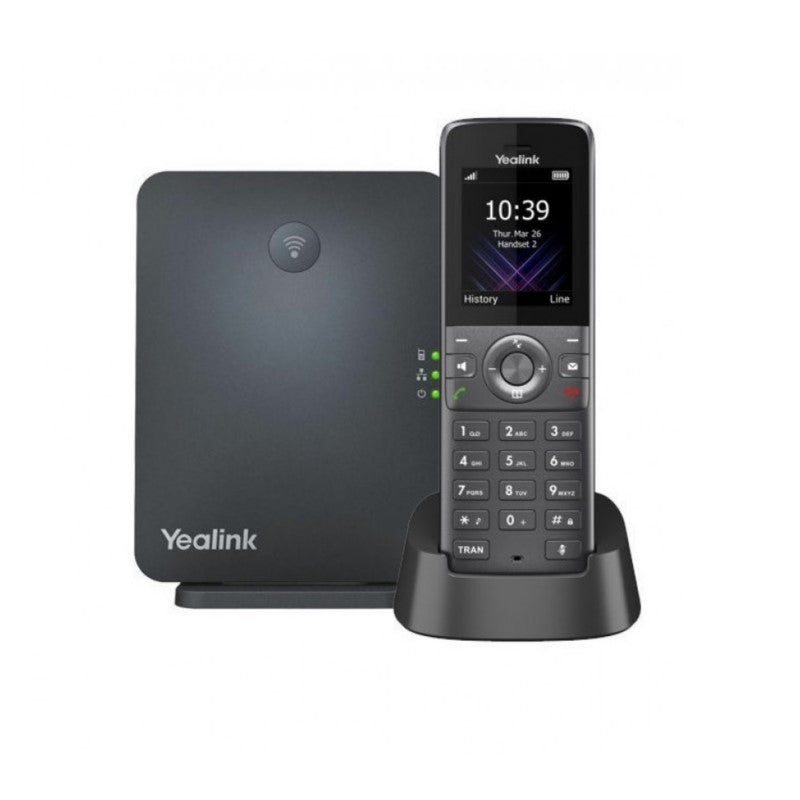
• The Yealink W73P is a high-performance SIP cordless phone system ideal for small and medium-sized businesses, offering superb mobility and efficient flexibility. • It eliminates additional wiring troubles and charges, supporting up to 10 SIP accounts and 20 simultaneous calls. Key Features: • High-performance SIP cordless phone system • 1.8″ 128 x 160 TFT color screen with intuitive user interface • Up to 20 simultaneous calls • Up to 10 DECT cordless handsets • Up to 10 SIP accounts • Support for Opus audio codec • Noise Reduction System and FNR (Flexible Noise Reduction) • Long-lasting battery life: up to 35-hour talk time and 400-hour standby time • Quick charging: 10-min charge time for 2-hour talk time • TLS and SRTP security encryption • Headset connection via 3.5 mm jack • Charger wall mountable • DECT radio coverage up to 50m indoors and 300m outdoors • Energy-saving ECO features

About This Product

The Yealink W73P brings practical cordless mobility to small and medium-sized workplaces where staff need to move around while staying connected. It suits retail floors, medical offices, light warehouses, and any environment where a desk phone would tether productivity. The system’s DECT base supports up to ten handsets and ten SIP accounts, so a single installation can cover multiple users without pulling new cable. That makes it a clean fit for offices in the GTA that are expanding or reorganizing spaces frequently.

This system pairs naturally with cloud-based VoIP services or on-premise IP PBXs that support standard SIP. It’s not a replacement for a full contact-center setup—the call capacity and handset count top out at levels better suited to a department or small branch. If your team rarely leaves their desks, a wired IP phone will cost less and offer the same audio quality without the range limitations.

Practical limits to keep in mind: DECT coverage is reliable within about 50 metres indoors, but reinforced concrete floors or metal racking can shrink that radius. For a multi-storey Toronto office, you may need to position the base centrally or add a repeater. The handset’s Opus codec support and noise reduction help in open-plan areas, but call quality still depends on your network’s stability and the VoIP provider’s infrastructure.

For a typical Canadian business with a handful of roaming staff, the W73P strikes a sensible balance between cost and capability. It’s overkill for a solo entrepreneur who just needs a single cordless handset, and it’s underpowered for a large call floor where dozens of agents need dense, concurrent cordless access. In that middle ground, though, it delivers dependable, secure mobility without complexity.
Services We Provide
  • Professional Installation & Configuration
  • Ongoing Maintenance & Support
  • Troubleshooting & Repairs
  • System Upgrades & Updates



