
Yealink W76P DECT IP Phone System -W56H Handset with W70B base-1302024

Frequently Asked Questions

First, confirm the base station has power and its status LED is solid or blinking normally. Then, on the handset, check that it’s registered to the base: go to the handset’s menu and look for the registration status. If it’s not registered, you may need to re-register it using the base station’s registration mode, but do not factory-reset anything yet—just verify power and registration first.
Start by confirming the base station’s network cable is securely connected and the Ethernet port shows link lights. Then log into the base’s web interface and check that the SIP account is registered with your VoIP provider. If the account shows ‘Register Failed,’ verify the username, password, and server address—typos are a common cause.
Choppy audio is often a network issue. Test by moving the handset closer to the base to rule out DECT range problems. If it persists, check your network for packet loss or jitter—try pinging the base’s IP address from a computer on the same LAN. Also, ensure no large file transfers or streaming are saturating your internet connection at the same time.
Check that the charging contacts on both the handset and the charger are clean and free of debris. Try a different charging cradle if available. If the battery is old, it may need replacement, but before buying a new one, let the handset charge for at least four hours undisturbed to see if it recovers.
Yes, the W76P uses standard SIP and works with most Canadian VoIP providers. You’ll need the provider’s server address, SIP credentials, and possibly a supported codec list. As long as your provider doesn’t require proprietary firmware, you can configure the base station’s web interface with those details.
Put the base station into registration mode—usually by pressing the paging/registration button on the base for a few seconds until the LED flashes. Then on the new handset, navigate to the registration menu and select the base. The handset should find the base and prompt you to confirm. If it doesn’t, ensure the base isn’t already at its ten-handset limit.
Swap the Ethernet cable with a known good one and try a different port on your switch or router. If the base is powered via PoE, make sure the switch port is providing enough power; some older switches may not supply the required wattage. A simple power cycle of both the base and the switch often clears transient issues.
Echo is usually caused by the far-end device or acoustic feedback. First, lower the handset volume slightly and see if that helps. If you’re using a headset, try a different one. On the base’s web interface, you can also check the audio settings for echo cancellation—make sure it’s enabled, but don’t change advanced parameters without guidance.
IP Phones

Yealink W76P DECT IP Phone System -W56H Handset with W70B base-1302024
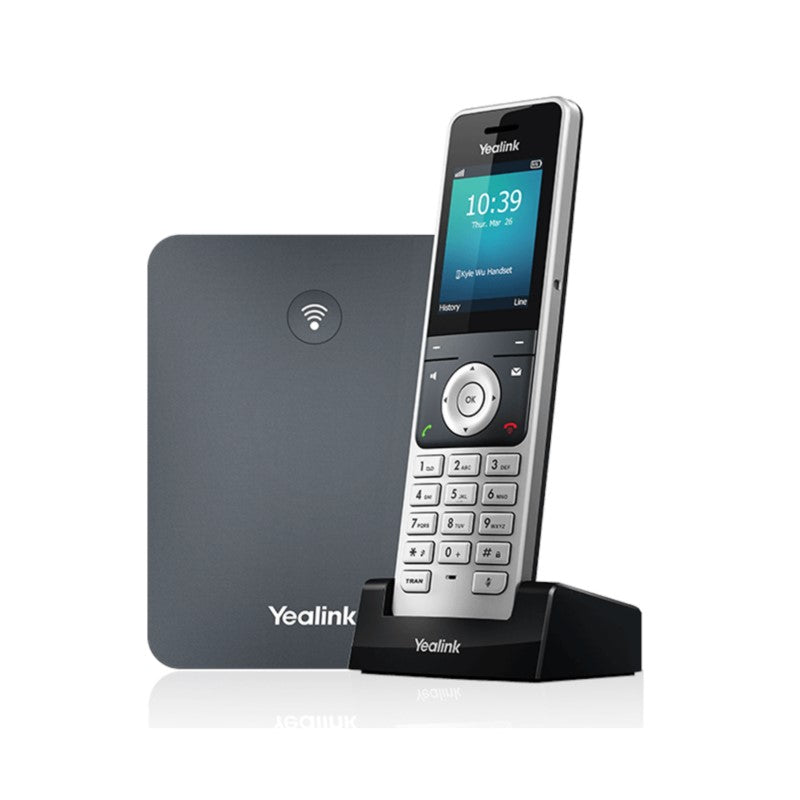
The Yealink W76P is a high-performance SIP cordless phone system ideal for small and medium-sized businesses. This DECT IP phone offers superb mobility and efficient flexibility, eliminating wiring troubles and charges. Key Features: • High-performance SIP cordless phone system • 2.4″ 240 x 320 color screen with intuitive user interface • Up to 20 simultaneous calls • Up to 10 DECT cordless handsets • Up to 10 VoIP accounts • Support for Opus audio codec • Up to 30-hour talk time (in ideal conditions) • Up to 400-hour standby time (in ideal conditions) • Quick charging: 10-min charge time for 2-hour talk time • TLS and SRTP security encryption • Noise Reduction System • Headset connection via 3.5 mm jack • Charger wall mountable • DECT radio coverage up to 50m indoors and 300m outdoors • Energy-saving ECO features

About This Product

The Yealink W76P is built for small to medium-sized businesses that need cordless voice coverage across a single floor or small building. It pairs a DECT base station with up to ten handsets, making it a practical fit for retail stores, medical offices, or any workspace where staff move around but still need reliable access to the phone system. Because it uses standard SIP, it slots into almost any hosted VoIP or on-premise PBX environment without proprietary lock-in.

This system replaces the clutter and fixed positions of wired desk phones with a clean wireless setup. The base station handles the SIP registration and call routing, while handsets stay light and simple. The 50-metre indoor range is typical for DECT, so in a typical GTA office with drywall and glass partitions, coverage is usually solid. For larger or multi-floor spaces, a single base may leave dead spots, and adding DECT repeaters or a second base becomes necessary.

Battery life is generous under ideal conditions, but real-world talk time drops with frequent use, poor signal, or older batteries. The quick-charge feature helps if a handset runs low mid-shift. Keep in mind that the system tops out at ten handsets and twenty simultaneous calls; a busy call centre or a large open-plan office with dozens of users would quickly outgrow it. For a team of five to fifteen people who don’t all need to be on the phone at once, it’s a cost-effective cordless solution.

If your deployment relies heavily on wideband audio or encryption, the W76P supports Opus and SRTP, so voice quality and security are on par with modern wired IP phones. Just factor in that DECT is a shared spectrum, and in dense urban environments like downtown Toronto, occasional interference is possible, though the system’s frequency-hopping mitigates most issues.
Services We Provide
  • Professional Installation & Configuration
  • Ongoing Maintenance & Support
  • Troubleshooting & Repairs
  • System Upgrades & Updates



