
Yealink W77P VoIP SIP Device Handset W70B+W57R

Frequently Asked Questions

First, check that the W70B base station is powered on and its Ethernet cable is securely connected to your network switch. Move the handset closer to the base and wait about 30 seconds to see if it reconnects. If the handset was recently added, confirm it has been successfully registered to the base by checking the handset status menu.
Remove the handset and inspect the charging contacts on both the handset and the cradle. Wipe them gently with a dry cloth if you see any dust or residue. Make sure the cradle’s power adapter is plugged into a working outlet and that the cable is fully seated in the cradle jack.
This often points to a Wi-Fi or DECT interference issue. Try relocating the W70B base station away from other wireless equipment like Wi-Fi access points or Bluetooth devices. If your network uses Wi-Fi in the 2.4 GHz band, moving the base even a few feet can reduce interference and stabilize the audio.
Log into the base station’s web interface and verify that the SIP server address, username, and password match exactly what your provider supplied. A common issue is a typo in the server address or authentication name. Also confirm that your network firewall allows SIP and RTP traffic to and from the base station.
Yes, the W70B base station uses standard SIP and works with any Canadian VoIP provider that supports SIP registration. You will need the provider’s SIP server address, your account credentials, and the codec preferences. Most Canadian providers have an interoperability guide or can provide the correct settings for a Yealink DECT base.
The vibration setting is configured per handset. From the handset menu, navigate to Settings, then Sounds, and confirm that Vibration is enabled for incoming calls. Also check that the handset is not in silent mode, which can suppress the vibration alert.
The W70B supports up to ten DECT handsets. Each additional handset needs to be registered to the base using the handset’s registration menu and the base station’s registration mode. The base can also handle up to ten SIP accounts, giving you flexibility in how lines are assigned across handsets.
Power cycle the W70B base station by unplugging it for ten seconds and plugging it back in. Wait for the base to fully boot up, then check each handset. If a handset still shows no connection, try turning the handset off and back on. If the issue persists, a Toronto-based VoIP support provider can usually resolve this remotely.
The W57R has a 3.5 mm headset jack, so you can connect a standard wired headset. There is also Bluetooth support for wireless headsets. Pairing is done through the handset’s Bluetooth menu, and the audio will route to the headset once connected.
The handset normally gets its time from an NTP server configured in the base station’s web interface. Check that the base has access to the internet and that the NTP server address is correct. If your network blocks NTP, you may need to set the time manually through the handset or adjust your firewall rules.
IP Phones

Yealink W77P VoIP SIP Device Handset W70B+W57R
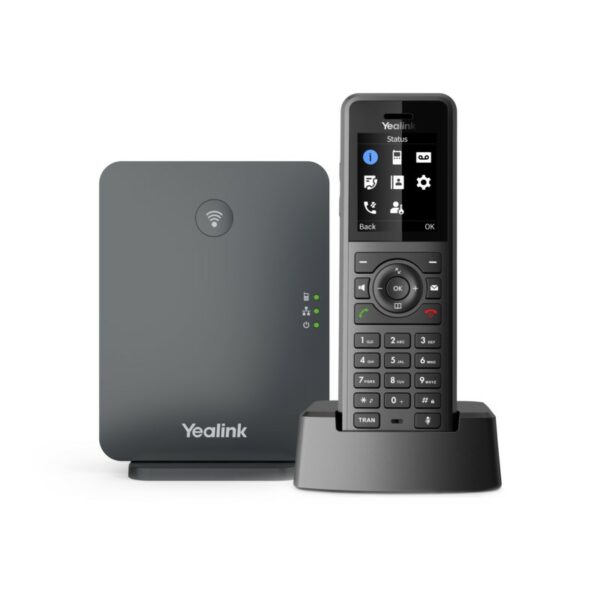
• High-performance ruggedized SIP cordless phone system for stressful situations, supporting up to 10 SIP accounts and 20 simultaneous calls. • Features: • 1.8″ 128 x 160 TFT color screen with intuitive user interface • Ruggedized DECT handset with IP54 protection rating • Up to 20 simultaneous calls • Up to 10 DECT cordless handsets • Up to 10 SIP accounts • Support for Opus audio codec and noise reduction system • Flexible Noise Reduction/Noise Cancellation • Quick charge: 10-minute charging time for 2-hour talk time • TLS and SRTP security encryption • Vibration alarm guarantees not to miss any call even in noisy situations • Dimensions: 8.07 × 7.17 × 3.74 in, weight: 1.64 lbs, brand: Yealink • Technical Specifications: • DECT Standards: CAT-iq2.0 • Frequency bands: 1880–1900 MHz (Europe), 1920–1930 MHz (US) • Phone Features: up to 20 simultaneous calls, support for Opus audio codec and noise reduction system

About This Product

The Yealink W77P bundles a W70B base station with a W57R handset, giving you a cordless SIP phone system built to handle environments where a standard office phone would not last long. It is a natural fit for warehouses, light manufacturing floors, busy restaurant kitchens, and outdoor retail spaces. The IP54 rating means the handset shrugs off dust and splashes, and the vibration alarm helps you feel an incoming call even when the ambient noise drowns out a ringtone. For a Canadian business, this is the kind of device you deploy in the back of a Toronto distribution centre or a Vancouver-area brewery where a desk phone would be out of place.

This system supports up to ten handsets and ten SIP accounts, so a single base can cover a small team without needing a separate line for each person. That makes it practical for shift supervisors, floor leads, and roaming staff who need to stay reachable but do not require a full desktop phone. The quick-charge feature is genuinely useful: ten minutes on the charger buys you two hours of talk time, which helps when a handset goes dead mid-shift. Opus codec support and the noise reduction system mean calls stay intelligible even with forklifts or kitchen equipment in the background.

Be aware of the tradeoffs. The W57R handset is ruggedized, but that toughness comes with a 1.8-inch colour screen that is smaller and lower resolution than what you would find on a modern desk phone or smartphone. It is designed for voice tasks, not directory browsing or heavy on-screen management. The system uses DECT, so the base station needs to be placed where its wireless signal can reach all the areas your team works; concrete walls and metal racking in a typical GTA industrial unit can cut that range down, so you may need to test placement carefully or add a repeater.

If your team sits at desks all day and just needs a basic cordless option for occasional calls, this system is overkill. A lighter, less expensive DECT phone would serve that purpose. The W77P earns its price when the handset will be dropped, splashed, or covered in dust regularly. For a carpeted office with ten users who rarely leave their cubicles, you are paying for durability you will never need.
Services We Provide
  • Professional Installation & Configuration
  • Ongoing Maintenance & Support
  • Troubleshooting & Repairs
  • System Upgrades & Updates



