
Yealink W90B Cordless DECT IP Multi-Cell System

Frequently Asked Questions

First, confirm that the handset is in range of the base station and that the base station is powered on and connected to the DECT Manager. Next, check that the handset is not already registered with another system and that the W90B is not over its local registration limit. If the handset still cannot register, power-cycle the handset and try again. If the problem persists, a network or provisioning issue may be preventing the DECT Manager from authorizing the registration; a Toronto-based VoIP support provider can often resolve this remotely.
Seamless handover relies on proper DECT synchronization among base stations. Verify that all W90B bases in the system are using the same sync method—either over-the-air DECT sync or wired LAN synchronization—and that the DECT Manager reports them as synchronized. Weak overlap between cells can also cause drops; try physically repositioning base stations to ensure coverage zones overlap by at least 15–20%. Reboot the DECT Manager after any physical changes to let it re-evaluate paths.
Check that the Ethernet cable is connected to the correct port on the base station (the one marked for network/PoE) and that your switch port actually provides PoE and meets the IEEE 802.3af standard. Try a different cable and a known-good PoE port. If the base station still shows no power, test it with the included DC power adapter to rule out a PoE-specific fault. Do not assume the base is dead; contact support before performing a factory reset or replacing hardware.
Yes, the W90B supports an external antenna. Attaching a higher-gain antenna can extend the DECT signal, particularly in open areas, but it changes the radiation pattern so you may need to re-map coverage. After installing, walk-test with a handset to confirm that the extended range doesn’t cause interference with neighboring base stations in your multi-cell system. Keep in mind that indoor range is always heavily influenced by wall materials; in a typical GTA concrete-and-steel office, even an external antenna will rarely reach the 50-metre indoor spec reliably.
Place the new base station in its intended location, connect it to the LAN, and give it power. On the W90DM DECT Manager, scan for new base stations and add the discovered W90B to your site configuration. The manager will push settings and synchronize the base. Ensure the new base uses the same synchronization method as the rest; if you use LAN sync, the manager and all bases must be in the same IP subnet with low-latency connectivity.
One-way audio in a multi-cell DECT system often points to a routing or firewall issue between the base station and the SIP server, where RTP audio streams are blocked in one direction. Confirm that the network path between the W90B’s subnet and your PBX or SIP provider allows UDP traffic on the full RTP port range. Also check that the handset in question is not in a coverage fringe area; poor DECT signal can manifest as intermittent audio dropouts before a handover triggers.
Confirm that the SIP credentials, registrar address, and associated server port entered in the W90DM DECT Manager match exactly what your provider gave you. Next, check network connectivity from the base station to the SIP server—use a simple ping test from a device in the same VLAN if possible. Also verify that the DECT Manager’s time and date are correct, since registration can fail if the TLS certificate is rejected due to clock skew. If all looks right, re-save the SIP account settings in the manager and restart the handset’s registration.
Firmware updates are handled centrally through the W90DM DECT Manager, so you can upload the new firmware file to the manager and push it to all base stations in the system without touching each one. Schedule the update during low-call times, because the base stations will reboot as part of the process and cordless service will be briefly interrupted per cell. Always use firmware specifically released for the W90 series by Yealink, and read the release notes to ensure compatibility with your current DECT Manager version.
IP Phones

Yealink W90B Cordless DECT IP Multi-Cell System
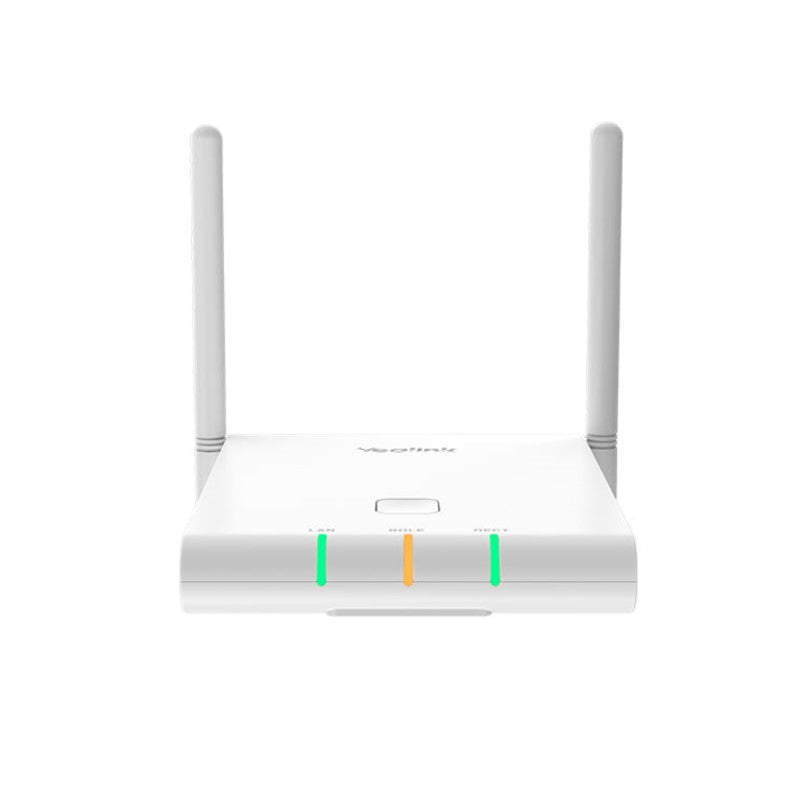
• The Yealink W90B base station, designed in conjunction with the Yealink W90DM DECT Manager, provides organizations with a full range of wireless coverage options. • This DECT multi-cell system offers an extremely scalable and reliable solution for organizations of any size, supporting up to 250 handsets and 250 simultaneous calls. Key Features: • Seamless handover and roaming • Support Air and LAN synchronization • Up to 60 base stations • Up to 250 handsets • Up to 250 SIP accounts • Up to 250 parallel calls • Support XML/LDAP/Remote Phonebook • External antenna, DECT radio coverage up to 50m indoors and 300m outdoors Additional Information: • Weight: 1 lbs • Dimensions: 9 × 7 × 3 in • Brand: Yealink Technical Specifications: • Phone Features: • Sync over the DECT and LAN (Seamless handover and roaming) • Each Multicell System: • Up to 60 base stations • Up to 250 handsets • Up to 250 VoIP accounts • Up to 250 simultaneous calls • Up to 8 WB (4 active handsets) calls per base • Up to 8 NB calls per base

About This Product

The Yealink W90B is a DECT base station designed specifically for multi-cell deployments, pairing with the W90DM DECT Manager to form a scalable wireless telephony fabric. It suits organizations that need dependable cordless coverage across larger spaces—multi-floor offices, light industrial facilities, or retail showrooms—where calls must roam seamlessly between zones. For Canadian businesses, particularly those in the GTA with open-plan or mixed-use spaces, a multi-cell system like this sidesteps the range limits of a single cordless base while keeping handset management centralized.

Deploying the W90B means committing to the DECT Manager architecture; the base station alone cannot orchestrate multi-cell handover or synchronization. This makes the system slightly more complex to set up than a standalone DECT base, but it also gives you precise control over coverage cells. It’s a purposeful tradeoff: you gain the ability to scale up to 60 bases and 250 handsets—enough for most mid-market deployments—without running into the interference and handoff problems that plague ad hoc cordless expansions. For a single small office or a home setup, this capacity is overkill; a simpler single-cell Yealink base would be a more cost-effective and immediate fit.

The system performs best in environments where voice traffic is steady but not extreme: 250 simultaneous calls across the whole multi-cell system provides ample headroom for call-center-like activity. If your deployment will exceed that concurrency regularly, you may need to consider a solution that supports more parallel sessions per cell. That said, the W90B’s support for wideband audio and external antennas gives you room to tailor audio quality and coverage to a specific floorplan, which is a practical advantage in older Toronto buildings with thick walls or metal studs.

Integrating the W90B with a hosted VoIP provider or an on-premise IP-PBX is straightforward because it speaks standard SIP. Canadian service providers with reliable SIP trunking will find no odd compatibility hurdles. Just plan your LAN carefully: base stations can sync over DECT or wired Ethernet, but if you choose LAN synchronization, they need a clean, low-jitter network path to the DECT Manager. In large, distributed offices, this may shape your switching topology more than you initially expect.
Services We Provide
  • Professional Installation & Configuration
  • Ongoing Maintenance & Support
  • Troubleshooting & Repairs
  • System Upgrades & Updates



