
Yealink W90DM Cordless DECT IP Multi-Cell System

Frequently Asked Questions

Start by verifying that the W90DM has a valid SIP account configured and that the handsets are properly associated with the DECT base. Ensure the base's IP address and SIP server details are correct in the W90DM's web interface. Also confirm the handsets are within range of the DECT signal — try moving them closer to a base station. If the issue persists, a Toronto-based VoIP support provider can usually resolve this remotely.
On the W90DM manager, enter the DECT base's web interface and enable registration mode. Then on the handset, navigate to the registration menu (typically under Settings > DECT > Register) and enter the base's PIN (default is usually 0000). The handset should automatically find the base and complete pairing. Repeat for each additional handset, and assign a SIP account from the W90DM’s extension list.
First, check the external antenna orientation and ensure they are securely attached. The W90DM supports up to 60 base stations, so adding additional bases in dead zones can help — just ensure they are all connected to the same LAN and configured as part of the same multi-cell system. Avoid placing base stations near large metal objects or concrete walls. If you’re in a large GTA warehouse, consider a site survey to optimize placement.
Seamless handover depends on overlapping DECT coverage between base stations. Verify that neighbouring bases are within 50 metres indoors and that they are registered to the same W90DM. The system should handle handover automatically, but if drops occur, check that each base is properly synced over the LAN. Also, ensure handsets are running the latest firmware — updates can improve roaming behaviour. If the issue continues, your VoIP support provider can test handover parameters.
The W90DM requires PoE (Power over Ethernet) from your switch. Confirm the switch port is PoE-enabled and delivers at least 802.3af. Try a different cable and port. If the PoE switch is working, the device should boot – give it up to two minutes. If it still doesn't respond, try a factory reset by holding the reset button for 10 seconds (only after verifying power is present), but contact support before taking destructive steps.
The W90DM is designed to work with Yealink DECT handsets, such as the W56H, W59R, W53H, and CP930W. It is not a standard SIP server; it manages DECT radio coordination and uses proprietary Yealink protocols for handset registration. For non-DECT phones, you would connect them directly to your PBX rather than through the W90DM. If you need multi-brand DECT support, consider a different system.
In the W90DM web interface, go to the Phonebook section and enter your LDAP server details (address, port, base DN, and credentials). Save and apply the settings. Then on the handset, ensure the LDAP phonebook is enabled and configured to query the server. The handsets will then be able to search for contacts from your corporate directory. For most Canadian business environments, this works well with Microsoft Active Directory.
This is typically a one-way audio issue caused by network firewall or NAT settings. Check that the W90DM and your SIP PBX are configured with the correct external IP and port forwarding, or use a session border controller. Also verify that the handset volume is turned up and not muted. A simple power cycle of the base station can sometimes resolve transient network issues.
No, the W90DM is a pure IP DECT system and requires a SIP-based PBX or VoIP service. It does not have FXO ports for analog lines. You would need an analog-to-VoIP gateway if you must integrate legacy phone lines, then connect that gateway to your PBX alongside the W90 system.
This may indicate that the W90DM is not saving its configuration to persistent memory, or the power interruption corrupted the settings. Ensure the device receives clean, uninterrupted PoE – consider using a UPS on the PoE switch. After power is restored, check if the configuration is reloaded from an auto-provisioning server (TFTP/HTTP/FTP). If you don't have auto-provisioning, manually back up the configuration file through the web interface after any changes.
IP Phones

Yealink W90DM Cordless DECT IP Multi-Cell System
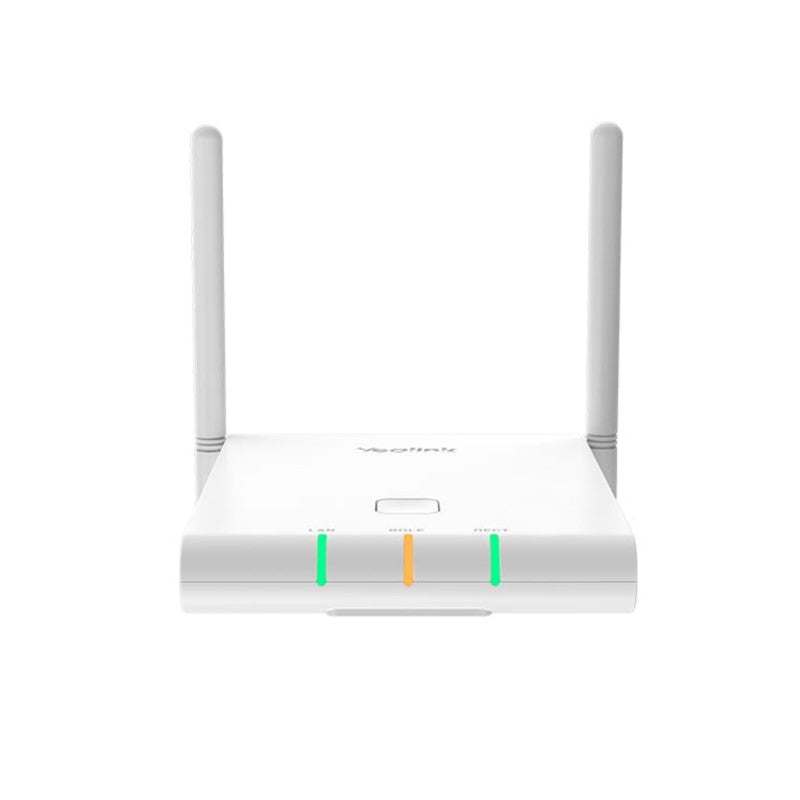
• The Yealink W90DM DECT Manager is part of the W90 DECT IP Multi-Cell System, designed for organizations requiring wireless coverage with ease of deployment. This scalable and reliable solution supports up to 250 handsets and 250 simultaneous calls, ensuring seamless roaming and handover. Key Features: • Seamless handover and roaming • Up to 250 parallel calls / 60 bases / 250 handsets / 250 SIP accounts • Support for LDAP / Remote Phonebook / Xsi Directory • External antennas for coverage up to 50m indoors and 300m outdoors • CAT-iq 2.0 DECT / Opus Codec compatibility System Compatibility: • Compatible with Yealink W59R/W56H/W53H/CP930W/DD devices Power and Dimensions: • PoE (power adapter not included) • Weight: 1 lb • Dimensions: 9 × 7 × 3 in Technical Specifications: Phone Features: • Sync over DECT and LAN for seamless handover and roaming • Up to 60 base stations, 250 handsets, 250 VoIP accounts, and 250 simultaneous calls • Call hold, transfer, and conference capabilities • Switching between calls, call waiting, mute, silence, and DND options • Caller ID with name and number • Anonymous call rejection and call forwarding options Note: For a full list of specifications, please refer to the product datasheet.

About This Product

The Yealink W90DM DECT Manager is the central controller of the W90 DECT IP Multi-Cell System, purpose-built for organizations where reliable cordless voice coverage is critical. This system shines in environments like large warehouses, hospitals, retail campuses, or multi-floor offices across the GTA where staff need to move freely while staying connected. Unlike a single DECT base station, the W90 system can scale to 60 base units and support up to 250 handsets and 250 simultaneous calls, all with seamless handover between cells. It’s often deployed alongside a SIP-based PBX to replace analog cordless systems or to extend coverage into areas where Wi-Fi calling is inconsistent. If you have fewer than 20 users and one or two rooms to cover, a simpler single-base DECT system will likely be more cost-effective and easier to manage. For larger deployments, pairing the W90DM with compatible Yealink handsets like the W56H or CP930W gives you a professional-grade solution without ongoing per-device licensing fees often seen with proprietary wireless systems. Just keep in mind that the W90DM is a manager unit — it requires a PoE switch for power and does not include a power adapter, so plan your network infrastructure accordingly. The system’s support for CAT-iq 2.0 and Opus codec ensures high-definition audio, though you’ll want to verify your existing handset models and PBX compatibility before committing to a full rollout.
Services We Provide
  • Professional Installation & Configuration
  • Ongoing Maintenance & Support
  • Troubleshooting & Repairs
  • System Upgrades & Updates



