
Fanvil KT30 Wireless Button for Y501&Y501-Y series and X305
Frequently Asked Questions
First, ensure the button is within range of the phone (up to 98 feet indoors) and that there are no large metal obstacles or electronic interference sources (like microwaves or cordless phones) between them. Then verify that the button has been properly paired to the base station or phone by following the pairing steps in your phone's manual—usually this involves pressing a learn/pair button on the phone while activating the wireless button. If it still doesn't work, replace the battery with a fresh one and retest.
Yes, low battery is the most common cause of a button that stops responding. The KT30 is designed for long battery life (up to about 100,000 presses), but batteries do eventually drain. Replace the battery with a new CR2032 or similar coin cell as specified in the datasheet. If that doesn't help, try re-pairing the button with the phone—sometimes the wireless link can be lost after a power cycle.
The KT30 has a tested indoor range of up to 98 feet (30 meters) and an outdoor range of up to 262 feet (80 meters). Walls, floors, and large metal objects can reduce this distance significantly. For a bathroom far from the base phone, consider installing the receiver (the phone) closer or using additional signal repeaters if your system supports them. Always test the actual range before permanent mounting.
The KT30 is designed specifically to work with Fanvil Y501, Y501-Y, and X305 series phones. It communicates using a proprietary 433 MHz protocol that is not compatible with other manufacturers' systems. If you have a non-Fanvil phone, you will need a compatible emergency button from that brand or a universal wireless input module that your phone supports.
Yes, the KT30 is rated IP65 for dust and water ingress, meaning it is protected against low-pressure water jets from any direction. This makes it suitable for bathroom installations, including above a shower or near a sink. However, it should not be submerged. If you are installing it outdoors (e.g., in a garden), make sure it is shielded from direct heavy rain and never immersed.
False triggers can happen if the button is accidentally pressed or if there is nearby radio interference at 433 MHz. First, check that the button is mounted in a location where it won't be bumped accidentally—install it high enough or behind a guard if needed. If interference is suspected, move any other 433 MHz devices (like wireless doorbells or weather stations) farther away from both the button and the phone. A quick note: some false triggers may also be caused by a weak battery; replace it to rule that out.
The general pairing method for Fanvil phones with the KT30 is: on the phone, go to the menu (usually under Settings > Extension > Emergency or Wireless) and enable the learn/pairing mode. Then press the button on the KT30 once to send a signal. The phone should confirm successful pairing. If you don't see that option, consult the phone's manual online for 'Wireless Button Pairing' or contact the vendor. A Toronto-based VoIP support provider can also walk you through it remotely.
The drawstring is designed to be long enough to reach a button that is mounted at a standard height (e.g., 30–40 cm from the floor). If the pull didn't activate it, first check that the button is mounted securely so that pulling the string actually moves the button mechanism. If the string feels too short, you can replace it with a longer cord, but ensure it doesn't get snagged. Also confirm that the button is paired and within range—try pressing the button directly to isolate the issue.
Each KT30 button uses a unique pairing with its base phone, so multiple buttons can coexist without interfering as long as each is paired to a separate receiver (phone). However, if two buttons share the same phone, they may both trigger the same event—confirm that your phone supports multiple wireless buttons. The 433 MHz frequency is shared with other household devices, so avoid placing many transmitters too close together to reduce the chance of signal collision.
Check if your Fanvil phone has a 'test mode' or 'silent mode' for emergency buttons—some configurations allow a press to flash a light or beep without calling out. If not, you can temporarily disable the emergency number or route it to a test extension. Alternatively, test during a maintenance window by pressing the button while the phone is set to do not disturb (DND) so it rings only locally. Always inform your call centre or monitoring service if you're testing in a live environment.
Accessories
Fanvil KT30 Wireless Button for Y501&Y501-Y series and X305
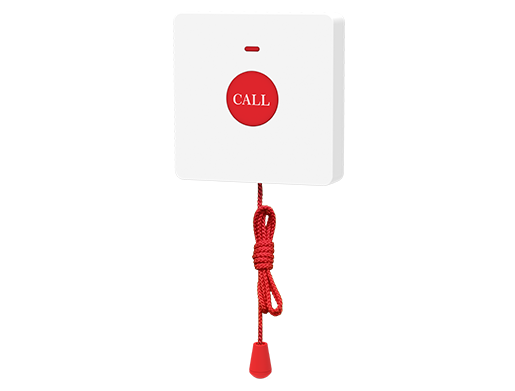
• Fanvil KT30 is a wireless emergency button designed for wall installation, primarily intended for use in places such as bathrooms. • Utilizes advanced 433MHz wireless frequency technology for reliable signal transmission and immediate assistance in emergency situations. Features: • IP 65 Waterproof and dustproof • Transmitting response distances: ‣ Indoor space up to 98 ft ‣ Outdoor space up to 262 ft • Button with extended drawstring design for emergency assistance in case of falls • Low power consumption: Supports users pressing buttons about 100,000 times For a full list of specifications, please refer to the product datasheet.
About This Product
The Fanvil KT30 is a wireless emergency button designed as a companion accessory for select Fanvil IP phones, including the Y501, Y501-Y, and X305 series. It is intended for wall-mounted installation in environments where quick access to assistance is critical, such as bathrooms, bedrooms, or common areas in assisted living facilities, nursing homes, or hospitals. The button uses 433 MHz wireless technology to trigger a call or alert on the paired phone, making it a practical choice for elderly or mobility-impaired individuals who may need to summon help after a fall. Its IP65 rating ensures it can withstand moisture and dust, which is particularly important in wet locations like bathrooms. The built-in drawstring allows someone on the floor to pull the button without needing to stand, a thoughtful design for fall scenarios. While the KT30 is a reliable add-on within its range (up to 98 feet indoors), it is limited to systems compatible with Fanvil devices and may not integrate with third-party or proprietary nurse-call systems. For a small office or a single residence, it is a cost-effective safety feature, but in a large facility requiring dozens of buttons, the indoor range may necessitate multiple receivers or careful placement. Canadian businesses, especially in the GTA senior-care sector, will find it a straightforward addition to existing Fanvil phone deployments, but should verify carrier compatibility if the base phone relies on SIP trunking beyond standard configurations.
Services We Provide
- Professional Installation & Configuration
- Ongoing Maintenance & Support
- Troubleshooting & Repairs
- System Upgrades & Updates



