
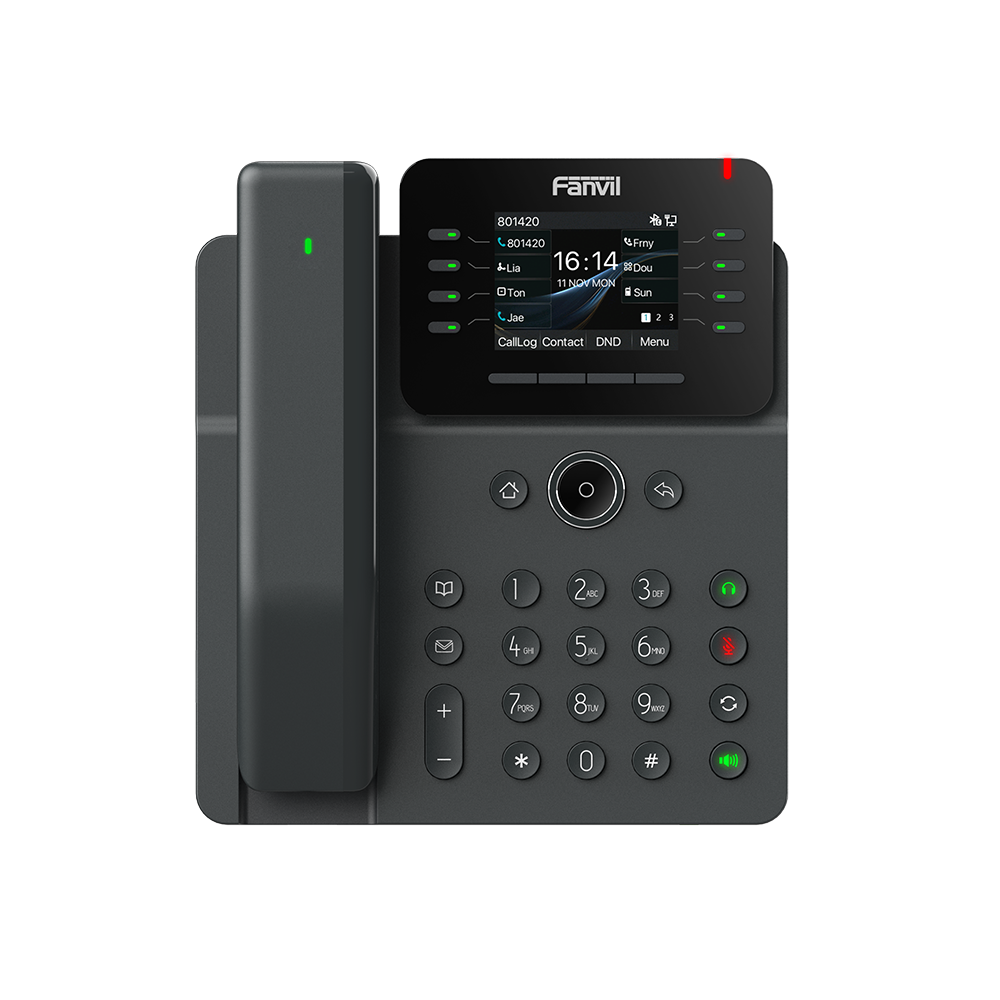
Fanvil V62 Pro Medium-Level Dual Gigabit PoE IP Phone Wireless Handset
Frequently Asked Questions
First, verify that the SIP server address, username, and password entered in the phone's account settings are exactly correct. A common issue is a typo in the server URL or credentials. If the settings are correct, check that your network allows outbound SIP traffic on the required ports (typically 5060 for UDP/TCP). If the issue persists, a Toronto-based VoIP support provider can usually resolve this remotely.
If you are using Power over Ethernet (PoE), confirm that your network switch provides PoE and that the Ethernet cable is securely connected at both ends. If you are using the optional power adapter, ensure it is plugged into a working outlet and the phone. Try a different known-working Ethernet cable to rule out a cable fault.
Ensure the Bluetooth handset is charged and turned on. On the phone, go to the Bluetooth settings menu and set it to discoverable mode. Then, on the handset, initiate a pairing search. Select the V62 Pro from the list of available devices and confirm the pairing code if prompted. Once paired, the handset should connect automatically in the future.
This is often a microphone mute issue. Check if the mute button on the phone or the Bluetooth handset is active. If not, verify that the handset's microphone is not blocked. If using a headset, ensure it is properly connected and selected as the audio device. A quick test with the phone's built-in speakerphone can help isolate the problem.
No, the Fanvil V62 Pro is an IP phone designed to work with a VoIP service or PBX over an Ethernet network. It does not have an FXO port for connecting to a traditional analog phone line. You will need a VoIP provider or an on-premises IP PBX to use this phone.
Intermittent call drops are often network-related. Check if your internet connection is stable and that there is no excessive packet loss or jitter. A wired Ethernet connection is always more reliable than Wi-Fi for VoIP. Also, verify that your router or firewall is not configured to close idle UDP sessions too quickly, as this can terminate active calls.
To start a conference, call the first participant. Once connected, press the Conference button (or the corresponding soft key). Then, dial the second participant. When they answer, press the Conference button again to merge all parties into a single call. The V62 Pro supports up to six participants in an audio conference.
First, check that the Ethernet cable is securely connected to the phone and to an active network port. If using PoE, ensure the switch port is providing power. Try rebooting the phone by unplugging the Ethernet cable for 10 seconds and reconnecting it. If the issue persists, verify that your network's DHCP server is functioning and that the phone is obtaining an IP address.
Yes, the Fanvil V62 Pro supports EHS (Electronic Hookswitch) for compatible wireless headsets. This allows you to answer and end calls from the headset without needing a separate dongle. You will need to connect the headset's EHS cable to the dedicated port on the phone and configure the headset type in the phone's settings.
Poor audio quality is usually a network issue. Check for high network usage on your connection, such as large file downloads or streaming, which can cause jitter and packet loss. Ensure your phone is using a wired connection rather than Wi-Fi. You can also try adjusting the audio codec priority in the phone's settings to favor a higher-quality codec like G.722 if your provider supports it.
IP Phones
Fanvil V62 Pro Medium-Level Dual Gigabit PoE IP Phone Wireless Handset
The Fanvil V62 Pro is a high-performance prime business phone with advanced features. Key Features: • 2.8-inch (320x240) HD color LCD screen • Supports 12 SIP lines and 6-way audio conference • Rich functions including HD audio, dual Gigabit ports, and integrated PoE • Compatible with Bluetooth wireless handset for excellent audio experience • Available in desktop stand and wall mountable options • Support for EHS wireless headset To learn more about this product's specifications, please refer to the provided datasheet.
About This Product
The Fanvil V62 Pro is a dual-line business IP phone designed for users who need more than a basic desk phone but don't require the full feature set of a top-tier executive model. It fits well in a medium-sized office or a busy cubicle environment where the ability to handle multiple calls and participate in audio conferences is important. The included Bluetooth wireless handset is a practical addition for users who want to move around their workspace while on a call, and the phone pairs naturally with a compatible EHS wireless headset for hands-free conversations. A key tradeoff is that while the 2.8-inch color display is clear and functional, it is smaller than the screens found on higher-end models, so users who rely heavily on visual call management or directory browsing may find it limiting. The phone is well-suited for a standard Power over Ethernet (PoE) deployment, which is common in many GTA office setups, but it may be overkill for a single-line user or underpowered for a receptionist or call center agent who needs a larger display and more programmable keys.
Services We Provide
- Professional Installation & Configuration
- Ongoing Maintenance & Support
- Troubleshooting & Repairs
- System Upgrades & Updates



