
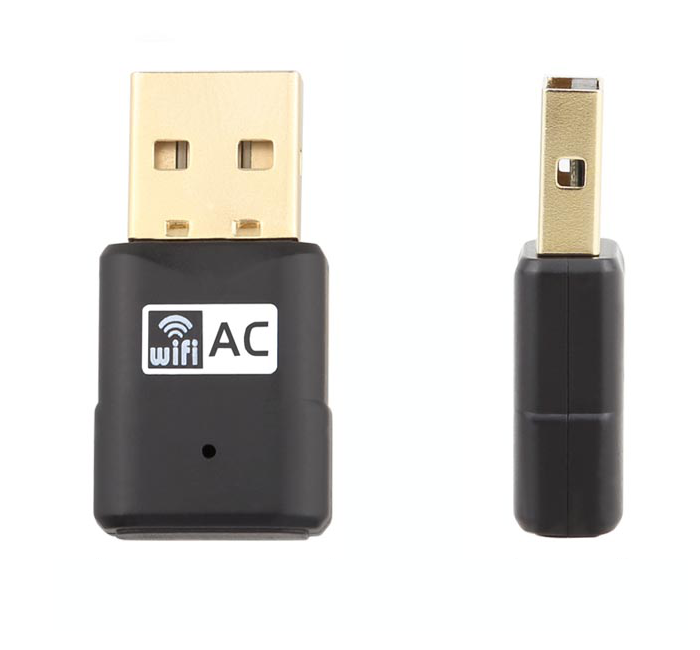
Fanvil WF20 WiFi Dongle
Frequently Asked Questions
First, ensure the dongle is firmly inserted into the USB port on the back or side of your Fanvil phone. If it still isn't detected, try power cycling the phone by unplugging it from power for 10 seconds and plugging it back in. If the issue persists, check that your phone model is listed as compatible (X5S/X6/X7/X7C/X210/X210i) and that the phone's firmware is up to date.
This usually indicates the phone is not properly registered with your VoIP service. Verify that your SIP account credentials (username, password, and server address) are correctly entered in the phone's settings. Also confirm that your WiFi network has internet access and that the phone can reach your VoIP provider's server. A quick test is to temporarily connect the phone via Ethernet to rule out a WiFi issue.
Start by checking the signal strength on the phone's display. If it's weak, move the phone closer to your WiFi router or access point. Also ensure the dongle is not plugged into a USB hub or extension cable, as this can degrade the signal. Interference from other 2.4 GHz devices (like microwaves or cordless phones) can also cause drops, so try changing the WiFi channel on your router.
No, the WF20 is intended for Fanvil phone models that do not have built-in WiFi. If your phone already has WiFi capability, using the dongle may cause conflicts or simply not be recognized. Check your phone's specifications to confirm whether it supports an external WiFi dongle.
On your Fanvil phone, go to the network settings menu and select the WiFi option. The phone should scan for available networks. Choose your network's SSID, enter the password (if required), and save the settings. The phone will then attempt to connect. If your network uses enterprise authentication (like WPA2-Enterprise), you may need to enter additional credentials; consult your IT department for those details.
This error typically means the phone's firmware does not support the dongle or the dongle is not fully compatible. First, update your phone's firmware to the latest version from Fanvil's support site. If the error persists, try a different USB port on the phone. If none work, the dongle may be defective or incompatible with your specific phone model.
No, the WF20 only supports 2.4 GHz WiFi at up to 150 Mbps. It will not detect or connect to a 5 GHz network. If your office uses only 5 GHz, you will need a different solution, such as a wired connection or a phone with built-in dual-band WiFi.
Choppy audio over WiFi is often due to network congestion or weak signal. First, check the WiFi signal strength on the phone. If it's low, move the phone closer to the router. Also, reduce the number of devices using the same WiFi network during calls. If the problem continues, try switching to a wired Ethernet connection to isolate whether the issue is WiFi-related.
The WF20 firmware is updated through the Fanvil phone itself. Connect the dongle to the phone, then go to the phone's settings menu and look for a USB or accessory firmware update option. The phone will check for available updates and guide you through the process. Ensure the phone is connected to the internet during the update.
Fanvil only guarantees compatibility with the models listed: X5S, X6, X7, X7C, X210, and X210i. Using it with other models may result in the dongle not being recognized or functioning incorrectly. If you have a different model, check with Fanvil support or your VoIP provider for alternative WiFi solutions.
Accessories
Fanvil WF20 WiFi Dongle
• The Fanvil WF20 WiFi Dongle is a plug-and-play USB accessory that connects your Fanvil IP phone to the wireless network. • It provides a reliable WiFi connection, enabling users to communicate, collaborate and access documents with ease. • Key Features: • High Transmission Rate • Plug and Play • Low Power Consumption • Compatible with Fanvil X5S/X6/X7/X7C/X210/X210i (Only support 2.4GHz/150Mbps) • Upgradable to ensure compatibility with the latest firmware versions • Compliant with IEEE802.11n, IEEE802.11b/g, and 802.11ac standards for maximum reliability and throughput • For a full list of specifications, please refer to the product datasheet (available upon request).
About This Product
The Fanvil WF20 WiFi Dongle is a practical accessory for anyone using a compatible Fanvil desk phone in a location where running an Ethernet cable is inconvenient or impossible. It is designed for small offices, home offices, or temporary workstations where a wired network drop is not available. The dongle plugs directly into the phone's USB port and connects to a 2.4 GHz wireless network, making it a simple solution for adding WiFi capability to a phone that otherwise requires a wired connection. It is important to note that this dongle only supports 2.4 GHz networks at up to 150 Mbps, so it is not suitable for environments that rely on 5 GHz WiFi or require higher throughput. In a Canadian business context, this can be a useful tool for a GTA office where a desk needs to be set up quickly without pulling new cable, but it should not be relied upon for high-bandwidth applications or in areas with significant 2.4 GHz interference. For most standard VoIP calling and basic collaboration, the WF20 performs adequately, but users with very dense wireless environments or those needing maximum reliability may still prefer a wired connection.
Services We Provide
- Professional Installation & Configuration
- Ongoing Maintenance & Support
- Troubleshooting & Repairs
- System Upgrades & Updates



