
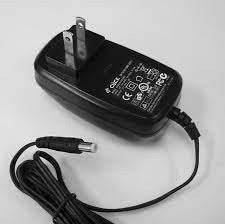
Grandstream 12V-0.5A Power Supply
Frequently Asked Questions
First, verify the outlet works by plugging in another device. Then ensure the DC barrel connector is fully seated in the phone's power port. If the phone still doesn't power on, try the adapter with a different compatible device to isolate the fault. If the issue persists, a Toronto-based VoIP support provider can usually resolve this remotely.
A very faint hum can be normal, but a loud or noticeable buzz often points to an electrical problem. Unplug the adapter and test it with another compatible phone or ATA. If the noise continues, it's safest to replace the adapter to avoid potential damage.
Yes, intermittent power delivery from a failing adapter can cause sudden reboots. Try a different wall outlet and check that the cable isn't pinched or stretched. If the reboots stop when you swap in another 12V adapter, this one is likely defective. If you're in the GTA, a local support provider can often supply and configure a new one quickly.
Some warmth is expected during use, but excessive heat is a warning sign. Make sure the adapter is in an open, ventilated area and not covered by papers or cloth. If it becomes too hot to touch comfortably, discontinue use and replace it.
Confirm the outlet is live and the cable is securely connected at both ends. Inspect the phone's power port for bent pins or debris. If possible, try a known-working adapter with the phone to determine whether the adapter or the phone itself is the problem.
No—exposed wiring can cause shorts, sparks, or shock. Stop using the adapter immediately and replace it. Tape or makeshift repairs are not safe for mains-powered equipment.
This adapter is specified for GXP2130, GXP2135, GXP2140, HT812, and HT813. The GXP2160 may have different voltage or current requirements. Always check the phone's original power specs, because using an incompatible adapter can damage the device.
Yes. The adapter works with standard 120V AC outlets found across Canada and outputs the correct 12V DC for compatible models. There are no regional compatibility concerns; it's purely a physical power accessory.
No. This is a direct AC-to-DC adapter meant for the phone's barrel power port. It does not inject power into Ethernet cables. If your network already supplies PoE, you don't need this adapter at all.
It's safer to use the manufacturer's specified adapter. Universal adapters can easily be set to the wrong voltage or polarity, risking permanent damage to your ATA. This Grandstream 12V-0.5A unit is the recommended replacement for your HT812.
Accessories
Grandstream 12V-0.5A Power Supply
• Grandstream 12V-0.5A Power Supply for use with GXP2130, GXP2135, GXP2140, HT812, and HT813 models. • Key Features: • Compatible power supply for reliable operation • Suitable for use in various Grandstream devices • Durable and efficient design
About This Product
For businesses or home offices relying on Grandstream GXP2130, GXP2135, GXP2140 IP phones or HT812/HT813 ATAs, having a dedicated spare power supply is sensible insurance against downtime. This 12V 0.5A adapter eliminates dependence on Power over Ethernet, making it a straightforward pick for small-scale deployments where a standard wall outlet is readily available.
Using an external adapter ensures that a phone or ATA remains powered even if a PoE switch fails or requires maintenance. However, it does introduce an extra cable and ties the device to a specific outlet location. For a single phone on a desk, this is rarely an issue; for a cluster of devices, managing multiple adapters can become messy compared to a PoE setup.
One practical limit to note is that this adapter is only certified for the models listed. Using it with devices that draw more than 0.5A or expect a different voltage can cause erratic behavior or damage. In Canadian offices where standard 120V outlets are ubiquitous, the adapter fits right in without voltage converters, making it a simple plug-and-play accessory.
Using an external adapter ensures that a phone or ATA remains powered even if a PoE switch fails or requires maintenance. However, it does introduce an extra cable and ties the device to a specific outlet location. For a single phone on a desk, this is rarely an issue; for a cluster of devices, managing multiple adapters can become messy compared to a PoE setup.
One practical limit to note is that this adapter is only certified for the models listed. Using it with devices that draw more than 0.5A or expect a different voltage can cause erratic behavior or damage. In Canadian offices where standard 120V outlets are ubiquitous, the adapter fits right in without voltage converters, making it a simple plug-and-play accessory.
Services We Provide
- Professional Installation & Configuration
- Ongoing Maintenance & Support
- Troubleshooting & Repairs
- System Upgrades & Updates



