
Grandstream F-MM850-300M-10G SFP+ Fiber Module

Frequently Asked Questions

Start by reseating the SFP+ module firmly until you hear or feel the latch click. Next, verify that both ends of the fiber patch cable are clean and undamaged, and that you’re using multi-mode fiber with LC connectors. If the switch has a management interface, check the port status for any error counters or optical power readings. If the issue persists, a Toronto-based VoIP support provider can usually resolve this remotely.
No, this is a multi-mode module designed for 850 nm over multi-mode fiber. Using single-mode fiber will result in severe signal loss and the link will not come up. If your infrastructure is single-mode, you need an SFP+ module rated for that fiber type.
Some switches require you to explicitly enable third-party or unsupported transceiver mode in the port settings. Check the switch configuration for a command like ‘service unsupported-transceiver’ or ‘allow-unsupported-sfp’. If that option is missing, verify the switch firmware is up to date and that the SFP+ port isn’t locked to a specific vendor list.
SFP+ modules can become warm during operation, especially in densely populated switches with limited airflow. Use the digital diagnostic monitoring (DDM) to check the temperature reading; if it stays within the module’s rated range, it’s safe. Ensure the switch’s fans are working and that adjacent ports aren’t blocked. If the temperature reading climbs above 70°C, consider spacing out modules or improving ventilation.
Intermittent drops often point to a dirty or damaged fiber connector, a kink in the cable, or a bend radius that’s too tight. Inspect both ends of the patch cable and the module’s LC port, cleaning them with a proper fiber cleaning tool. Also, check the DDM readings for fluctuating RX power; a value near the lower sensitivity limit (-11.1 dBm) might indicate excessive loss along the run.
Usually, no. The module is hot-pluggable and the switch should auto-negotiate speed and duplex. However, on some managed switches you may need to set the port speed to 10 Gbps manually if auto-negotiation fails, or enable flow control. Check the switch’s port configuration to confirm it isn’t forced to a lower speed.
LC connectors are polarized and only insert one way. Make sure the connector’s key is aligned with the slot on the module and that you’re pushing straight in. If it still won’t latch, inspect the connector for bent or broken tabs, and try a different known-good patch cable. Never force it, as that can damage the module’s internal sleeve.
You can use a fiber optic power meter to measure the output at the far end of the patch cable, but a safer first check is to look at the switch’s DDM interface for TX power and bias current. If those readings are within the expected range, the module is transmitting. Never look directly into the fiber port—laser light is invisible and can damage your eyes.
Accessories

Grandstream F-MM850-300M-10G SFP+ Fiber Module
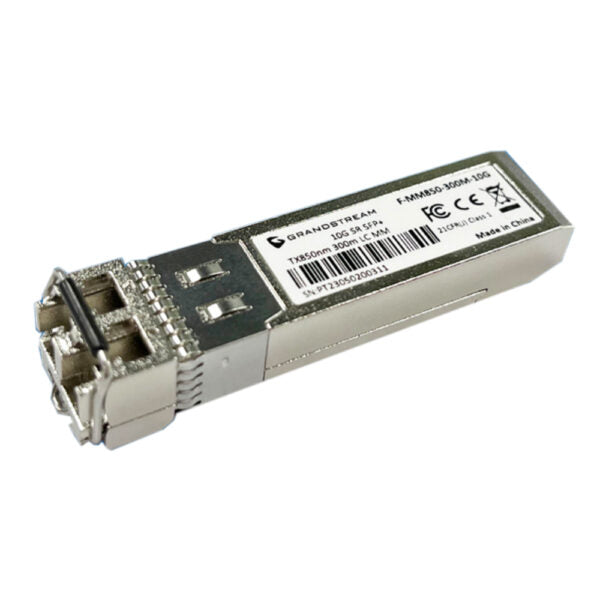
• Hot-pluggable small-form factor transceiver modules with high sensitivity PIN receiver and signal conditioner for 1.25/10 Gigabit Ethernet applications. Key Features: • Low EMI and excellent ESD protection • Multi-mode fiber module supporting up to 300 meters • 10Gbps data rate and support for single-mode fibers Notes: • Please select the correct fiber cable according to the module type. • The multi-mode module corresponds to the multi-mode fiber, while the single-mode module corresponds to the single-mode fiber. • Select the same wavelength fiber cable for connection. • Choose an appropriate fiber module based on your network's transmission distance requirements. Technical Specifications: • Model: F-MM850-300M-10G • Fiber Mode: Multi-Mode Fiber • Connector Type: Duplex LC • DDM: Yes, I2C for integrated Digital Diagnostic Monitoring • Nominal Wavelength: 850nm • Data Rate: 10Gbps SFP+ • Max Power Consumption: 1W • Transfer Distance: 300 meters • TX Power: -6 to -1dBm, ±3dB • RX Power: -11.1 to 0.5dBm, ±3dB • Operation Voltage: 3.3V±0.3V • Standards: SFF-8472, SFP+ MSA, IEEE 802.3ae, RoHS-6 For a full list of specifications, please refer to the product datasheet (available on our website).

About This Product

This SFP+ module is intended for network engineers and IT teams building or upgrading short-range 10 Gigabit Ethernet links inside a building or campus. It fits any switch, router, or media converter with an open SFP+ cage that follows the MSA standard, making it a straightforward way to add fiber connectivity without replacing existing hardware. In a typical Toronto office high-rise, multi-mode fiber is often already in place for floor-to-floor or data-center connections, and this module matches that infrastructure perfectly.

Because it uses 850 nm multi-mode optics, the module is limited to 300 meters over OM3 or better fiber. That’s plenty for most enterprise LAN backbones but not for long-haul or metro links. If your runs exceed that distance or you’re connecting between buildings with single-mode fiber, you’ll need a different transceiver. For dense 10G aggregation in a wiring closet, this module is a cost-effective choice that pairs naturally with Grandstream’s own managed switches, though it will work equally well in any standards-compliant gear.

Installation is plug-and-play, but the module does draw up to 1 watt, so plan for power and cooling if you’re populating many ports. The integrated digital diagnostics (DDM) let you monitor optical power and temperature, which is useful for proactive troubleshooting. One practical note: the duplex LC connector demands a matching multi-mode patch cable with the same 850 nm wavelength; mixing single-mode cables or different wavelengths will cause link failures.
Services We Provide
  • Professional Installation & Configuration
  • Ongoing Maintenance & Support
  • Troubleshooting & Repairs
  • System Upgrades & Updates



