
Grandstream F-MM850-550M-1.25G SFP Fiber Module

Frequently Asked Questions

Start by reseating the module and the LC connectors on both ends of the fiber run. A common cause is a connector that looks fully seated but is not fully latched. Then verify that the fiber type matches the module; this unit requires multi-mode fiber, and a single-mode patch cord will not establish a link. If the port remains down, check the switch interface configuration to confirm the SFP port is not administratively disabled.
The module follows the SFP MSA standard and is not vendor-locked. It will work in any switch or router with a standard SFP cage that supports 1.25 Gbps multi-mode optics and reads the SFF-8472 monitoring data. If a non-Grandstream host rejects it, that is typically a switch firmware policy rather than a module fault, and you can usually override it in the port settings.
Inspect the fiber patch cords and the module’s LC port for dust or contamination. A quick clean with a proper fiber cleaning tool often restores a marginal link. After cleaning, use the switch’s digital diagnostic monitoring (DDM) readout to check the receive power level; if it is hovering near the lower end of the -18 dBm sensitivity range, the fiber plant itself may have degraded and you should confirm the actual loss with a light source and power meter before replacing any hardware.
This module is designed for a fixed 1.25 Gbps data rate and does not support auto-negotiation down to 100 Mbps on the fiber side. If the link is training at a lower speed, the issue is almost certainly on the switch port configuration or the connected device. Verify that the SFP port and the remote end are both set to a forced 1 Gbps full-duplex mode, and confirm that the fiber run is within the supported distance for your fiber grade.
Digital diagnostic monitoring provides real-time readings of transmit and receive optical power, module temperature, and supply voltage. You access it through the host switch’s CLI or web interface, typically under a transceiver details or port diagnostics menu. In a Grandstream switch, you would look for the SFP port status page. These readings are most useful for catching a degrading link before it drops entirely.
It depends on the fiber plant and distance. If you have multi-mode fiber (OM2) and the total run, including patch cords, is under 550 meters, this module should work. For an outdoor or inter-building run, however, many Canadian deployments use single-mode fiber for longer reach and better environmental tolerance. Check your actual fiber type and measured distance; if either is beyond the module’s spec, you will need a single-mode equivalent instead.
First confirm the switch port is configured as an SFP port and not a combo copper port that is still active. Then check that the switch firmware is current; older firmware revisions occasionally fail to read the DDM data correctly, which can make the module appear absent. This module draws only 0.8 W, so it is unlikely to be a power budget problem unless the switch is already at its absolute PoE limit.
The module requires multi-mode fiber with an LC duplex connector. Look at the cable jacket; multi-mode is typically aqua or orange and is marked as OM1 or OM2. If your existing cabling is yellow and marked as OS1 or OS2 single-mode, this module will not function. In a Canadian office built within the last decade, you are most likely to find OM2 or OM3 multi-mode in the riser.
Accessories

Grandstream F-MM850-550M-1.25G SFP Fiber Module
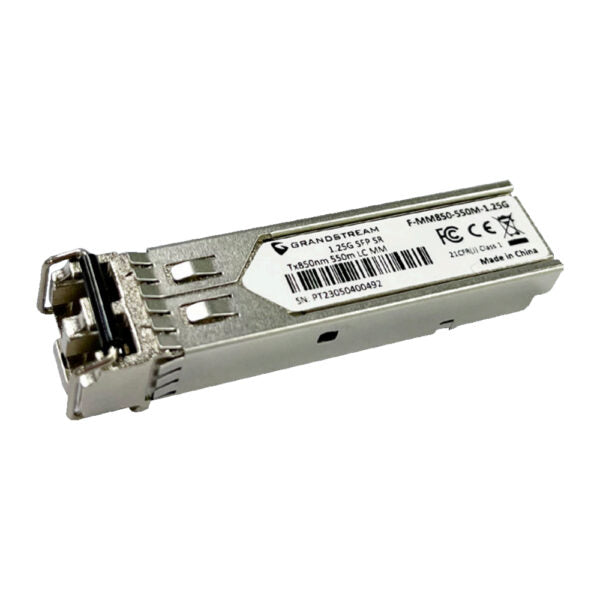
• High sensitivity PIN receiver and signal conditioner for 1.25/10 Gigabit Ethernet applications • SFP modules with very low EMI and excellent ESD protection • Low power consumption, ideal for enterprise LAN networks and other optical links Features: • Multi-Mode Fiber Module • Supports transmission distances of up to 550 meters • Data rate: 1.25Gbps • Compatible with Class 1 Laser Products Technical Specifications: • Model: F-MM850-550M-1.25G • Fiber Mode: Multi-Mode Fiber • Connector Type: Duplex LC • Integrated Digital Diagnostic Monitoring (DDM) • Nominal Wavelength: 850nm • Data Rate: 1.25Gbps SFP • Max Power Consumption: 0.8W • Transfer Distance: • 50/125µm(OM2): 0.55km • 62.5/125µm(OM1): 0.3km • TX Power: -10 to -3dBm, ±3dB • RX Power: -18 to -3dBm, ±3dB • Operation Voltage: 3.3V±0.3V • Standards: SFF-8472, SFP MSA, IEEE 802.3z, RoHS-6

About This Product

This SFP module is a straightforward, cost-effective way to connect Grandstream switches and gateways to a multi-mode fiber backbone over short campus or in-building runs. It is not a general-purpose transceiver for high-speed data centers; it is purpose-built for 1.25 Gbps links, which aligns with the uplink and trunk speeds commonly found in mid-range VoIP and networking gear. In a typical Toronto office or light industrial deployment, it fits where you already have OM1 or OM2 fiber in the walls and need to bridge a switch closet to a floor distribution point within a few hundred meters.

The module pairs naturally with Grandstream’s own managed switches that offer SFP cages, but it will also work in any standards-compliant SFP port that respects the MSA and SFF-8472 specifications. It is a low-power part, drawing well under one watt, so it adds minimal thermal load to a switch already running in a ventilated rack. The integrated digital diagnostic monitoring lets you read optical levels and temperature from the host device, which is useful when you are troubleshooting a link that has gone marginal on an older fiber plant.

A buyer should understand the distance limits clearly. Over OM2 fiber, the reach is roughly 550 meters; over older OM1, it drops to about 300 meters. This is not a long-haul module and will not serve a link between buildings separated by more than a city block unless your fiber plant is upgraded. For a small to mid-sized business in the GTA consolidating voice and data onto a single managed switch, that is usually plenty. If your run exceeds those distances or you are using single-mode fiber, you need a different module altogether.

This is an overkill purchase for a small office with two switches in the same room that could just use a copper patch cable. It is underpowered for a deployment that requires 10 Gigabit speeds or spans several kilometers. It makes the most sense when you are intentionally building a dedicated voice network on fiber for electrical isolation and reliability, and you want a module that is guaranteed compatible with your Grandstream ecosystem without any third-party coding headaches.
Services We Provide
  • Professional Installation & Configuration
  • Ongoing Maintenance & Support
  • Troubleshooting & Repairs
  • System Upgrades & Updates



