
Grandstream F-SM1310-10KM-10G SFP+ Fiber Module

Frequently Asked Questions

First, ensure the module is fully inserted and clicked into the SFP+ slot. Then, verify that your switch supports standard MSA-compliant third-party optics; some vendors lock their ports to branded modules. If the switch has a CLI, try the 'no lldp med fast-start' or similar command to disable proprietary checks. If the issue persists, a Toronto-based VoIP support provider can usually resolve this remotely.
Check that the fiber cable is single-mode (often yellow) and terminated with duplex LC connectors. Inspect the connector ends for dirt or damage; clean them with a lint-free fiber cleaning tool if needed. Also confirm that the device on the other end is powered on and has a compatible SFP+ module installed at the same speed and wavelength.
Most 1G SFP slots are not designed for 10G SFP+ modules and may not detect them, or they could be physically incompatible due to different electrical interfaces. Always check your device's documentation: if the slot is labeled 'SFP+' or '10G', it should work; if only 'SFP', assume it will not. For 1G links, use a standard 1G SFP module instead.
Low receive power often indicates a dirty or damaged fiber connector, a bent cable, or a link that is near or beyond the 10 km range. Clean both ends of the fiber with an appropriate tool and inspect for physical damage. If the RX power is below -14.4 dBm, the link may be unreliable. If cleaning doesn't help, test with a known-good patch cable.
Yes, SFP+ modules are designed for hot-swapping. However, always handle the module by its body, avoid touching the gold contacts, and insert it firmly until it clicks. While it is safe to swap without powering down, it's best practice to disable the port first to avoid traffic disruption or log errors.
Intermittent drops are often caused by a dirty fiber connection or a loose module. Reseat the module at both ends and clean all fiber connectors. Also verify that the cable does not exceed 10 km and that the path has no tight bends or splices. If the problem continues, check for electromagnetic interference near the cable or consider swapping the module with a known-working one to isolate the fault.
In most cases, the module will auto-negotiate speed and duplex when inserted. No manual configuration is required unless your switch uses proprietary optics validation. If the module isn't recognized, you may need to enable third-party optics support in the switch settings or disable the optical monitoring feature. Consult your switch's manual for the specific command or menu option.
Yes, SFP+ modules can become warm during operation, especially at 10G speeds. The F-SM1310-10KM-10G consumes up to 1W, which is within normal limits. Ensure the switch has adequate airflow around the SFP+ cages. If the module becomes uncomfortably hot to the touch (above 70°C), check the ambient temperature and airflow, and consider moving the switch to a cooler location.
No, this module is designed for single-mode fiber (OS1/OS2) only. Using it with multimode fiber will result in no link or extremely short reach. The 1310nm wavelength and optics are optimized for single-mode. If you have multimode cabling, you need a different SFP+ module (e.g., 10GBASE-SR with 850nm wavelength).
Most switches allow you to read the module's DDM information via CLI or web interface. Look for commands like 'show interface transceiver details' or 'show sfp'. The serial number and vendor information are stored in the EEPROM and can be displayed there. If your switch doesn't support this, you can try a USB-to-SFP adapter on a PC with appropriate software.
Accessories

Grandstream F-SM1310-10KM-10G SFP+ Fiber Module
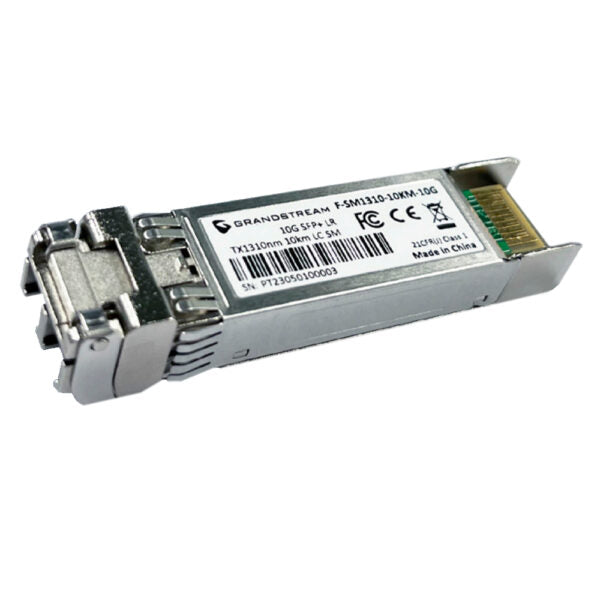
• High-sensitivity PIN receiver and signal conditioner for 1.25/10 Gigabit Ethernet applications • Hot-pluggable small-form factor transceiver modules with excellent EMI and ESD protection • Low power consumption, ideal for enterprise LAN networks and other optical links • SFP module support for very low EMI • Excellent ESD protection Features: • Single-mode fiber option • 1310nm wavelength • 10-Kilometer transfer distance • 10Gbps data rate • Supports Class 1 Laser Product with warning regarding eye safety Technical Specifications: • Model: F-SM1310-10KM-10G • Fiber Mode: Single-Mode Fiber • Connector Type: Duplex LC • DDM: Yes, I2C for integrated Digital Diagnostic Monitoring • Nominal Wavelength: 1310nm • Data Rate: 10Gbps SFP+ • Max Power Consumption: 1W • Transfer Distance: 10km • TX Power: -8.2 to 0.5dBm, ±3dB • RX Power: -14.4 to 0.5dBm, ±3dB • Operation Voltage: 3.3V±0.3V • Standards: SFF-8472, SFP+ MSA, IEEE 802.3ae, RoHS-6

About This Product

The Grandstream F-SM1310-10KM-10G is a 10 Gigabit SFP+ transceiver designed for single-mode fiber connections over distances up to 10 kilometres. This module is a practical choice for network administrators building or extending enterprise LANs, campus networks, or data centre links that require reliable 10Gbps throughput without the reach limitations of multimode fibre. It pairs naturally with any 10G SFP+ switch, router, or media converter that complies with the SFP+ MSA standard, making it a straightforward drop-in upgrade for existing fiber infrastructure.

For Canadian businesses, particularly those managing multi-building office parks in the GTA or connecting remote floors within a single facility, this module offers a cost-effective way to bridge gaps where copper cabling isn't feasible. The 10-kilometre range covers most intra-city campus links, and the low power draw (1W) helps keep cooling and energy costs in check. However, it is important to note that this transceiver requires single-mode fiber (typically OS2) and duplex LC connectors; it will not work with multimode cabling.

Buyers should be aware that while the module is MSA-compliant, some enterprise switches from vendors like Cisco or Arista enforce proprietary coding that may require manual configuration or a specific compatibility mode. The module is overkill for runs under a few hundred metres where cheaper multimode optics or even copper DAC cables would suffice, and it is underpowered for links exceeding 10 km—those would need a higher-power, longer-reach model. For most standard 10G fiber links within a building or between nearby buildings, this Grandstream module delivers solid performance at a reasonable price point.
Services We Provide
  • Professional Installation & Configuration
  • Ongoing Maintenance & Support
  • Troubleshooting & Repairs
  • System Upgrades & Updates



