
Grandstream GMD1208 microphone

Frequently Asked Questions

First, ensure the GVC3220 is powered on and within 10 feet of the microphone. On the GVC3220, navigate to Settings > Bluetooth and confirm that pairing mode is enabled. Then, place the GMD1208 close to the base unit and press the mute button for three seconds until the LED blinks blue—this triggers ultrasound pairing. If pairing still fails, power-cycle both devices and try again.
Check that the GMD1208 is within 66 feet of the GVC3220 and that there are no large metal objects or electronic interference between them (common in rooms with many wireless devices). Try switching the connection to the proprietary 2.4 GHz mode instead of Bluetooth if you are using Bluetooth, as the proprietary link is more stable. Also verify that both devices have the latest firmware from Grandstream.
First, ensure the GMD1208 has sufficient battery—if it uses a built-in rechargeable battery, leave it on the charging base (if included) or connect it via USB to the GVC3220 for power. A solid red LED indicates muted, green means active. If the button feels physically stuck, try gently pressing it a few times. If the LED remains off, power-cycle the microphone by removing its battery or disconnecting power for 30 seconds, then reconnect.
Echo usually happens when the microphone picks up audio from the speaker. Make sure the GMD1208 is placed at least three feet away from the GVC3220’s built-in speakers and on a stable surface, not near reflective walls. On the GVC3220, enable Acoustic Echo Cancellation (AEC) in the audio settings if it is not already active. Also, verify that the microphone is not pointing directly at the speaker.
First, check the mute LED on the microphone—if it is red, tap the mute button once to unmute (it should turn green). Next, confirm that the GVC3220 is using the GMD1208 as the active audio input by checking the device list in its settings. If the indicator shows no input signal, move closer to the microphone (within 5 meters) and speak normally. Still silent? Try unpairing and re-pairing the device.
Officially, the GMD1208 is designed exclusively for the Grandstream GVC3220 multimedia conferencing system. It uses proprietary 2.4 GHz technology that only works with that base unit. While it does include Bluetooth, the microphone is not intended to function as a standalone Bluetooth headset or speakerphone for other devices like laptops or smartphones. For other uses, you would need a different microphone.
The GMD1208 typically receives firmware updates through the GVC3220 base unit. Ensure your GVC3220 has the latest firmware installed; then, while the GMD1208 is paired and connected, check the GVC3220’s settings for an "Accessories" or "Peripherals" menu—some models allow updating connected devices from there. If no option appears, the base unit may handle updates automatically. Always download firmware only from Grandstream’s official website.
Background noise can come from HVAC systems, other electronics, or wireless interference. Try moving the microphone farther from potential noise sources and away from walls. If you are on Bluetooth, switch to the proprietary 2.4 GHz mode, which uses dynamic beamforming and noise shield technology to reduce ambient noise. Also confirm that you are not sitting too far—stay within the 5-meter pickup range for best clarity.
The GMD1208’s LED provides basic status: a slow blinking red or amber light usually indicates charging, while solid green (or off when fully charged) means ready. When the battery is low, the LED may blink rapidly or change color. For exact battery percentage, check the GVC3220’s interface—when paired, it often displays the battery level of connected accessories. If you do not see this, a full charge typically takes two to three hours.
The GVC3220 supports pairing with only one GMD1208 at a time. If you need extended coverage for a very large room, you may need to rely on the base unit’s built-in microphones plus the single expansion microphone. For rooms larger than about 15 by 20 feet, consider a different conferencing setup with a dedicated microphone array or additional external audio equipment. Check Grandstream’s documentation for your specific base unit model to confirm.
Accessories

Grandstream GMD1208 microphone
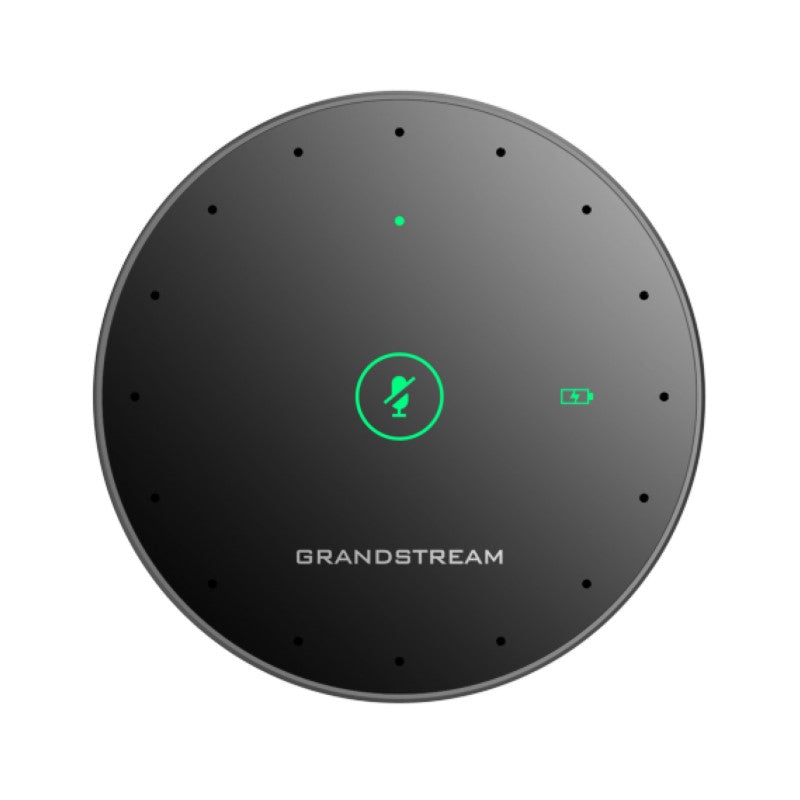
• GMD1208 is a wireless microphone companion device for the Grandstream GVC3220 Ultra HD Multimedia Conferencing System, increasing overall audio coverage range. • Integrated Bluetooth allows pairing with devices for high-definition voice quality. • Key features include: • Ultrasound pairing technology • Proprietary 2.4GHz wireless technology with dynamic beamforming technology • High-quality audio coding with error tolerance • Built-in 8 omni-directional MEMS microphones with a 5-meter pickup range • Capacitive touch mute button with LED indicator for status notifications • Additional information: • Weight: 0.8 lb • Dimensions: 8 × 6 × 3 in • Accessory type: Microphone Technical specifications: • MIC: • 8 omni-directional MEMS microphones • Up to 5-meter pickup range • Maximum connection distance: • In 2.4G mode: up to 66 ft. • In Bluetooth mode: up to 33 ft • Audio feature: ANS, AGC/DRC, Noise Shield Technology

About This Product

The Grandstream GMD1208 is a wireless expansion microphone designed exclusively for the GVC3220 Ultra HD conferencing system. It is ideal for medium-to-large conference rooms where the base unit's built-in microphone may struggle to capture voices from all participants, especially those seated farther from the screen. By extending the audio pickup range to up to five meters, this accessory helps ensure that everyone in the room is heard clearly, reducing the need for participants to lean in or repeat themselves. In a typical GTA office environment, the GMD1208 fits naturally into boardrooms or collaboration spaces that seat six to twelve people, pairing wirelessly with the GVC3220 without visible cabling clutter.

This microphone relies on a proprietary 2.4 GHz wireless link for stable, low-latency audio, with Bluetooth available as a secondary connection option. While the proprietary mode offers extended range (up to 66 feet line-of-sight), users should be aware that both the base unit and the microphone must remain in the same room and within reasonable proximity to avoid dropouts. The GMD1208 is not a standalone device; it functions only as a companion to the GVC3220, so it cannot be repurposed with other conferencing systems or used as a general-purpose Bluetooth microphone.

For deployment, the device works best in rooms where the base unit is placed at one end—such as near a display—and the microphone is positioned on a table near participants. It may be overkill for small huddle rooms where two or three people gather, as the base unit's own microphones often suffice. Conversely, in very large boardrooms (12+ people) or rooms with unusual layouts, a single expansion microphone might not provide uniform coverage; multiple units are technically possible depending on the base system's support. The tradeoff is between convenience and coverage: adding a GMD1208 is a quick, wire-free upgrade, but those with complex audio needs may still require a dedicated ceiling microphone array or a separate audio system.

From a Canadian business perspective, the GMD1208 is well-suited for modern Toronto offices that prioritize clean aesthetics and minimal setup. Its wireless nature eliminates the need for drilling or cable routing, making it a practical choice for rented or heritage spaces. Compatibility with the GVC3220 is straightforward, and no carrier-specific considerations apply since this is a local-room accessory, not a network device. It is worth confirming that your GVC3220 firmware supports the GMD1208 before purchasing, as software updates sometimes affect pairing behavior.
Services We Provide
  • Professional Installation & Configuration
  • Ongoing Maintenance & Support
  • Troubleshooting & Repairs
  • System Upgrades & Updates



