
Grandstream GRP_WM_B for GRP2624/GRP2634
Frequently Asked Questions
No, this kit is specifically shaped for the GRP2624 and GRP2634. The mounting holes and bracket arms will not line up properly with other models, and forcing a fit could damage the phone’s case or cause it to fall. For a GRP2615 you would need the mount designed for that series.
A small gap is expected because the bracket holds the phone slightly off the wall to allow for cable routing. If the phone is noticeably tilted or one corner sticks out, check that you’ve fully seated the bracket’s arms into the back of the phone and that no cables are bunched behind it. Sometimes readjusting the position of the Ethernet cord relieves pressure and lets the phone sit correctly.
First, confirm all screws are tightened against the bracket and that the bracket itself isn’t flexing. If the wall anchors are loose in the drywall, the mount won’t be stable—using a stud or better anchors usually solves it. Also ensure the phone’s locking tab (if present) is fully engaged with the bracket.
It is possible with heavy-duty toggle anchors, but a stud provides the most secure hold for a device that might be handled daily. If you must use drywall anchors, choose ones rated for at least twice the combined weight of the phone and handset, and test the mount’s rigidity before hanging the phone. A loose mount can lead to dropped connections if the Ethernet cable gets tugged.
You can substitute longer wood screws of similar diameter and head shape from a hardware store. Make sure the screw heads sit flush in the bracket’s keyhole slots without protruding, as that can scratch the back of the phone. Using screws that are too long, however, might damage hidden wiring or pipes, so limit the extra length to what is strictly needed.
The bracket is designed to leave the network and power ports accessible. When running the Ethernet cable, route it through the provided channel or create a gentle loop so the connector isn’t being bent sharply when the phone hangs. If you are using a PoE injector, the extra cable bulk can be managed with a small adhesive clip on the wall alongside the mount.
The handset cradle on the GRP2624/2634 has a small tab that can be rotated to hold the handset in a wall-mount position. Check the tab orientation—it often needs to be flipped 180 degrees so the hook catches the handset securely when gravity pulls it downward. The phone’s quick start guide illustrates this adjustment.
Accessories
Grandstream GRP_WM_B for GRP2624/GRP2634
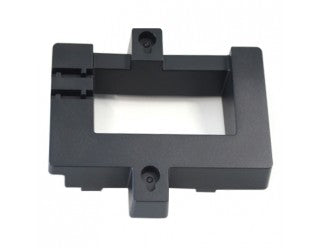
The Grandstream GRP_WM_B Wall Mounting Kit is specifically designed to support the GRP2624 and GRP2634 models. This kit includes all necessary components for a secure and stable installation. • Wall mounting system with adjustable arms • Durable and rust-resistant construction • Easy-to-follow mounting instructions included
About This Product
This wall mount kit is purpose-built for the Grandstream GRP2624 and GRP2634 IP phones. It is a practical choice if you need to place these desk phones in a fixed, wall-mounted position—common in light industrial settings, back offices, retail kiosks, or anywhere counter space is at a premium. The kit gives you the bracketry and hardware to securely attach the phone to a vertical surface without resorting to makeshift solutions.
Businesses that standardize on these GRP models will appreciate that the mount is engineered specifically for the phone’s shape and weight, so the handset and keypad remain accessible and the cabling can exit cleanly. Keep in mind this is not a universal mount—it only fits the two listed models, so if your deployment mixes in GRP261x or other Grandstream phones, you will need different mounting solutions. Also, the installation assumes a solid wall surface or proper anchoring; drywall alone may not hold up well in high-traffic areas.
For a Toronto office running a small GRP2624 fleet, this mount can help optimize space at reception or shared desks. In call centre environments where every inch matters, wall-mounting a supervisor phone can free up work surfaces. The mount itself is passive, so there is no networking or power consideration beyond making sure the Ethernet cable has enough slack and isn’t stressed when the phone is in its final position.
Businesses that standardize on these GRP models will appreciate that the mount is engineered specifically for the phone’s shape and weight, so the handset and keypad remain accessible and the cabling can exit cleanly. Keep in mind this is not a universal mount—it only fits the two listed models, so if your deployment mixes in GRP261x or other Grandstream phones, you will need different mounting solutions. Also, the installation assumes a solid wall surface or proper anchoring; drywall alone may not hold up well in high-traffic areas.
For a Toronto office running a small GRP2624 fleet, this mount can help optimize space at reception or shared desks. In call centre environments where every inch matters, wall-mounting a supervisor phone can free up work surfaces. The mount itself is passive, so there is no networking or power consideration beyond making sure the Ethernet cable has enough slack and isn’t stressed when the phone is in its final position.
Services We Provide
- Professional Installation & Configuration
- Ongoing Maintenance & Support
- Troubleshooting & Repairs
- System Upgrades & Updates



