
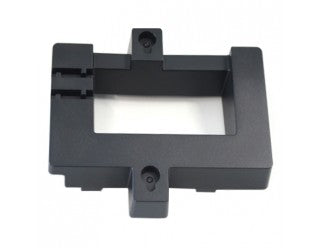
Grandstream GRP_WM_D Wall Mounting Kit for GRP2636
Frequently Asked Questions
No, the GRP_WM_D is designed specifically for the GRP2636. The mounting holes and shape are unique to that model. If you have a different Grandstream phone, you will need the corresponding wall mount kit for that model.
First, ensure the mounting screws are fully tightened and that the bracket is flush against the wall. Check that the phone's mounting slot is properly aligned and snapped into place. If the wall surface is uneven, the bracket may not sit flat; use a level and consider shims if necessary.
Yes, but you will need masonry anchors and a hammer drill to create pilot holes. The kit's screws are designed for wood or drywall; they will not hold in concrete without proper anchors. Use appropriate hardware for your wall type.
Verify that the mounting bracket is level during installation. Use a spirit level before tightening. If the bracket is level but the phone still tilts, check that the phone's footstand is not interfering — the footstand should be removed or set to the wall mount position as specified in the GRP2636 manual.
The kit typically includes a bracket that can be used as a template by holding it against the wall and marking the screw positions. If you prefer a separate paper template, you can create one from the bracket's outline. For precise alignment, measure the distance between the bracket's slots.
If the included screws do not reach a stud or are insufficient for your wall thickness, you may need to purchase longer screws of the same gauge and head type. Ensure that the replacement screws are compatible with the bracket's holes. For drywall without a stud, use appropriate toggle bolts or drywall anchors rated for the phone's weight.
Yes, the mount is designed to allow access to all ports on the back of the GRP2636. Run the cables upward or downward as needed. Some wrapping may be necessary to maintain a tidy installation. Make sure cables are not pinched between the phone and bracket.
Double-check that you are using the correct mounting holes on the bracket and that the bracket is oriented correctly. Measure the distance between the bracket's slots to ensure it matches your wall anchors. If the holes are off, you may have drilled in the wrong location; patch and redrill. Consider using a stud finder to locate solid framing.
The phone is designed for wall mounting and has secure slots. However, overtightening screws can strip the bracket or crack the phone's housing, and failing to secure the phone into all locking tabs can cause it to fall. Follow the installation instructions carefully, and if you are unsure, consult a professional installer.
The mount only accommodates the base GRP2636 phone. If you have expansion modules (e.g., GXP EM series) attached, they will not fit when the phone is wall-mounted. The phone must be desk-mounted when expansion modules are in use.
Accessories
Grandstream GRP_WM_D Wall Mounting Kit for GRP2636
The Grandstream GRP_WM_D Wall Mounting Kit is designed to provide a secure and durable installation solution for your GRP2636 device. • Easy-to-use mounting kit • Compatible with GRP2636 device • Durable construction for long-lasting performance • Space-saving design for optimal wall mount placement
About This Product
This wall mounting kit is intended for businesses that want to mount a Grandstream GRP2636 phone on a wall, freeing up desk space or placing the phone in a high-traffic area. It's ideal for reception desks, warehouse workstations, or open-plan offices in the GTA where counter space is limited. The kit pairs directly with the GRP2636 model; there is no adapter or multi-model bracket.
Installation is straightforward, but you should verify that your wall surface (drywall, concrete, wood stud) can support the mount with the included hardware. The kit does not include wall anchors for every surface type, so you may need to purchase those separately if mounting on drywall without a stud. Be aware that this mount is specific to the GRP2636 and will not fit other Grandstream phones from the GRP series; if you later swap phone models, the mount will likely need to be replaced.
For most small-to-medium business deployments in the Toronto area, this mount is a practical, low-cost solution for wall installations. It adds no extra network or power features — it simply holds the phone securely. If you never intend to wall-mount the phone, the kit is unnecessary. Conversely, if you need to mount a different device or require a heavy-duty bracket for public-facing areas, you may need a sturdier or more universal solution.
Installation is straightforward, but you should verify that your wall surface (drywall, concrete, wood stud) can support the mount with the included hardware. The kit does not include wall anchors for every surface type, so you may need to purchase those separately if mounting on drywall without a stud. Be aware that this mount is specific to the GRP2636 and will not fit other Grandstream phones from the GRP series; if you later swap phone models, the mount will likely need to be replaced.
For most small-to-medium business deployments in the Toronto area, this mount is a practical, low-cost solution for wall installations. It adds no extra network or power features — it simply holds the phone securely. If you never intend to wall-mount the phone, the kit is unnecessary. Conversely, if you need to mount a different device or require a heavy-duty bracket for public-facing areas, you may need a sturdier or more universal solution.
Services We Provide
- Professional Installation & Configuration
- Ongoing Maintenance & Support
- Troubleshooting & Repairs
- System Upgrades & Updates



