
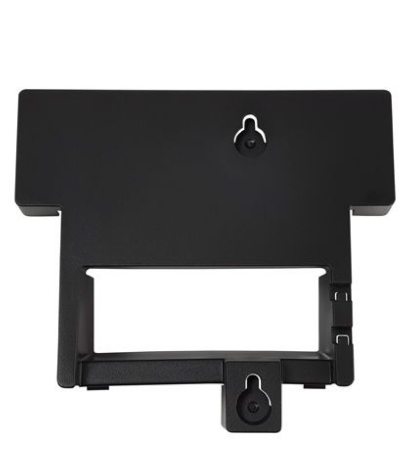
Grandstream GXV3380 Wall Mount Bracket
Frequently Asked Questions
Yes, the phone clips or slides onto the bracket and can be lifted off for service without damaging the wall mount, as long as the bracket itself remains secured to the wall. Always disconnect the cables gently before taking the phone off the mount.
A loose fit usually indicates that the locking tab or retention clip has not engaged fully. Remove the phone, check that the bracket is fastened tightly to the wall without any flex, and try reseating the phone firmly until you hear or feel it lock into place.
Mounting the phone on a wall should not degrade wireless performance by itself, provided the bracket does not block the antenna area. If you notice a weaker connection, check that the phone is not placed behind large metal surfaces or inside a recessed cabinet that could interfere with the wireless signal.
The bracket is fixed and does not offer tilt or swivel adjustment; the viewing and camera angle are determined entirely by where you mount it on the wall. You may need to reposition the bracket lower or higher, or place a spacer underneath, to achieve a comfortable camera framing for video calls.
When wall-mounted, the handset hanger tab usually needs to be reversed or adjusted so the handset stays secure. Check the phone’s installation guide for the correct tab orientation in wall-mount mode; this does not require any modification to the bracket itself.
The bracket’s mounting holes are designed for common screw sizes, so it can be anchored into a stud or used with heavy-duty drywall anchors appropriate for the wall type. Because the GXV3380 is relatively heavy, anchoring solely into drywall without proper anchors is not recommended in any business setting.
Accessories
Grandstream GXV3380 Wall Mount Bracket
• This product was designed to perfectly match the Grandstream GXV3380. • Key features include accurate compatibility, reliable performance and easy installation.
About This Product
The Grandstream GXV3380 Wall Mount Bracket is a dedicated accessory for installers, facilities managers, and IT teams who need to secure the GXV3380 IP Video Phone in a fixed, wall-mounted position. It is a practical choice in reception areas, light industrial zones, or executive offices where desk space is at a premium and a clean, professional wall installation is preferred over a desktop stand. Because it is purpose-built for the GXV3380, it eliminates the guesswork of universal mounts, ensuring that the device sits flush and remains stable over time.
This bracket makes the most sense in environments where the GXV3380’s video camera and touchscreen interface are used as a room kiosk or a collaborative endpoint—think a shared space in a Toronto condominium concierge desk or a small business lobby—rather than at a personal desk. It keeps the phone securely in place while allowing natural access to the screen and camera angle. For Canadian offices subject to frequent cleaning or high-traffic movement, a robust wall mount also reduces the risk of the phone being knocked over or displaced.
A buyer should understand that this is a passive mounting accessory; it does not change the capabilities of the phone, nor does it add any tilt or swivel articulation. The installation angle and viewing position are fixed once mounted, so careful placement planning is essential to avoid glare on the screen or an awkward camera angle during video calls. The bracket’s reliability is directly tied to the quality of the wall anchoring used during installation, which is not included.
For large-scale deployments, such as outfitting dozens of identical meeting rooms across a GTA office park, these brackets keep the installation uniform and professional. The product is overkill, however, in situations where the GXV3380 will only ever sit on a standard office desk, as the phone already ships with its own desktop stand. It is not designed for any other Grandstream phone model, so mixed-fleet deployments should verify compatibility before ordering in bulk.
This bracket makes the most sense in environments where the GXV3380’s video camera and touchscreen interface are used as a room kiosk or a collaborative endpoint—think a shared space in a Toronto condominium concierge desk or a small business lobby—rather than at a personal desk. It keeps the phone securely in place while allowing natural access to the screen and camera angle. For Canadian offices subject to frequent cleaning or high-traffic movement, a robust wall mount also reduces the risk of the phone being knocked over or displaced.
A buyer should understand that this is a passive mounting accessory; it does not change the capabilities of the phone, nor does it add any tilt or swivel articulation. The installation angle and viewing position are fixed once mounted, so careful placement planning is essential to avoid glare on the screen or an awkward camera angle during video calls. The bracket’s reliability is directly tied to the quality of the wall anchoring used during installation, which is not included.
For large-scale deployments, such as outfitting dozens of identical meeting rooms across a GTA office park, these brackets keep the installation uniform and professional. The product is overkill, however, in situations where the GXV3380 will only ever sit on a standard office desk, as the phone already ships with its own desktop stand. It is not designed for any other Grandstream phone model, so mixed-fleet deployments should verify compatibility before ordering in bulk.
Services We Provide
- Professional Installation & Configuration
- Ongoing Maintenance & Support
- Troubleshooting & Repairs
- System Upgrades & Updates



