
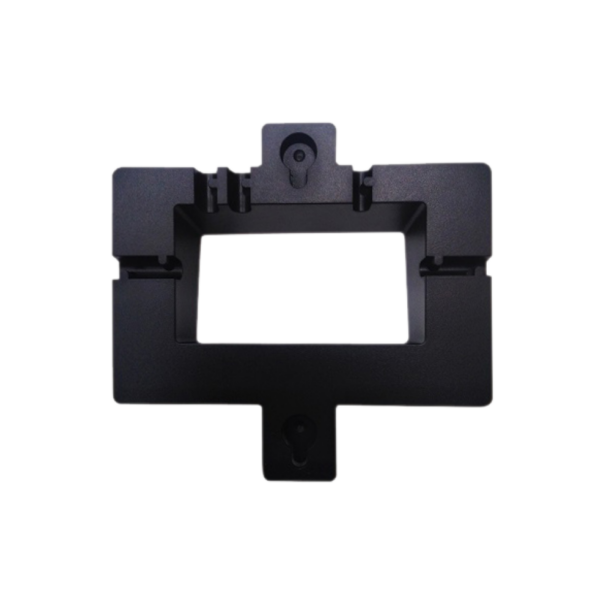
Grandstream Wall Mount Bracket GRP_WM_A for GRP26XX
Frequently Asked Questions
Start by locating the downloadable installation guide referenced in the product description; it provides step-by-step diagrams. You will need to remove the phone's base stand, align the bracket with the mounting holes on the back of the phone, and secure it using the included screws. Ensure the bracket is oriented correctly so the handset hook engages properly. If you run into trouble, a Toronto-based VoIP support provider can walk you through the process remotely.
No, the GRP_WM_A is specifically designed for the GRP2601, GRP2602, GRP2603, and GRP2604 models. The screw pattern and handset hook placement are unique to those phones. Using it with any other model will likely result in an insecure fit and could damage the phone's mounting points.
First, confirm that you removed the original desk stand completely; even a small plastic tab left in place can prevent a flush fit. Next, check that the bracket is attached to the phone with the correct orientation—the handset hook tab should be at the top. If the wall itself is uneven, you may need to use small spacers behind the bracket, but avoid over-tightening the screws, which can warp the plastic.
It is not recommended. The combined weight of the phone and handset, along with daily use, can pull standard screws out of drywall over time. Always use appropriate wall anchors rated for at least 10 lbs, and if you are unsure about your wall type, consult a local hardware supplier. For business installations in the Toronto area, many VoIP support providers can also handle physical mounting.
The bracket includes a small plastic tab that acts as a hook for the handset when the phone is vertical. Make sure that tab is not broken and is properly seated in the bracket slot. Also check that the handset's earpiece recess aligns with the tab. If the tab is missing or damaged, you may need a replacement bracket.
The installation guide is available as a downloadable PDF from the product page where you purchased the bracket, typically under a 'Downloads' or 'Support' tab. It includes detailed illustrations showing screw placement and handset hook adjustment. If you cannot locate it, contact the seller or your VoIP equipment provider for a direct link.
No, the bracket package includes only the screws needed to attach the bracket to the phone itself. Wall-mounting screws and anchors are not provided because the appropriate hardware depends on your wall material. You will need to supply your own fasteners suitable for wood studs, drywall, or concrete.
Yes, all ports on the GRP260X series remain accessible after mounting. The bracket does not block the headset jack, Ethernet port, or power connector. Just be mindful of cable routing so that cords do not put strain on the connectors or interfere with the handset.
Accessories
Grandstream Wall Mount Bracket GRP_WM_A for GRP26XX
• Compatible with models GRP2601, GRP2602, GRP2603 and GRP2604. • Includes a downloadable installation guide (GRP WM A) for easy setup. Installation Guide: Please find the comprehensive installation guide for this product by clicking on the link provided above.
About This Product
This wall mount bracket is designed for businesses that need to free up desk space or secure a phone in a fixed location, such as a reception counter, hallway, or warehouse station. It pairs directly with the Grandstream GRP2601, GRP2602, GRP2603, and GRP2604 models, offering a clean, low-profile installation that keeps the handset and keypad accessible while the phone sits flush against the wall. The bracket itself is a simple, rigid plate with no adjustment for tilt or swivel, so it works best where a straight-on viewing angle is acceptable.
For Canadian offices, especially in the GTA where compact workstations are common, wall-mounting can help reclaim valuable desk real estate without sacrificing call quality or ease of use. The bracket includes a downloadable installation guide, and the mounting process is straightforward with the right hardware, though you will need to supply screws and anchors suitable for your wall type. It is not a universal mount; it will not fit other Grandstream series or third-party phones, so double-check your model before ordering.
A buyer should be aware that this bracket does not include any cable management features, so you may need to plan for tidy routing of the Ethernet and power cords separately. If your deployment requires frequent repositioning or an angled view, a more flexible mounting solution would be a better fit. In environments with high vibration or uneven walls, the rigid design might transmit minor wobble, though that is rarely an issue in standard office settings. For a single handset in a quiet office, it is a cost-effective way to mount a phone securely; for a large-scale rollout, the consistent mounting pattern simplifies installation across multiple units.
For Canadian offices, especially in the GTA where compact workstations are common, wall-mounting can help reclaim valuable desk real estate without sacrificing call quality or ease of use. The bracket includes a downloadable installation guide, and the mounting process is straightforward with the right hardware, though you will need to supply screws and anchors suitable for your wall type. It is not a universal mount; it will not fit other Grandstream series or third-party phones, so double-check your model before ordering.
A buyer should be aware that this bracket does not include any cable management features, so you may need to plan for tidy routing of the Ethernet and power cords separately. If your deployment requires frequent repositioning or an angled view, a more flexible mounting solution would be a better fit. In environments with high vibration or uneven walls, the rigid design might transmit minor wobble, though that is rarely an issue in standard office settings. For a single handset in a quiet office, it is a cost-effective way to mount a phone securely; for a large-scale rollout, the consistent mounting pattern simplifies installation across multiple units.
Services We Provide
- Professional Installation & Configuration
- Ongoing Maintenance & Support
- Troubleshooting & Repairs
- System Upgrades & Updates



