
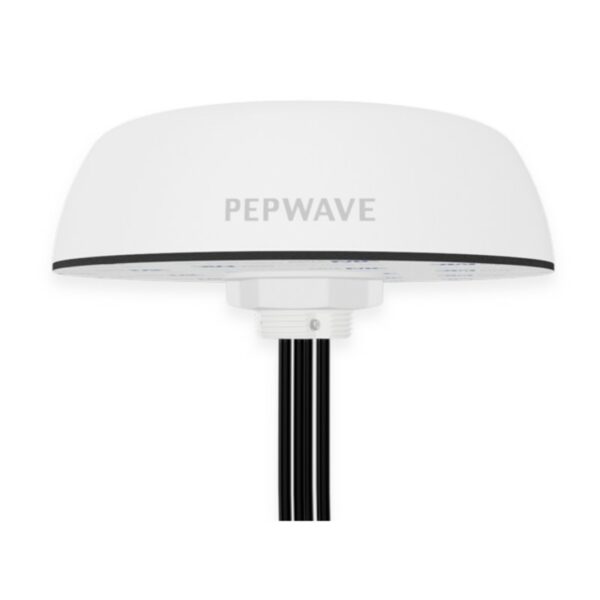
Peplink Mobility 42G-5G cellular and Wi-Fi antenna system ANT-MB-42G-S-W-16
Frequently Asked Questions
First, check that all SMA connectors are fully tightened and that the antenna cable is not pinched or damaged during routing. Loose connections are a common cause of signal loss. If the issue persists, a Toronto-based VoIP support provider can usually resolve this remotely.
Yes, as long as your router has SMA female connectors for external antennas and supports the frequency bands used by your carrier. The Mobility 42G covers 600-6000 MHz, which includes most LTE and 5G bands in Canada, but verify your router's antenna port compatibility before installation.
Ensure the antenna has a clear view of the sky—metal roofs or heavy tree cover can block GPS signals. Also confirm that the GPS cable is connected to the correct port on your router or GPS receiver, as the antenna has a dedicated GPS line.
The included double-sided 3M adhesive pad can be used on clean, flat surfaces, but for long-term reliability on a moving vehicle, a permanent mount is recommended. If you need a temporary setup, ensure the surface is dry and free of wax or oil before applying the pad.
Check that the Wi-Fi antennas are not placed too close to metal objects or other antennas, which can cause interference. Also verify that your router's Wi-Fi settings are configured for the correct channel and band, as the antenna itself does not affect signal quality if the environment is noisy.
Yes, the Mobility 42G covers frequencies from 600 to 6000 MHz, which includes the 5G bands used by major Canadian carriers like Rogers, Bell, and Telus. However, performance depends on your router's modem and carrier support for those specific bands.
Extending the cable with a coupler and additional cable is possible, but it will introduce signal loss. For best performance, use a high-quality, low-loss extension cable and keep the total length under 25 feet. If you need a longer run, consider repositioning the antenna or router.
This is usually a router or SIM issue, not an antenna problem. First, power cycle the router and check that the SIM card is properly inserted and activated. If the router still shows no service, test with a known-working SIM to rule out carrier or account issues.
While it can be used indoors, the antenna is designed for outdoor or vehicle mounting to maximize signal strength. Placing it inside a building may reduce performance due to walls and interference. For indoor use, a smaller desktop antenna would be more practical.
Try moving the antenna away from sources of electromagnetic interference like power inverters, large motors, or other wireless transmitters. If the problem continues, check that all cable connections are properly shielded and that the antenna is grounded according to the installation guide.
Accessories
Peplink Mobility 42G-5G cellular and Wi-Fi antenna system ANT-MB-42G-S-W-16
• Peplink Mobility 42G, a 7-in-1 cellular and Wi-Fi antenna system with GPS receiver, is designed for optimal network performance in various environments. • Key features: • Supports 4x LTE, 2x Wi-Fi, and 1x GPS connectivity • Operates across frequencies of 600-6000MHz • IP68 rated, SMA connector, white color, and a length of 16ft/4.8m • Additional information: • Weight: 3.3 lb • Dimensions: 9.1 × 8.5 × 6.1 in • Accessory Type: Antennas • Technical Specifications: • Model: Mobility 42G • Product code: ANT-MB-42G-S-W-16 • Includes antenna, wall/pole mount, and double sided 3M adhesive pad
About This Product
The Peplink Mobility 42G-5G is a 7-in-1 antenna system designed for vehicles, RVs, or fixed locations where reliable cellular and Wi-Fi connectivity is critical. It combines four LTE antennas, two Wi-Fi antennas, and a GPS receiver into a single rugged enclosure, making it ideal for mobile offices, fleet vehicles, or remote work sites that need consistent network access on the go. This antenna pairs naturally with Peplink routers and other cellular modems that support multiple antenna inputs, and it can replace a collection of separate antennas with a cleaner, more durable installation. The IP68 rating means it can handle rain, dust, and vibration, but the tradeoff is that installation requires careful routing of the 16-foot cable and a suitable mounting surface. For a small office or home setup, this antenna is overkill—a simpler indoor unit would suffice—but for a Toronto-based business with field crews or a mobile command center, it provides the robust signal handling needed to maintain connectivity across the GTA's varied urban and suburban environments.
Services We Provide
- Professional Installation & Configuration
- Ongoing Maintenance & Support
- Troubleshooting & Repairs
- System Upgrades & Updates



