
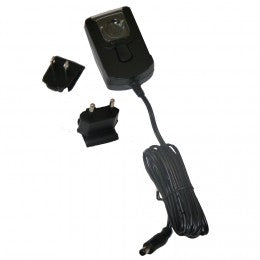
Snom A6 10W PSU AC Power Adaptor for all Snom Desk Telephones and M500
Frequently Asked Questions
First, verify that the outlet is working by plugging in another device. Next, check that the adapter's barrel connector is fully inserted into your Snom phone's power port—sometimes a loose fit prevents contact. If the issue persists, try a different wall outlet or a power bar. If the adapter still doesn't power the phone, it may be defective, but these steps rule out the most common causes before you contact support.
While any 5V DC adapter with a 2A current rating could technically provide the same voltage, third-party adapters may not meet the same safety or electrical noise standards as the Snom-branded unit. Using a non-Snom adapter could lead to performance issues like audio hum or even damage over time. For reliable operation, stick with the Snom A6—it's designed specifically for Snom phones and ensures clean power delivery.
This typically means the phone is still set to prioritize PoE, or the power adapter connection is not fully engaged. Confirm that the adapter's plug is firmly seated in the phone and that you have removed any PoE cable from the LAN port (most Snom phones will still try to power over Ethernet first). If the phone still doesn't switch over, there may be a setting in the phone's network configuration to disable PoE priority—check the phone's web interface under Power Settings, or contact your VoIP provider for remote adjustment.
Yes, the Snom A6 adapter is rated for all Snom desk telephones and the M500 series. Older models like the Snom 300 or 370 accept the same 5V/2A DC input. As long as the phone's power jack matches the barrel connector size (standard 5.5 mm outer diameter / 2.1 mm inner, tip-positive), it will work. You can confirm compatibility by checking your phone's underside label or user manual for the required voltage and current.
A slight warmth is normal for any AC-to-DC adapter under load, but if it becomes uncomfortably hot to the touch or smells burnt, that's a sign of trouble. First, ensure the adapter is not covered or placed in a confined space that restricts ventilation. Also check that the phone is not drawing more than 2A (unlikely with normal use). If overheating persists, stop using the adapter and contact support—it may have an internal fault.
Yes, absolutely. Unplug the Ethernet cable from the phone's LAN port (or ensure that port is not connected to a PoE switch) and plug the Snom A6 adapter into the phone and a wall outlet. The phone will automatically power on. In many Canadian offices, this is a common scenario when moving between a PoE-enabled desk and a non-PoE workspace. If the phone doesn't boot, double-check the adapter connection and try a different outlet.
A buzzing noise usually indicates electrical interference or a grounding issue. Try plugging the adapter into a different wall outlet, preferably on a different circuit. Avoid using a shared power bar with large appliances or fluorescent lights. If the noise continues, the adapter may be faulty and introducing ripple into the power supply. Test with another Snom A6 adapter if available; if the noise disappears, the original unit should be replaced.
The Snom A6 adapter is designed for all Snom desk telephones and the M500 series—this includes the M500 base station. The M500 base requires 5V DC at 2A, exactly what this adapter supplies. It's a common replacement for the base's own adapter. Just ensure you're using the correct voltage; using a higher voltage adapter would damage the base.
Random reboots often point to insufficient or unstable power. First, ensure no other high-wattage device is sharing the same wall outlet or power strip, as load fluctuations can starve the adapter. Next, inspect the adapter's cable for any visible damage or kinks. If the cable is fine, try connecting the phone directly to a wall outlet (not a power bar) to rule out power strip issues. If reboots continue, the adapter may be failing under load—contact support for a replacement.
A loose connector can cause intermittent power and may eventually damage the phone's power jack. Before using it, try gently squeezing the barrel of the connector with pliers to create a tighter fit—be careful not to crush it. If it remains loose, do not force it. Instead, obtain a replacement adapter. A loose connection can cause voltage drops that lead to odd phone behavior or incomplete booting. A Toronto-based VoIP support provider can help you source a proper replacement quickly.
Accessories
Snom A6 10W PSU AC Power Adaptor for all Snom Desk Telephones and M500
• The Snom 10W PSU-A6 AC Adapter is designed for all Snom Desk Telephones and M500 models, providing reliable performance with a power supply capacity of 10W. • Key Features: • AC Adapter – US • 10W Capacity • Voltage: 5V • Current: 2A
About This Product
The Snom A6 10W AC power adaptor is a practical add-on for any Snom desk telephone or M500 series handset, particularly useful if your office setup doesn't rely on Power over Ethernet (PoE). While many modern business environments in Toronto and across Canada run PoE switches that power phones directly through the network cable, this adapter ensures your Snom phone can still function at a desk without PoE—or serve as a backup power source if your PoE switch runs out of ports. It's a straightforward replacement or spare that avoids downtime when an original adapter is misplaced or fails.
This adaptor is best suited for small to medium-sized offices, home offices, or any deployment where the phones are not centrally powered. It's a single-device accessory, so if you're managing a multi-desk rollout, you'd need one per phone unless your network already provides PoE. The 5V/2A output reliably matches the power requirements of Snom's desk phones, and the US plug works with standard North American outlets—common in Canadian workplaces. There are no extra features here, no universal voltage range (it's fixed at 5V), so it's not a replacement for a multi-voltage travel adapter.
The main tradeoff to keep in mind is that this adapter is exclusively for Snom devices that accept a 5V DC input. It won't power other VoIP phones or USB gadgets. If your desk phone happens to be an older model that expects a different voltage, this unit won't work. Also, if your office is already fully PoE-enabled, buying these adapters for every desk would be redundant and add unnecessary cabling. In that context, the adapter is overkill—you'd be better off sticking with PoE. But for a single desk lacking PoE or for a hot-swap spare in a service kit, it's a perfectly focused solution.
This adaptor is best suited for small to medium-sized offices, home offices, or any deployment where the phones are not centrally powered. It's a single-device accessory, so if you're managing a multi-desk rollout, you'd need one per phone unless your network already provides PoE. The 5V/2A output reliably matches the power requirements of Snom's desk phones, and the US plug works with standard North American outlets—common in Canadian workplaces. There are no extra features here, no universal voltage range (it's fixed at 5V), so it's not a replacement for a multi-voltage travel adapter.
The main tradeoff to keep in mind is that this adapter is exclusively for Snom devices that accept a 5V DC input. It won't power other VoIP phones or USB gadgets. If your desk phone happens to be an older model that expects a different voltage, this unit won't work. Also, if your office is already fully PoE-enabled, buying these adapters for every desk would be redundant and add unnecessary cabling. In that context, the adapter is overkill—you'd be better off sticking with PoE. But for a single desk lacking PoE or for a hot-swap spare in a service kit, it's a perfectly focused solution.
Services We Provide
- Professional Installation & Configuration
- Ongoing Maintenance & Support
- Troubleshooting & Repairs
- System Upgrades & Updates



