
Snom D7C Color Expansion Module for D785, D735 and D717

Frequently Asked Questions

First, check that the USB cable is securely connected to both the expansion module and the host phone. If the connection is loose, the module may not receive power or data. Also, ensure the host phone is powered on and functioning. If the issue persists, try a different USB port on the phone or a different cable. A Toronto-based VoIP support provider can usually resolve this remotely if the problem continues.
The keys are programmed through the host phone's web interface or menu settings. On the phone, navigate to the expansion module settings, where you can assign speed dials, busy lamp fields, or other functions to each key. The module is fully configurable via the host phone, so no separate software is needed. If you're unsure, consult the phone's user manual for step-by-step instructions.
Start by power cycling both the host phone and the expansion module. Disconnect the USB cable, wait 10 seconds, and reconnect. If the module still isn't detected, check that the phone's firmware is up to date, as older firmware may not support the D7C. Also, verify that the phone model is compatible (D785, D735, or D717). If the problem continues, contact your VoIP provider for assistance.
No, the D7C is specifically designed for Snom D7xx series desk phones, such as the D785, D735, and D717. It will not work with other Snom models or phones from other manufacturers. If you need expansion keys for a different phone, look for a compatible expansion module from that brand.
This usually indicates a provisioning or configuration issue. First, check that the busy lamp field settings on the host phone are correctly configured for the extensions you want to monitor. If the settings are correct, try refreshing the phone's configuration by rebooting it. If the problem persists, verify that the phone's firmware is up to date, as older versions may have bugs with LED status updates.
Connect the first module to the host phone via USB. Then, use the USB port on the first module to connect the second module, and so on. Note that the second and third modules will require an external AC power supply, as the phone's USB port can only power one module. Ensure you use the correct power adapter (5Vdc, 10W) to avoid damage.
First, check the USB connection to ensure it is secure. A loose connection can cause power fluctuations. If the connection is fine, try a different USB port on the host phone. If the issue continues, the module may be drawing too much power, especially if you have multiple modules daisy-chained without an external power supply. Ensure each additional module has its own power adapter.
Yes, the D7C supports custom background images. You can upload an image through the host phone's web interface. The image should be in a supported format (typically JPEG or PNG) and sized appropriately for the display. Check the phone's manual for specific resolution requirements. This is a great way to brand the phone for a Toronto office.
The module's configuration is stored on the host phone, not the module itself. After a power outage, the phone should restore its settings from memory. If the configuration is lost, the phone may not have saved the settings properly. Try saving the configuration again via the phone's web interface. If the problem repeats, check that the phone's firmware is up to date, as this can affect settings retention.
Each D7C module has 48 programmable LED function keys (16 keys per page, with 3 pages). With three modules daisy-chained, you can have up to 144 programmable keys. This is ideal for a busy receptionist or call center agent who needs to monitor many extensions. Remember that the second and third modules will require external power.
Accessories

Snom D7C Color Expansion Module for D785, D735 and D717
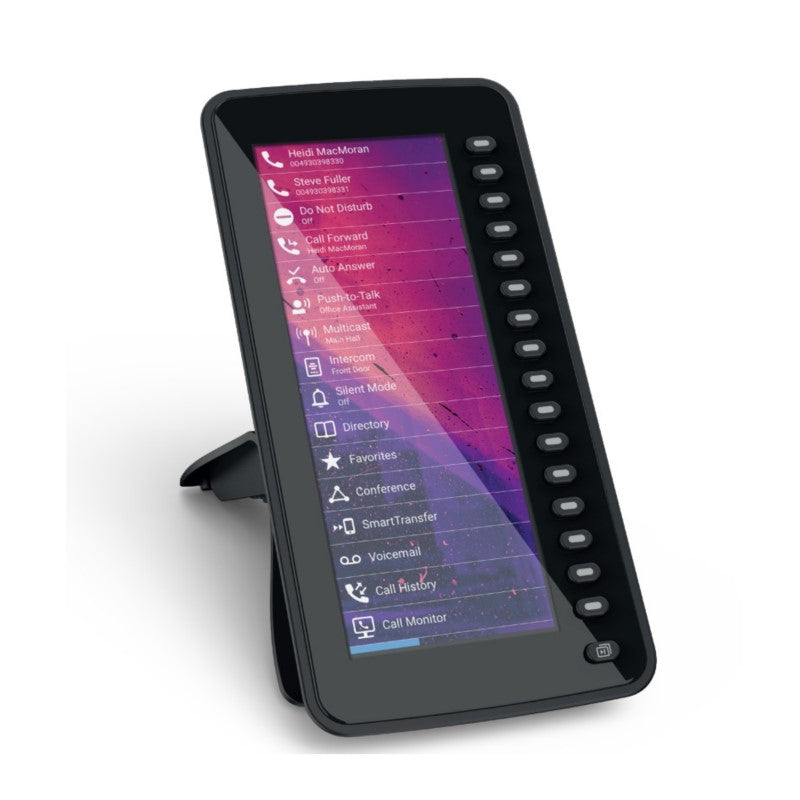
• The Snom D7C color expansion module is designed for users who need quick access to speed dials and busy lamp fields to stay productive throughout the day. It features 16 keys per page, totaling 48 programmable LED function keys. • Key features: • High-resolution color display (6.8”) • 16 highly programmable multicolor LED function keys • Fully configurable via host phone • Revised user interface • Theme and icon support • Custom background image support • Daisy chain up to 3 modules • Power supplied by phone via USB port • The expansion module is plug-and-play, easily connected via a USB cable to your D7xx series desk phone. • Note: The second D7C module will require an AC power supply if powering more than two expansion modules. • Dimensions: 10 x 10 x 5 in. Weight: 2 lb • Technical specifications: • Input voltage: 5Vdc (SELV) • Power supply: USB or 5Vdc power adapter (3), 10 Watts • USB 2.0 cable with angled type A plug • Environmental conditions: Ambient temperature 0°C to 35°C, non-operation -10°C to 45°C

About This Product

The Snom D7C is a color expansion module designed for users who need quick access to a large number of speed dials and busy lamp fields. It is ideal for receptionists, administrative assistants, or anyone in a busy office environment who handles a high volume of calls and needs to monitor the status of multiple extensions at a glance. The module pairs seamlessly with Snom D7xx series desk phones, such as the D785, D735, and D717, and can be daisy-chained up to three units for a total of 144 programmable keys. This makes it a practical upgrade for a GTA-based call center or a front desk in a Toronto law firm, where efficiency and quick access to contacts are critical.

A key tradeoff to consider is that while the first module is powered directly via USB from the host phone, a second or third module will require an external AC power supply. This adds a small amount of desk clutter and an extra power outlet requirement, which is worth planning for in a tight workspace. The module is plug-and-play, so setup is straightforward, but it is important to note that it is only compatible with the D7xx series phones, not with older Snom models or other brands. For a small office with only a few extensions, this module may be overkill, as the phone's built-in keys might suffice. Conversely, in a large deployment with dozens of extensions, the D7C provides a cost-effective way to expand without replacing the base phone.

In a Canadian business context, the D7C works well with most SIP-based VoIP services commonly used in the GTA, such as those from local providers like Rogers Business or Telus. However, ensure your phone's firmware is up to date to avoid any compatibility quirks with Canadian carrier settings. The module's color display and customizable backgrounds add a professional touch, but the real value lies in the busy lamp field functionality, which can significantly reduce the time spent searching for contacts or checking extension status.
Services We Provide
  • Professional Installation & Configuration
  • Ongoing Maintenance & Support
  • Troubleshooting & Repairs
  • System Upgrades & Updates



