
Snom D815 Desk Phone

Frequently Asked Questions

First, verify that the SIP credentials (username, password, and domain) are entered correctly in the phone's account settings. Also check that the phone is connected to the network and has obtained a valid IP address. If the issue persists, confirm that your network firewall or router is not blocking SIP traffic on the required ports (usually 5060 for UDP/TCP).
Ensure the phone is receiving power. If you are using PoE, confirm that the Ethernet cable is connected to a PoE-enabled switch port and that the cable is not damaged. If using an AC adapter, verify that it is the correct voltage and is firmly plugged into the phone and a working outlet. Try a different Ethernet cable or power source to isolate the issue.
Start by checking the volume settings on the phone and ensure the handset or headset is securely connected. If using a headset, verify that the headset type is correctly configured in the phone's audio settings. Also, test with a different handset or headset to rule out a hardware fault.
First, check that the phone is powered on and the backlight settings are not set to a very low level. If the display remains blank, try a power cycle by disconnecting the Ethernet cable and any power adapter for 30 seconds, then reconnecting. If the issue continues, the display may have a hardware defect, and you should contact support.
Navigate to the phone's Settings menu, select Network, then choose WLAN. Scan for available networks, select your SSID, and enter the Wi-Fi password. Ensure your wireless network uses WPA2 encryption for compatibility. Note that for best call quality, a wired Ethernet connection is recommended over Wi-Fi.
First, check your network connection: if using Wi-Fi, try switching to a wired Ethernet connection to rule out wireless interference. Also, verify that your internet connection is stable and has sufficient bandwidth. If the issue persists, try reducing the audio codec to G.711 in the phone's settings, as it uses less bandwidth.
Ensure the expansion module is properly connected to the phone via the dedicated port on the side of the D815. Power cycle both the phone and the expansion module by disconnecting them from power for 30 seconds. If it still isn't detected, check that the expansion module is compatible with the D815 and that the phone's firmware is up to date.
During an active call, press the Transfer key on the phone. Dial the number of the extension you want to transfer to. When you hear ringing or the recipient answers, press Transfer again to complete the transfer. For a blind transfer, press Transfer, dial the number, and then hang up without waiting for an answer.
First, check the key assignment in the phone's settings under Function Keys. Ensure each key is programmed with a valid function or line. If the LEDs still behave incorrectly, try a soft reset by navigating to Settings > Maintenance > Restart. If the issue persists, the keys may need to be recalibrated or replaced.
Yes, the Snom D815 is interoperable with all major IP PBX platforms and should work with Canadian carriers that provide SIP trunking. You will need to configure the SIP account settings provided by your carrier. For specific settings, consult your carrier's documentation or contact their support for guidance.
IP Phones

Snom D815 Desk Phone
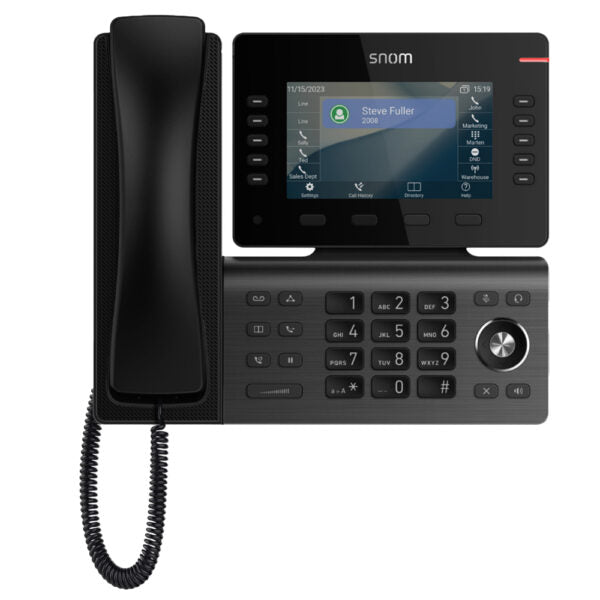
• Snom D815 Desk Phone • Features: • 5” (480×272) color LCD display • 10 configurable self-labeling multicolor LED keys • 2 USB ports for connectivity and storage • Elegant design with a compact footprint • WLAN capability for wireless connectivity • Electronic Hook Switch (EHS)1 support for wireless headsets • D8C Expansion Module1 ready for future upgrades • 2-port Gigabit Ethernet switch (RJ45) • 3-year standard warranty for reliable performance • Note: Power Supply is sold separately. • Additional Information: • Weight: 2.95 lb • Dimensions: 11 × 9 × 4 in • Phone Type: Desk • Technical Specifications: • Model: D815 • APN: 80-S212-00 • Box Contents: Includes phone unit, foot stand, handset with cord, Ethernet cable, and Quick Start Guide • Color: Gunmetal Black • Phone Features: • 12 SIP identities / accounts • XML browser for web-based applications • Call lists for dialed, received, missed calls • Local directory with 1000 entries • Multiple language support • DTMF in-band / out-of-band / SIP-INFO • Interoperable with all major IP PBX platforms • Speed dialing and URL dialing capabilities • Local dial plan and automatic redial on busy • Call completion (busy / unreachable) and caller identification • Call waiting, call blocking (deny list), auto answer, hold, music on hold, blind and attended transfer • User Interface: • Localization (language, time, dial tone) • Red LED for call indication / message waiting • 4 context sensitive keys • 10 programmable line / function keys with multicolor LEDs • Dedicated keys for Message, directory, call history, transfer, hold, conference • Audio keys with LED indication: Mute, speakerphone, headset • Volume key and 5-way navigation key • For a full list of specifications, please refer to the Product Data Sheet.

About This Product

The Snom D815 is a mid-range executive desk phone designed for professional office environments where a larger display and programmable keys improve workflow. Its 5-inch color screen and ten self-labeling multicolor LED keys make it suitable for users who handle multiple lines, such as receptionists, managers, or power users in a busy office. The phone pairs well with the optional D8C expansion module for even more line appearances, and its built-in WLAN and dual USB ports offer flexibility for wireless connectivity and peripheral storage. However, note that the power supply is sold separately, so you will need to either use Power over Ethernet (PoE) from a compatible switch or purchase an AC adapter. While the D815 supports twelve SIP accounts and works with all major IP PBX platforms, it may be overkill for a single-line home office user who would be better served by a simpler, lower-cost model. In a Canadian context, this phone is a solid choice for GTA office deployments where multi-line handling and headset integration via EHS are important, and it is compatible with most Canadian VoIP carriers.
Services We Provide
  • Professional Installation & Configuration
  • Ongoing Maintenance & Support
  • Troubleshooting & Repairs
  • System Upgrades & Updates



