
Snom D8C Color Expansion Module for D8 Series

Frequently Asked Questions

First, ensure the USB cable is securely connected to both the module and the phone. Try a different USB port on the phone if available. If the phone has a USB power setting, make sure it is enabled. If the issue persists, a Toronto-based VoIP support provider can usually resolve this remotely.
Check that the module is properly seated and the USB connection is secure. The LEDs are controlled by the phone's configuration, so verify that the BLF or function key settings are correctly programmed on the phone. A simple power cycle of the phone and module can often reset the LED behavior.
The module itself does not store configuration; all settings are managed by the host phone. Ensure the phone's configuration is saved to its internal memory or provisioned from a server. After a power cycle, the phone should reapply the settings to the module automatically. If not, check the phone's provisioning settings.
No, the D8C is designed exclusively for the Snom D8xx series phones. It will not work with other Snom models or phones from other manufacturers. If you need expansion keys for a different phone, you would need a compatible module for that specific model.
Access the phone's web interface or local menu, navigate to the function key or expansion module settings, and assign the desired extension or feature to a specific key on the D8C. The module's keys are numbered and will appear as additional programmable keys in the phone's configuration.
First, check the USB connection and try reseating the cable. If the issue continues, power cycle the phone and module. Flickering can sometimes be caused by electromagnetic interference from nearby devices—try moving the module away from other electronics. If the problem persists, the display may need service.
Yes, the D8C includes a power adapter that can be plugged into a standard AC outlet. This is useful if the phone's USB port cannot supply enough power or if you are using multiple modules. Simply connect the adapter to the module's power jack.
Ensure the keys are not physically stuck or obstructed. Check the phone's configuration to confirm that those keys have been assigned a function. If the keys are programmed but unresponsive, try a soft reboot of the phone. If only specific keys fail, there may be a hardware issue with the module.
The D8C does not have its own firmware; it relies on the host phone's firmware. Ensure your D8 series phone is running the latest firmware from Snom. The module's features and compatibility are updated through the phone's firmware updates.
After making changes to the key assignments on the phone, the display labels should update automatically. If they do not, try refreshing the phone's web interface or restarting the phone. In some cases, you may need to re-apply the configuration profile from the provisioning server.
Accessories

Snom D8C Color Expansion Module for D8 Series
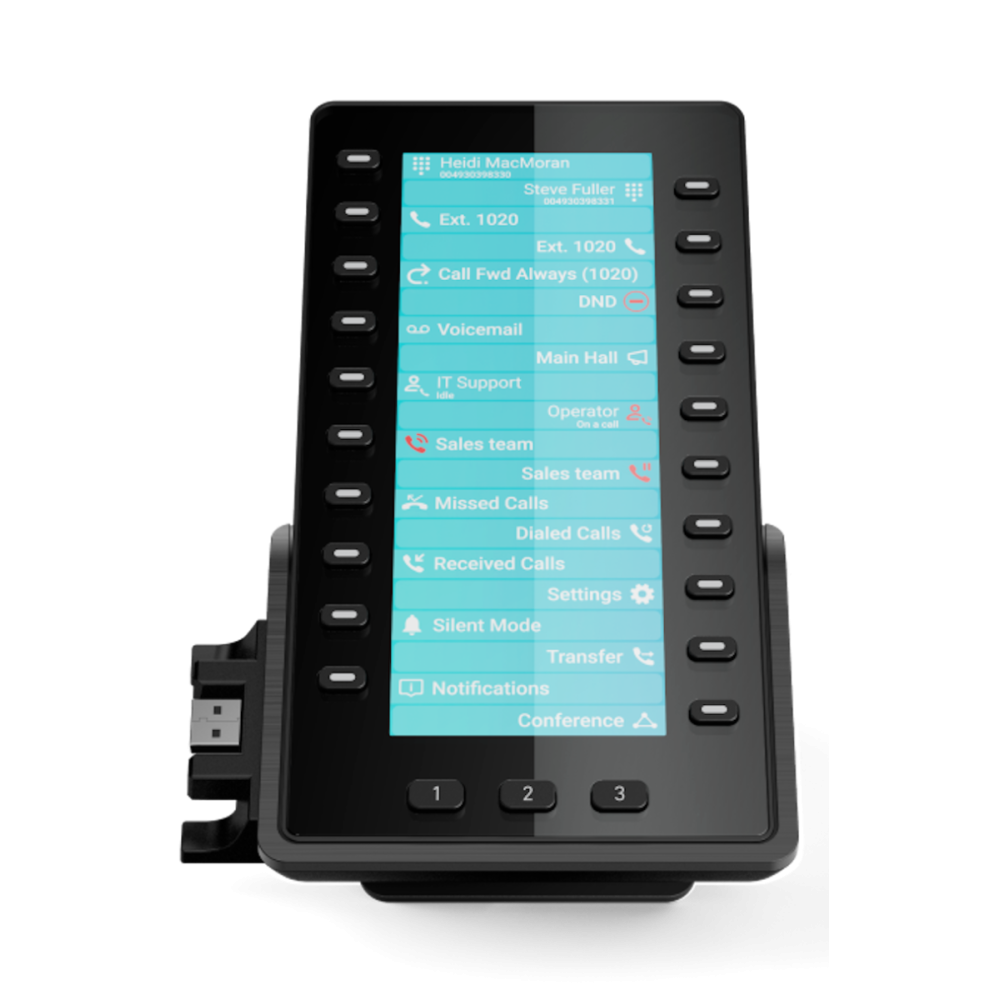
• The Snom D8C is an expansion module for the D8xx series, featuring a high-resolution colour display with a clear user interface. • Smart Display • Multipage display • Smart Label • Plug & Play • USB port Additional Information: • Weight: 400 g without foot stand, 455 g with foot stand • Dimensions: 210 mm × 140 mm × 43 mm (without foot stand), 155 mm × 118 mm × 170 mm (with foot stand) Technical Specifications: • Package Contents: Expansion module D8C, Footstand, Screws, Quick Installation Guide • Display and Indicators: TFT LCD, true color, backlit; 23 LED indicators; Function key status indication: 20 multicolor LEDs • Function Keys: 23 hard keys in total; 3 dedicated function keys: Page 1/2/3 • Interfaces and Connections: USB 2.0 type A port; Power options: USB powering, Power adapter (100 – 240 V AC) • User Interfaces and Setup: Plug & Play; Completely configurable via host phone; Customization: Theme and icon support, Custom background image support • Dimensions and Weight: Dimensions without foot stand, with foot stand; Weight without/with foot stand • Environmental Conditions: Operating ambient temperature (0 °C – +35 °C), Nonoperating (storage) temperature (-10 °C – +45 °C) • Humidity: 5 % – 95 %

About This Product

The Snom D8C is a color expansion module designed specifically for the Snom D8xx series of business phones. It is ideal for receptionists, executives, or anyone who needs to monitor and manage a high volume of calls or extensions from a single desk phone. The module adds 23 programmable keys with a high-resolution color display that can show call status, BLF (busy lamp field) information, or custom labels, making it a practical upgrade for busy office environments like those in the GTA where efficient call handling is critical.

This module connects to the host phone via USB and is recognized automatically, requiring no separate power source if the phone's USB port can supply enough power—though a power adapter is included for setups where the phone cannot. It pairs seamlessly with any D8 series phone, such as the D812 or D862, and can be daisy-chained with additional modules for even more keys. The tradeoff is that it is only compatible with the D8 series, so it cannot be used with other Snom phone lines or third-party devices.

For a small office with only a few extensions, this module may be overkill—the built-in keys on the phone itself might suffice. Conversely, in a large call center or a busy front desk where dozens of extensions need to be monitored, a single module may not provide enough keys, and you might need multiple units. The module's operating temperature range (0°C to 35°C) means it is suited for indoor office use only, not for unconditioned spaces.
Services We Provide
  • Professional Installation & Configuration
  • Ongoing Maintenance & Support
  • Troubleshooting & Repairs
  • System Upgrades & Updates



