
Snom EHS Wireless Headset Adapter

Frequently Asked Questions

First, confirm that the headset is on the compatibility list for both the adapter and your Snom phone model. Then, make sure the adapter cable is fully seated in the correct port on the phone—usually the dedicated EHS or headset port, not a general USB or AUX jack. On the headset base, verify that the EHS mode is enabled (sometimes labeled as "Electronic Hookswitch" or a similar setting). If the issue persists, a Toronto-based VoIP support provider can usually resolve this remotely.
This often points to a protocol mismatch. Check the phone's web interface under the headset or accessories settings and ensure the correct EHS protocol (e.g., DHSG or a vendor-specific option) is selected for your headset brand. Also, try a quick power cycle of both the headset base and the Snom phone—unplug the phone's power for 10 seconds, then plug it back in. This can reset the communication without losing configuration.
No special drivers are needed on your computer. The adapter relies on the firmware already present in your Snom phone. However, it's a good idea to make sure your phone's firmware is up to date, as newer versions often improve EHS compatibility. You can check and update the phone's firmware through its web interface, but never downgrade unless directed by support—doing so can break other functionality.
The adapter uses a dedicated EHS cable connection, not USB. If your Plantronics headset base supports an EHS or DHSG interface (usually an RJ-style or specific jack), it should work. Check the base for a port labeled "EHS" or "Hookswitch." If the headset only connects via USB to a computer, this adapter won't bridge that—it's designed for desk phone integration.
Start with the physical connections: reseat the adapter cable at both the phone and the headset base. Sometimes the plug can work loose from desk movement. Next, verify the headset is still paired and charged. If everything appears connected, reboot the Snom phone by unplugging its power briefly. This safe restart often clears temporary glitches in the EHS communication.
Compatibility depends on the phone model's support for EHS. The Snom D785 does have an EHS port, so the adapter should work, but always cross-check the official compatibility list for your specific headset brand and model. The adapter supports vendor-specific protocols and the DHSG standard, which covers most professional wireless headsets from Jabra, Plantronics, and Sennheiser when used with compatible Snom phones.
The adapter itself doesn't process audio—it only handles call control signals. Audio is transmitted directly between the headset base and the phone via the headset's own connection. Check that the headset's audio cable (if separate from the EHS cable) is fully plugged in, and verify the headset's balance or mono/stereo settings. A simple power cycle of the headset base often resolves one-sided audio.
No, the adapter is designed for a single headset connection. It provides one EHS interface to one headset base. For training scenarios, you would need a headset base that supports multiple headsets natively, but call control would still only work from the primary headset paired to the adapter.
A slight warmth is normal because the adapter draws power from the phone's EHS port. However, it shouldn't become hot to the touch. If it's uncomfortably warm, double-check that the adapter is not covered by papers or other objects that could trap heat. Also confirm that you're using the original cable and that the phone's port isn't supplying excessive power—if the phone is faulty, the adapter could overheat. In such cases, contact support before continuing use.
Accessories

Snom EHS Wireless Headset Adapter
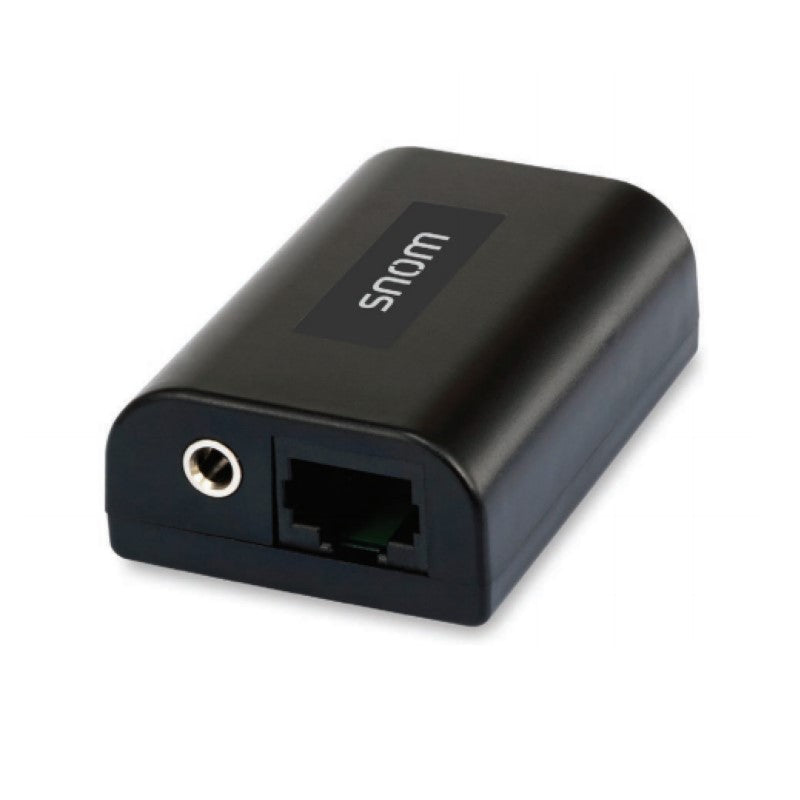
• The SNOM EHS Wireless Headset Adapter enables users to make and receive calls with complete freedom of movement, thanks to its integration with Snom Series desk phones. • This adapter creates a bridge between professional VoIP telephony and professional wireless headsets from leading brands such as Jabra, Plantronics, and Sennheiser. • Key features include: • Signaling of ringing tone on the headset • Acceptance and termination of calls on the headset itself • Perfect integration of firmware for seamless operation • Vendor-specific EHS protocols and DHSG Standard for compatibility • No additional power supply required • Easy to connect and use • Weight: 0.5 lb • Dimensions: 6 × 4 × 2 in • Color: Black • APN: 89-S015-00 • Product dimensions (WxDxH): 2.34″ x 1.52″ x 0.77″ • Giftbox dimensions (WxDxH): 4.92″ x 3.74″ x 1.38″ • Master pack dimensions (WxDxH): 16.93″ x 12.60″ x 13.78″ • For a full list of specifications, please refer to the product datasheet available for download.

About This Product

The Snom EHS Wireless Headset Adapter is a small but purposeful accessory for anyone using a Snom desk phone who wants to move around freely during calls. It bridges the gap between the phone and a professional wireless headset from brands like Jabra, Plantronics, or Sennheiser, so you can answer or end a call directly from the headset without touching the phone. For a busy office, a reception area, or a home workspace where multitasking is common, this adapter removes the physical tether and keeps the phone's core functions accessible at a distance.

What makes it practical is that it draws power from the phone itself—no extra power brick to manage. It supports both vendor-specific EHS protocols and the broader DHSG standard, which means it can integrate cleanly with many headset models. That said, compatibility is not universal: you need to confirm that both your specific Snom phone model and your headset are on the supported list. It's a straightforward add-on, but it does add one more small box to the desk setup.

This adapter is ideal for a single-line user who takes a high volume of calls and values hands-free mobility. It fits naturally into Canadian office environments where Snom phones are deployed—think professional services, medical offices, or mid-sized businesses in the GTA that want reliable call control without being chained to a desk. If your workflow already relies on a corded headset or the handset, the upgrade is noticeable.

It is not a fit for every scenario. If you use a softphone on a computer more than the desk phone, or if you need advanced headset features like multi-call handling from the headset itself, this adapter won't add that. It's also overkill for a phone that rarely rings. On the other hand, if you need to integrate headsets with a non-Snom phone system, this isn't the right tool—it's purpose-built for the Snom ecosystem.
Services We Provide
  • Professional Installation & Configuration
  • Ongoing Maintenance & Support
  • Troubleshooting & Repairs
  • System Upgrades & Updates



