
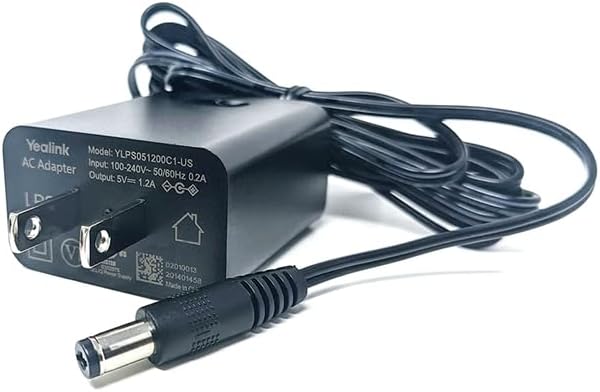
Yealink 5V/1.2A Power Supply for T2/T4 Series PS5V1200US
Frequently Asked Questions
First, confirm the adapter’s barrel connector is fully seated in the phone’s power port; it can feel secure when it isn’t. Next, test the adapter with another compatible Yealink phone if one is available to isolate whether the issue follows the adapter or stays with the phone. If the phone still won’t start, the adapter may be faulty and a replacement would be the next step.
Yes, you can use this adapter even if your phone normally receives power over Ethernet. Simply unplug the network cable from the LAN port, connect the adapter to the phone’s DC input, and plug it into a standard outlet. The phone will run on AC power, bypassing the PoE entirely, which is useful for off-network configuration.
This can happen if the power adapter is not delivering a stable 1.2A current. Try a different known-working outlet to rule out a circuit issue, and ensure the adapter is not plugged into a power bar that is overloaded. If the problem persists, the adapter may have a fault and should be swapped with a new unit.
This specific 5V, 1.2A adapter is designed for the listed models like the T41S, T42S, T43U, and others. The older T28P and T38G require a different power specification, so using this adapter with them would be incorrect and could prevent proper operation.
A failing power supply can cause erratic network behavior if the phone’s network interface is underpowered. First, check if the phone’s Ethernet link lights are active and stable. If the link is unstable and you are not using PoE, the adapter might be delivering insufficient current, causing the phone’s internal components to malfunction.
It’s normal for a power adapter to generate some warmth during operation. However, if it becomes too hot to hold, unplug it immediately. Ensure it’s in a ventilated spot and not covered by papers or buried under desk clutter, as overheating can lead to failure or a safety hazard.
Yes, this 5V, 1.2A adapter is the correct specification for the Yealink T53W. It will function as a direct replacement for the original power supply.
Yes, this model is designed for use with standard North American 120V AC power, which is typical in Canadian office environments. Its compact design won't block other outlets, which is helpful for power bars in a typical Toronto office setup.
Accessories
Yealink 5V/1.2A Power Supply for T2/T4 Series PS5V1200US
5V, 1.2A AC power supply for the T27G, T41S, T43U, T44U, T53, T53W, T55A and T42S. Key Features: • Compatible with the specified Yealink models • Adjustable power output to suit different device requirements • Compact design: 8 × 8 × 4 in dimensions • Lightweight: 0.2 lbs weight Additional Information: • Brand: Yealink • Amperage: 1.2A
About This Product
This is a genuine Yealink power adapter designed to keep a wide range of T2 and T4 series desk phones running smoothly. For any office that has standardized on these models, having a spare or replacement on hand avoids the downtime of a lost or damaged power supply. It’s a small, lightweight unit that fits neatly into a power bar without crowding adjacent outlets, making it practical for dense desktop setups or reception areas where space is at a premium.
If your deployment uses Power over Ethernet, you might wonder why you’d ever need this supply. It becomes essential for desks where PoE isn’t available, or when a phone is being configured at a workstation away from a PoE switch. It also serves as a reliable backup during network maintenance or PoE switch failures, letting a critical phone stay operational on a standard outlet.
For a Toronto small business or a branch office in the GTA, keeping one of these in the IT closet is a low-cost insurance policy. It’s not a device that needs upgrading or replacing with a new model; it simply works. The only real trade-off to consider is that it’s useless for phones outside the listed compatible models, so double-check your handset’s label before ordering.
If your deployment uses Power over Ethernet, you might wonder why you’d ever need this supply. It becomes essential for desks where PoE isn’t available, or when a phone is being configured at a workstation away from a PoE switch. It also serves as a reliable backup during network maintenance or PoE switch failures, letting a critical phone stay operational on a standard outlet.
For a Toronto small business or a branch office in the GTA, keeping one of these in the IT closet is a low-cost insurance policy. It’s not a device that needs upgrading or replacing with a new model; it simply works. The only real trade-off to consider is that it’s useless for phones outside the listed compatible models, so double-check your handset’s label before ordering.
Services We Provide
- Professional Installation & Configuration
- Ongoing Maintenance & Support
- Troubleshooting & Repairs
- System Upgrades & Updates



