
Yealink BH70 Dual UC USB-C Bluetooth Headset

Frequently Asked Questions

First, make sure the dongle is plugged directly into a USB-A or USB-C port (avoid hubs if possible). Check that the headset is charged (press the power button briefly — you should see a solid or blinking light). If it still won't connect, try inserting the dongle into a different port and restarting your computer. If the issue continues, a simple power cycle of both headset and computer often resolves the pairing handshake.
Press and hold the Bluetooth button on the headset until the LED flashes red and blue to enter pairing mode. On your phone, find "Yealink BH70" in Bluetooth settings and tap to pair. The headset supports two simultaneous connections, so your PC call and mobile notifications can coexist. If the PC connection drops, check that the phone pairing was successful and the headset isn't trying to connect to a third device.
The three-mic setup actively filters noise, but it works best when the headset is worn correctly with the microphone boom close to your mouth. Make sure the headband is adjusted so the earcups seal around your ears, and avoid having a fan or air conditioner blowing directly at the mics. In very noisy environments, you can also mute yourself when not speaking.
The busy light is controlled by the headset's firmware and typically activates when a call is active on any connected device. First check that the busy light feature is enabled in the Yealink USB Connect software (available for Windows and Mac). Also confirm the headset is on and the call is routed through it — if you're using computer audio via the dongle, the software must be running. If the light still doesn't come on, updating the headset firmware often resolves the issue.
This usually points to interference or battery-saving settings. Keep the headset within 10 metres of the connected device, and away from large metal objects or competing wireless devices. On your phone or computer, disable any Bluetooth power-saving mode for this device (check system settings). Also ensure the headset battery isn't low — a rapid double-blink or audio tone indicates low battery. If disconnections persist, remove the headset from your device's Bluetooth list and pair it fresh.
The BH70 is designed primarily for computers and smartphones using Bluetooth or the included BT51 dongle. It is not a DECT headset and does not have a wired connection to a desk phone's handset port. However, if your desk phone supports Bluetooth (many modern VoIP phones do) or has a USB port that accepts a dongle, you can pair it that way. For older desk phones without Bluetooth, this headset won't connect directly.
Audio dropouts are often caused by signal interference or low battery. First, verify the headset is charged (fully charge it and test). Then move closer to the connected device and ensure no metal barriers are in between. If using the dongle, try a different USB port and avoid USB 3.0 ports that can generate interference. Restarting the softphone client on your computer can also help if the issue is app-related.
Download and install the Yealink USB Connect software from the Yealink support site. Connect the headset to your computer using the USB cable (not just Bluetooth). Open USB Connect, go to the device tab, and if a firmware update is available you'll see an option to upgrade. Let the process complete without disconnecting. Keeping firmware current often resolves pairing or audio quirks.
Use the included USB-C cable and a 5V/1A or higher USB power source (a standard computer USB port or a wall charger). Check for debris in the charging port. If the headset is fully discharged, it may take a few minutes before the charge indicator lights up. If it still won't charge after trying a different cable and charger, contact your VoIP support provider — the battery may need service.
Headsets

Yealink BH70 Dual UC USB-C Bluetooth Headset
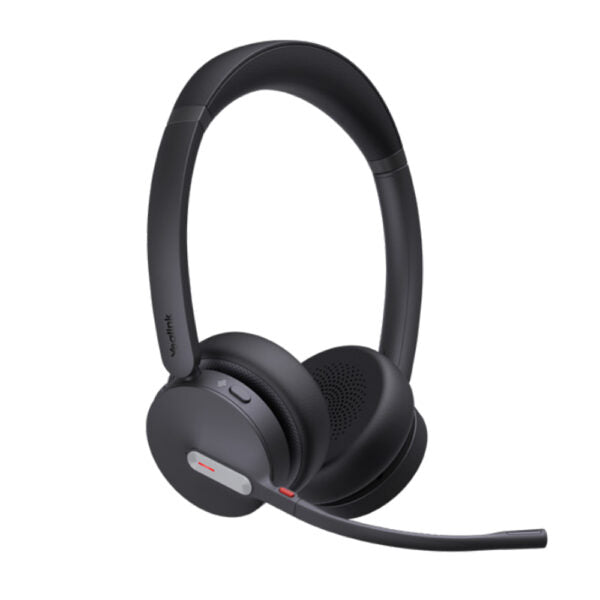
• Enhance your productivity and stay competitive with the Yealink BH70 Bluetooth wireless headset, designed for office, home, or on-the-go use. Equipped with advanced 2nd generation microphone noise cancellation technology, three AI-powered microphones intelligently reduce background noise for a seamless call experience. The ergonomic design provides exceptional comfort for extended wear throughout the day. • Key features: • 3-Mic Noise Cancellation • All-day-wearing comfort • 35mm custom speakers with brilliant audio quality • Up to 35 hours wireless battery life • Engineered for minimizing wind noise • Lightweight design • Enhanced Busy Light • Compatible with mainstream UC platforms • Connectivity: Bluetooth Dongle BT51-C • Additional Information: • Weight: 0.74lb • Dimensions: 7 × 8.15 × 2.1 in • Headset Type: Bluetooth, Stereo, UC Certified, USB • Technical Specifications: • Model: BH70 Dual UC USB-C • Part number: 1208668 • Box Contents: • BH70 Dual Headset • Drawstring Bag • TypeC to A 2.0 Cable • Quick Start Guide • BT51 Dongle • Color: Black • Audio: • Microphone: 3 Mics MEMS • Microphone sensitivity: -14 dBFS/Pa • Microphone frequency range: 100Hz-8kHz • Acoustic Shield: Yes • Active Noise Cancellation: No • Speaker: Ø 35mm • Speaker sensitivity: 117 dB @1 mW-1kHz • Speaker max input power: 30 mW • Speaker frequency response: 20Hz-20kHz • Battery: • Music time: Up to 43 hrs • Talk time: Up to 35 hrs (with busylight off) / Up to 28 hrs (with busylight on) • Charging time: Up to 90min • Standby time: Up to 22 days • Connectivity: • Bluetooth version: Bluetooth 5.2 • Wireless range: 50m/164ft • Bluetooth® Dongle: BT51 dongle with USB-A or USB-C variant • Simultaneous Bluetooth connections: 2 • Multiple device pairing: Up to 8 devices

About This Product

The Yealink BH70 is a smart choice for professionals who spend hours on calls in open-plan offices, home workspaces, or while moving between desks. It brings together Bluetooth 5.2 reliability and a USB-C dongle so you can quickly pair it with a laptop or desktop without wrestling with Bluetooth settings on meeting-heavy days. The three-microphone array focuses on your voice and cuts out background chatter and hum, which makes a real difference in busy environments — though it's microphone noise reduction, not active noise cancellation for your ears, so you'll still hear the office around you. It pairs well with any UC platform (Teams, Zoom, RingCentral, etc.) and can connect to two devices at once, so you can hop from a PC call to a mobile conversation without re-pairing. The all-day comfort and long battery life mean you won't need to charge midday, but if you need full ear isolation or very loud environments, this model leans toward call clarity over immersive silence. For most Toronto-area office setups — whether at a downtown high‑rise or a home office in the suburbs — the BH70 offers a solid balance of voice quality, ease of use, and multi‑device flexibility without the complexity of a full desk phone system. It is overkill for someone who only takes a few calls a week, but for daily heavy users it hits a sweet spot.
Services We Provide
  • Professional Installation & Configuration
  • Ongoing Maintenance & Support
  • Troubleshooting & Repairs
  • System Upgrades & Updates



