
Yealink BH70 Mono UC USB-C Bluetooth Headset

Frequently Asked Questions

Make sure the headset is powered on and within range of the BT51 dongle—about a metre away is fine. Unplug the dongle, wait ten seconds, and reconnect it to a different USB port directly on the computer, not through a hub. Also verify that the dongle’s LED is solid or slowly blinking, indicating it’s ready to pair.
The microphone boom should be positioned about two finger-widths from the corner of your mouth, not tucked near your cheek. Ensure nothing is covering the tiny MEMS mic ports on the back and tip of the boom; a case or sticker could muffle them. Test with a local recording app to confirm the mic picks up your voice clearly before the next call.
The busy light, when enabled, reduces talk time to around 28 hours. If you do not need the visual busy indicator, open the Yealink USB Connect software and disable it. Also, confirm that the headset is fully charged until the LED turns a steady green, and that you’re not accidentally leaving it connected to two active devices simultaneously, which can drain the battery faster.
Wireless interference is the usual culprit. Move away from active microwave ovens, cordless phone bases, or busy Wi-Fi routers. Keep the BT51 dongle at least a metre from USB 3.0 ports or hubs, which can emit radio noise. If the crackling stops when you move closer to the computer, the wireless path was the cause.
The busy light feature may need to be turned on inside the Yealink USB Connect desktop application. Install or open the app, navigate to the BH70 settings, and look for a ‘Busy Light’ toggle. Once enabled, it should activate whenever the headset detects an active call on the computer connected via the dongle.
Range and obstacles are often to blame. Try to stay within 30 metres of the dongle in a typical office with walls; the 50-metre spec is in open air. Also, check that the dongle’s firmware is up to date through the Yealink USB Connect tool. If the issue persists, a Toronto-based VoIP support provider can usually resolve this remotely.
Yes. The headset supports dual simultaneous connections. First, pair it with the BT51 dongle for your computer, then turn on Bluetooth on your phone and add the BH70 as a new Bluetooth device. When a call comes in on either device, the headset will switch to the active source automatically.
While the headset is powered on, briefly press the multi-function button. A voice prompt will announce the remaining battery percentage. Alternatively, install the Yealink USB Connect app on your computer; it shows a precise battery gauge on the home screen when the dongle is connected.
First, plug the headset into a charger for at least 20 minutes to rule out a deep-discharge state. Then perform a soft reset by simply powering it off and on again using the sliding switch. Clean around the buttons with a dry cloth to make sure no debris is causing a stuck press.
If your Yealink desk phone supports Bluetooth (many T4S and T5 series models do), you can pair the BH70 as a standard Bluetooth headset without using the BT51 dongle. Just put the headset into pairing mode and search for it from the phone’s Bluetooth menu. Audio and call control will then route through the headset.
Headsets

Yealink BH70 Mono UC USB-C Bluetooth Headset
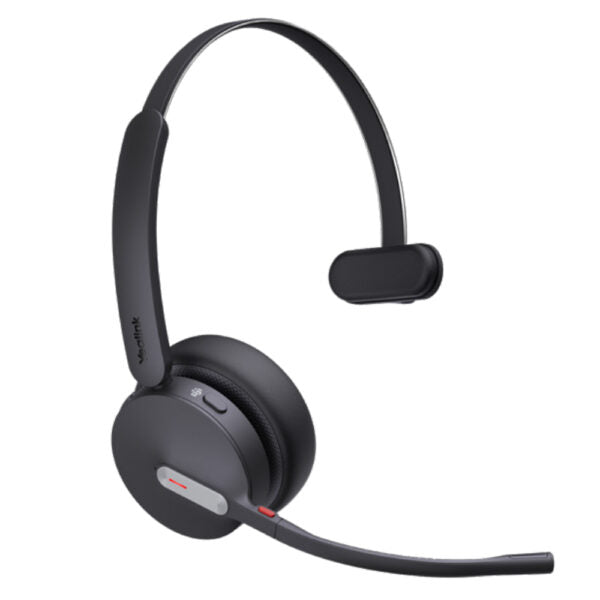
*Enhance production efficiency and maintain absolute competitiveness with the Yealink BH70 Bluetooth wireless headset, designed for various scenarios including office, home, or on-the-go use. • Equipped with Yealink’s advanced 2nd generation microphone noise cancellation technology, three AI-powered microphones intelligently reduce background noise to ensure a seamless call experience. • Designed ergonomically based on extensive user studies, the BH70 provides exceptional comfort for extended wear throughout the day with impeccable stereo playback sound quality. Key Features: • 3-Mic Noise Cancellation • All-day-wearing comfort • Brilliant audio quality from 35mm custom speakers • Up to 35 hours wireless battery life • Engineered for minimizing wind noise • Lightweight design • Enhanced Busy Light • Compatible with mainstream UC platforms • Connectivity: Bluetooth Dongle BT51-C Additional Information: • Weight: 0.62lb • Dimensions: 7 × 8.15 × 2.1 in • Headset Type: Bluetooth, Mono, UC Certified, USB Technical Specifications: • Model: BH70 Mono UC USB-C • Part number: 1208670 • Box Contents: + BH70 Mono Headset + Drawstring Bag + TypeC to A 2.0 Cable + Quick Start Guide + BT51 Dongle • Color: Black Audio: • Microphone: 3 Mics MEMS • Microphone sensitivity: -14 dBFS/Pa • Microphone frequency range: 100Hz-8kHz • Acoustic Shield: Yes • Active Noise Cancellation: No • Speaker: Ø 35mm • Speaker sensitivity: 117 dB @1 mW-1kHz Battery: • Music time: Up to 43 hrs • Talk time: Up to 35 hrs (with busylight off) / Up to 28 hrs (with busylight on) • Charging time: Up to 90min • Standby time: Up to 22 days Connectivity: • Bluetooth version: Bluetooth 5.2 • Wireless range: 50m/164ft • Bluetooth® Dongle: BT51 dongle with USB-A or USB-C variant • Simultaneous Bluetooth connections: 2 • Multiple device pairing: Up to 8 devices

About This Product

The Yealink BH70 Mono is built squarely for the professional who spends working hours on calls and values all-day comfort above everything else. Its single earcup design intentionally leaves one ear free, so you stay aware of colleagues in an open office or doorbell at home without yanking off the headset. The included BT51 dongle does the heavy lifting for PC connectivity, delivering a stable, low-latency link that often outclasses a laptop’s built-in Bluetooth. In a typical Canadian hybrid-work setup—three days in a downtown Toronto tower, two days remote—the headset transitions smoothly between softphone apps on the desk and a paired smartphone on the go.

Microphone noise cancellation is the headset’s signature strength. Three MEMS mics and Yealink’s Acoustic Shield technology work together to suppress the hum of HVAC systems, keyboard clatter, and even wind outdoors, so the person on the other end hears you, not your environment. However, there is no active noise cancellation for the earpiece; the speaker delivers crisp, clear voice, but if you regularly work from a bustling café or a noisy home with children, background sound will still reach your open ear. This is a conscious trade-off—awareness versus isolation.

Pairing the BH70 with a Yealink desk phone that supports Bluetooth gives you a unified accessory for both your PC-based UC platform and traditional handset calls, reducing desk clutter. It’s also a natural fit for contact centers and customer success teams who need a lightweight headset that can last an entire shift. The 35-hour talk time (with the busy light off) means you can forget about charging during a typical 9-to-5, but enabling the red busy light trims that noticeably; plan your charging routine accordingly.

For a solo entrepreneur who only occasionally jumps on a Zoom call, this headset is probably more than you need—a simpler wired earcup would do. Conversely, if your work demands immersive stereo sound for media editing or you absolutely need to block out external din, you’d be better served by an ANC stereo model. In the middle ground of voice-first, all-day calling, the BH70 Mono hits a sweet spot that many Canadian businesses will appreciate.
Services We Provide
  • Professional Installation & Configuration
  • Ongoing Maintenance & Support
  • Troubleshooting & Repairs
  • System Upgrades & Updates



