
Yealink BH74 with Stand Teams USB-C/A – 1208682

Frequently Asked Questions

First, ensure the headset is charged and powered on. If you're using the included BT51C dongle, plug it directly into a USB-A or USB-C port on your computer. If the headset still doesn't connect, try removing the device from your computer's Bluetooth list and re-pairing it by pressing and holding the call control button until the LED flashes red and blue. For Teams use, make sure the headset is set as the default communication device in your system sound settings.
Check that the microphone boom is positioned correctly—it should be about a finger's width from the corner of your mouth. Also, ensure the mute button is not activated. If the issue persists, verify that the headset's firmware is up to date via the Yealink Device Manager or your UC platform's settings. Background noise cancellation can sometimes affect voice pickup if the mic is blocked or too far away.
Put the headset in pairing mode by pressing and holding the call control button for about 5 seconds until the LED flashes red and blue. On your phone, go to Bluetooth settings and select "Yealink BH74" from the available devices. The headset can remember up to eight paired devices and connect to two simultaneously, so you can switch between your phone and computer easily.
First, make sure the dongle is plugged directly into your computer's USB port, not through a hub or extender, which can cause interference. Also, check that the headset is within 50 meters (160 feet) of the dongle and that there are no large metal objects or walls between them. If the problem continues, try a different USB port or update the dongle's firmware.
The BH74 is designed primarily for computer and mobile device use via Bluetooth or the included USB dongle. It does not have a traditional RJ9 or DECT connection for desk phones. If you need to use it with a desk phone, you would need a separate Bluetooth adapter compatible with your phone model. For most modern VoIP desk phones with Bluetooth, you can pair it directly, but call control features may be limited.
The busy light is a Teams-specific feature that requires the headset to be connected via the BT51C dongle and the Teams desktop app to be running. If you are using standard Bluetooth or a different UC platform, the busy light may not activate. Check that your Teams app is up to date and that the headset is selected as the communication device in Teams settings.
First, check the Bluetooth signal strength—move closer to the connected device and away from other wireless devices like Wi-Fi routers or microwaves. If using the dongle, try a different USB port or ensure the dongle is not obstructed. Also, make sure the headset's firmware is updated, as audio issues are sometimes resolved in newer releases.
Firmware updates are typically done through the Yealink Device Manager software, which you can download from Yealink's support site. Connect the headset to your computer via the USB cable or dongle, open the software, and follow the on-screen instructions to check for and install updates. Keeping firmware current ensures optimal performance and compatibility with UC platforms.
The BH74 offers up to 65 hours of music time with ANC off. To maximize battery life, turn off active noise cancellation when not needed, and disable the busy light if you don't use it. Also, make sure the headset is fully charged before use and store it on the charging stand when not in use to keep it topped up.
Yes, the BH74 supports simultaneous connections to two Bluetooth devices, such as your computer and phone. You can also pair up to eight devices total and switch between them. To connect a second device, put the headset in pairing mode again and select it from the new device's Bluetooth list. The headset will remember all paired devices.
Headsets

Yealink BH74 with Stand Teams USB-C/A – 1208682
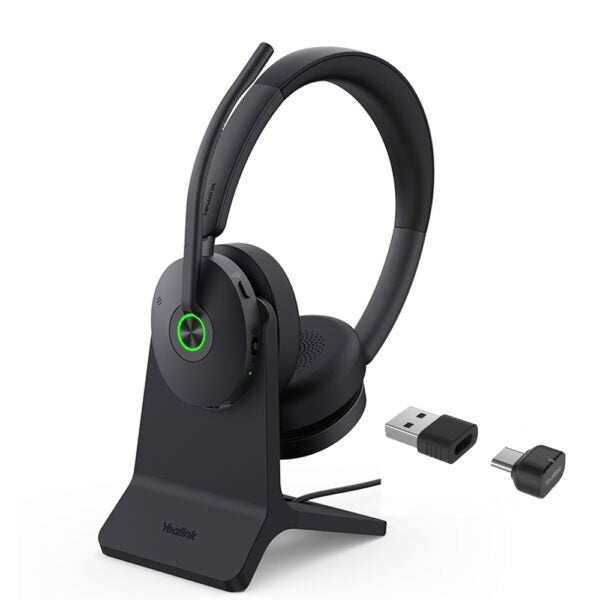
• Enhance your production efficiency and maintain competitiveness with the Yealink BH74 Bluetooth wireless headset, suitable for office, home, or on-the-go use. • Equipped with advanced second-generation microphone noise-canceling technology and ANC active noise cancellation, ensuring clear and immersive phone conferences and music enjoyment. • Designed ergonomically based on extensive user studies, providing exceptional comfort for extended wear throughout the day. • Boasting impeccable stereo playback sound quality, you can indulge in an unparalleled audio experience. • Key features include: • Acoustic shield technology 3.0 • All-day-wearing comfort • Dual-sided busy light • Hybrid ANC noise reduction • Ultra-long battery life • Compatible with mainstream UC platforms • Teams Certified Weight: 1.72 lbs Dimensions: 8.82 × 7.99 × 3.31 in Headset Type: Bluetooth, Stereo, Teams Certified, USB • Technical Specifications: • Model: BH74 with Stand Teams USB-C/A • Part number: 1208682 • Package Contents: • BH74 with Stand Teams USB-C/A Headset • Carrying Case • USB Charging Cable • Quick Start Guide • BT51C Dongle • USB C/A adapter • Connectivity: • Bluetooth version: Bluetooth 5.3 • Wireless range: 50 m/160 ft • Connect to: USB C/A adapter with BT51C dongle, USB cable, Bluetooth • Simultaneous Bluetooth connections: 2 • Multiple device pairing: Up to 8 devices • Audio: • Mic number: 6 • Acoustic Shield: Yes • Active Noise Cancellation: Yes • Speaker: Ø 30mm • Hearing Protection: • Peak Block Protection (EN50332) • Australian G616 Protection (AU G616) • Daily Noise Exposure Protection • Battery: • Music time: Up to 65 hrs (ANC off) • Talk time: Up to 32 hrs (ANC & Busy light off) • Charging time: Up to 90min • Standby time: Up to 20 days • For a full list of specifications, please refer to the product datasheet.

About This Product

The Yealink BH74 is a premium wireless headset designed for professionals who need to stay productive across the office, home, or on the move. It fits naturally into a unified communications environment, especially for users on Microsoft Teams, as it is Teams Certified and includes a dedicated USB dongle and adapter for easy connection to a laptop or desktop. The headset's advanced noise-canceling microphones and hybrid active noise cancellation make it a strong choice for open-plan offices or noisy home spaces, where background noise can disrupt calls. It pairs well with a softphone on a computer or with a mobile device, and its dual Bluetooth connectivity allows you to switch between two devices without re-pairing. The included charging stand is a practical addition for daily desktop use, keeping the headset charged and within easy reach.

One practical tradeoff to consider is that while the BH74 offers excellent wireless range and battery life, the full feature set—including the busy light and ANC—is best realized when used with the included BT51C dongle rather than standard Bluetooth, which may limit some functionality on certain devices. For a small or home office, this headset is likely more than adequate, but for very large call centers or environments requiring integration with a desk phone via a wired connection, it may be overkill or underpowered. The BH74 is not a replacement for a dedicated desk phone headset with a DECT base; it is optimized for softphone and mobile use. In a Canadian business context, this headset is well-suited for GTA office deployments where Teams is the primary collaboration platform, and its compatibility with mainstream UC platforms ensures it works with most Canadian-hosted VoIP services.

The BH74 is a solid mid-to-premium option for the individual professional who values call clarity and comfort over a full day of meetings. It is not designed for heavy-duty, multi-line call center work, but for knowledge workers, managers, and remote employees, it provides a reliable, high-quality audio experience. The headset's ergonomic design and all-day-wearing comfort mean it can be worn for consecutive calls without discomfort, which is a key consideration for anyone spending hours in virtual meetings.
Services We Provide
  • Professional Installation & Configuration
  • Ongoing Maintenance & Support
  • Troubleshooting & Repairs
  • System Upgrades & Updates



