
Yealink BH74 with Stand UC USB-C/A – 1208684
Frequently Asked Questions
Yealink BH74 with Stand UC USB-C/A – 1208684
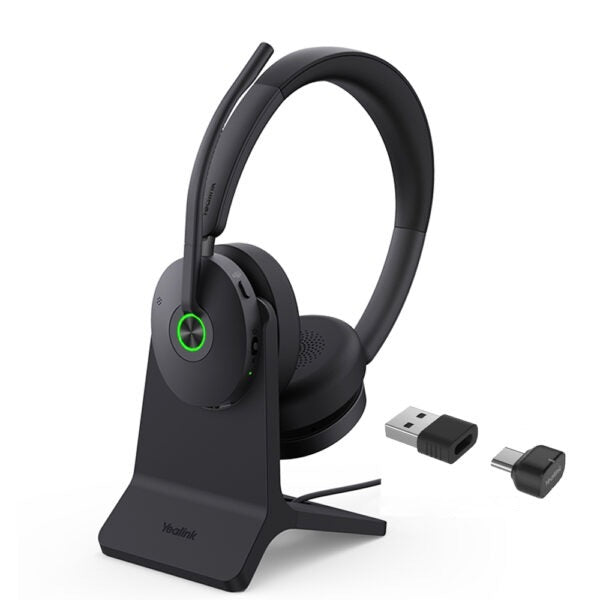
• Enhance production efficiency and maintain absolute competitiveness with the Yealink BH74 Bluetooth wireless headset, suitable for various scenarios including office, home, or on-the-go use. • Equipped with Yealink's advanced second-generation microphone noise-canceling technology and ANC active noise cancellation ensure clear and immersive phone conferences and music enjoyment. • Designed ergonomically based on extensive user studies, providing exceptional comfort for extended wear throughout the day. • Boasting a long-lasting battery life and effortless usability, the BH74 serves as your best communication and collaboration companion. Key Features: • Acoustic shield technology 3.0 • All-day-wearing comfort • Dual-sided Busy light • Hybrid ANC noise reduction • Ultra-long battery life • Compatible with mainstream UC platforms • UC Certified Additional Information: • Weight: 1.72 lbs • Dimensions: 8.82 × 7.99 × 3.31 in • Headset Type: Bluetooth, Stereo, Teams Certified, USB Technical Specifications: • GENERAL INFO: • Model: BH74 with Stand UC USB-C/A • Part number: 1208684 • Package Contents: • BH74 with Stand UC USB-C/A Headset • Carrying Case • USB Charging Cable • Quick Start Guide • BT51C Dongle • USB C/A adapter • Connectivity: • Bluetooth version: Bluetooth 5.3 • Wireless range: 50 m/160 ft • Connect to: USB C/A adapter with BT51C dongle, USB cable, Bluetooth • Simultaneous Bluetooth connections: 2 • Multiple device pairing: Up to 8 devices • Audio: • Mic number: 6 • Acoustic Shield: Yes • Active Noise Cancellation: Yes • Speaker: Ø 30mm • Hearing Protection: • Peak Block Protection (EN50332) • Australian G616 Protection (AU G616) • Daily Noise Exposure Protection • Battery: • Music time: Up to 65 hrs (ANC off) • Talk time: Up to 32 hrs (ANC & Busy light off) • Charging time: Up to 90min • Standby time: Up to 20 days • Call Control & Light: • Answer/End/Reject a call • Volume up/down • Microphone mute • Move the microphone boom arm up to mute, or down to unmute • Power on/off/pairing • Ambient sound/noise canceling/off • Play/Pause • Dual busy lights
About This Product
This model ships with the charging stand and the BT51C USB-C/A dongle, which makes it a straightforward choice for a desk-first setup where the headset lives on its stand when not in use. The stand keeps the headset charged and visually tidy, while the dongle provides a stable, pre-paired connection to a computer running Microsoft Teams or another UC platform. For a professional who spends most of the day at a single workstation but occasionally needs to walk away and stay on a call, this bundle removes the friction of plugging and unplugging cables.
The BH74 makes sense as a step up from a basic corded or mono Bluetooth headset when stereo audio, active noise cancellation, and long battery life are genuine daily needs. However, it is overkill for someone who only takes a handful of short calls a week and does not need ANC or dual-device connectivity. On the other hand, it is not a replacement for a dedicated wired headset in a high-density contact center where every gram of weight and every millisecond of latency is scrutinized; its strength is flexibility, not the absolute lowest latency or lightest possible build.
A practical tradeoff worth knowing is that the impressive battery figures are quoted with ANC and the busy light turned off. In real-world use with those features active, runtime will be shorter, though still ample for a full workday and beyond. For Canadian businesses evaluating Teams-certified devices, the BH74 meets the certification bar, meaning the call-control buttons and mute sync work reliably with Teams without extra configuration, which is a genuine time-saver during deployment across a mid-sized team.
Services We Provide
- Professional Installation & Configuration
- Ongoing Maintenance & Support
- Troubleshooting & Repairs
- System Upgrades & Updates



