
Yealink BH76 Teams Black USB-C – 1208618

Frequently Asked Questions

First, ensure the headset is connected to your computer via the USB-C Bluetooth adapter and that the Teams desktop app is running. The Teams button only works when the headset is paired using the dedicated adapter, not via standard Bluetooth. Also, check that the headset firmware and Teams app are up to date. If the button still doesn't respond, try re-pairing the headset with the adapter by placing it in the charging stand and pressing the button on the adapter for 2 seconds.
The BH76 has four levels of ANC that you cycle through by pressing the ANC button on the headset. If it seems weak, make sure you're not in the lowest level or off mode. Also verify that the ear cushions fit snugly—if they're not sealing well around your ears, passive noise isolation suffers and ANC effectiveness drops. Re-seating the headset or adjusting the headband can help.
First, check that the charging cable or wireless charging stand is properly connected to power. For cable charging, make sure the USB-C port is free of debris and the cable is securely inserted. If using the Qi stand, verify that the headset is centered on the pad—the LED should blink amber. Try a different USB power source. If the headset still doesn't charge after an hour, the issue may be with the battery or charging circuit.
Yes, the BH76 supports multipoint Bluetooth, so it can be connected to your phone via standard Bluetooth and to your computer via the USB-C adapter simultaneously. You can take calls from either device. To set this up, first pair the headset with your phone (using the headset's Bluetooth pairing mode), then plug the USB-C adapter into your computer—the headset will automatically connect to both.
First, ensure the retractable microphone arm is pulled down and positioned near the corner of your mouth. If it's stowed or too far away, audio pickup will be weak. Also check your computer's sound settings: make sure the BH76 is selected as both the input and output device and that the microphone volume is not muted or turned down. On Windows, go to Settings > System > Sound and test the microphone level.
Bluetooth dropouts are often caused by interference or range limitations. Make sure you're within about 30 meters (100 feet) of the paired device and that there are no large metal objects or other wireless devices (like microwaves) between them. Try moving the USB-C adapter to a different port, preferably one with direct line of sight. If the issue persists, try unpairing and re-pairing the headset from both the adapter and any Bluetooth devices.
Distorted audio can be a sign of a poor Bluetooth connection or interference. First, try moving closer to your computer and reducing the distance between the headset and the USB-C adapter. Echo issues are often caused by the microphone picking up sound from the speakers—ensure the headset is properly seated on your ears and the microphone arm is positioned correctly. Also check if sidetone (hearing your own voice) is enabled in the Yealink software and try lowering it.
You'll need the Yealink USB Connect software installed on your computer. Connect the headset via the USB-C adapter, open the software, and it will automatically check for firmware updates. If an update is available, follow the on-screen prompts to install it. Keeping firmware current ensures optimal Teams integration and fixes known issues.
Battery life is typically 35 hours for talk and 40 hours for music. If you're seeing much less, check if ANC is on continuously—each level uses some power. Also, frequent Bluetooth reconnections or being far from the paired device can increase drain. Try turning off ANC when not needed and keeping the headset on the charger when not in use. If the drain persists after a full charge cycle, the battery may be aging and should be evaluated.
Yes, the BH76 also works as a standard Bluetooth headset. To pair without the adapter, put the headset into pairing mode (press and hold the Bluetooth button until the LED flashes red and blue) and select it from your device's Bluetooth list. However, the Teams button and full integration with Microsoft Teams will only work when using the dedicated USB-C adapter.
Headsets

Yealink BH76 Teams Black USB-C – 1208618
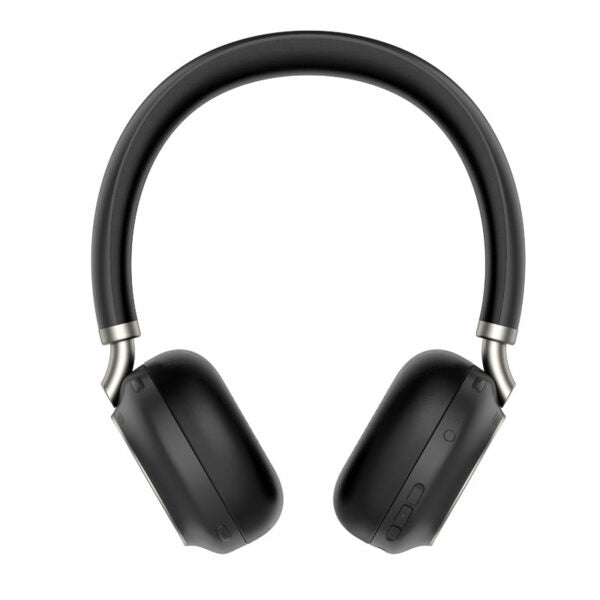
The Yealink BH76 Bluetooth Wireless Business Headset provides a stylish appearance with ultimate audio quality playback experience. It features: • Retractable hidden microphone arm • Multiple microphones Acoustic Shield Technology • 4 levels of ANC for enhanced noise cancellation • Qualcomm aptX digital audio algorithm for high-definition professional audio and optimized music playback experience • Up to 40 hours wireless battery life • Qi wireless charging stand with dual-side busylight for full visible angles • Excellent audio experience and all day wearing comfort • Teams Certified for seamless collaboration Weight: 0.92lb Dimensions: 7.64 × 8.15 × 2.09 in Headset Type: Bluetooth, Teams Certified, USB Battery: • Talking time: up to 35 hours • Music time: up to 40 hours • Standby time: 112 hours • Charging Time (cable): within 2 hours • Charging Time (wireless charging): within 3 hours Audio: • Active Noise Cancellation: YES • Speaker size: 35 mm Ø • Speaker sensitivity: 117 dB @1 mW-1k Hz • Audio codecs: Aptx-HD • User hearing protection: EN50332 Connectivity: • Connection (computer and mobile devices): USB-C Bluetooth adapter, Bluetooth • Bluetooth device: Yes • Bluetooth version: Bluetooth 5.2 • Operating range: Up to 30m/Up to 100ft

About This Product

The Yealink BH76 is a Bluetooth wireless headset designed for professionals who spend a significant portion of their day on Microsoft Teams calls. It's a strong fit for open-plan offices, home offices, or any environment where clear communication and focus matter. The headset pairs with your computer through the included USB-C Bluetooth adapter, or directly with a mobile device via standard Bluetooth, making it versatile for hybrid work setups. If your workplace uses Teams extensively, the dedicated Teams button and certification ensure seamless call control and integration, which can be a major time-saver in busy GTA offices where quick meeting access is a priority.

In terms of practical tradeoffs, the BH76 offers excellent battery life—up to 35 hours of talk time—so you can easily go through a full work week without reaching for the charger. The Qi wireless charging stand adds convenience, but note that wireless charging takes an hour longer than cable charging. The retractable microphone arm and multiple microphones with acoustic shield technology help reduce background noise, but the 4-level ANC is adjustable, so you may need to experiment to find the right balance for your space. While the headset is comfortable for all-day wear, the over-ear design may feel warm in longer sessions.

This headset is an ideal upgrade from a basic wired or older Bluetooth model, particularly if your organization has standardized on Teams. It's also a good replacement for a dedicated desk phone headset if you've moved to softphones. However, if you rarely take calls or work in a completely quiet private office, the advanced ANC and premium audio features may be more than you need. Conversely, if you're in a very loud environment like a call center or warehouse, a dedicated noise-cancelling microphone boom might offer better isolation than the BH76's design. For most knowledge workers in Toronto-area businesses, this headset strikes a strong balance between quality, battery life, and integration.
Services We Provide
  • Professional Installation & Configuration
  • Ongoing Maintenance & Support
  • Troubleshooting & Repairs
  • System Upgrades & Updates



