
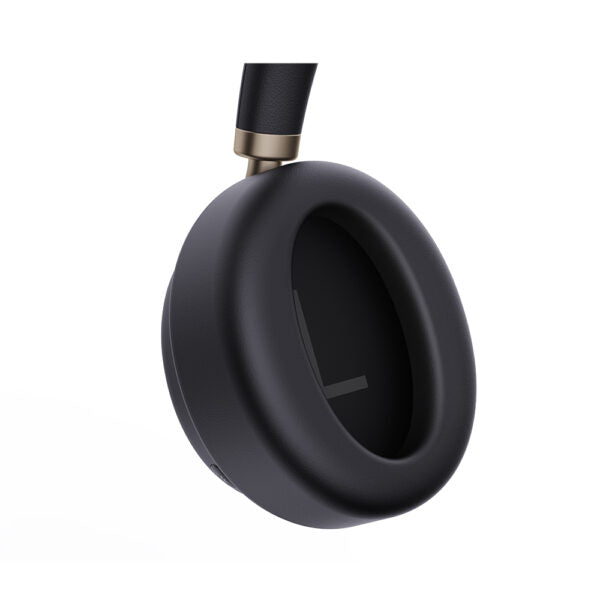
Yealink Black Ear Cushion for BH76 Plus (1 Pair) – 3311017
Frequently Asked Questions
Align the cushion’s notches or tabs with the corresponding grooves on the earcup, then press gently around the perimeter until you feel it snap into place. Avoid using excessive force; if it resists, double-check orientation before trying again.
Most often, the cushion isn’t fully seated. Remove it, inspect the mounting ring for debris or damage, and reattach by pressing evenly around the rim. If the problem persists, the cushion or headset’s mounting points may be worn—contact your supplier for a possible warranty claim.
Passive isolation relies on a complete seal around your ear. Check that the cushion is fully snapped in and that the material isn’t twisted. If you wear glasses, the frames can break the seal; try adjusting the headset position. A defective cushion that’s misshapen or overly soft could also reduce isolation—compare with the other cushion to spot inconsistencies.
No, these cushions are engineered exclusively for the BH76 Plus. The mounting mechanism and cushion shape differ across models, so using them with an incompatible headset will result in a poor fit, no seal, and possible damage. Always verify the model number before ordering.
The ear cushion itself doesn’t impact the Active Noise Cancellation electronics, but a bad seal can let in more ambient noise, making the ANC appear less effective. Check installation, and test by gently pressing the earcup against your ear to see if outside noise drops. If only one side seems worse, switch the cushions between earcups to isolate whether the issue follows the cushion or the earcup.
In a typical office or call centre environment, plan to replace them every 6–12 months. Signs include flattening, cracks, peeling material, or a noticeable drop in comfort and isolation. Heavy daily use, heat, or skin oils can accelerate wear. Buying a spare pair in advance ensures you’re not without a headset when cushions degrade.
Yes, each cushion in the pair is identical and can be used on either the left or right earcup. There’s no left/right designation. If you’re replacing only one side, that’s fine, but matching wear levels across both ears helps maintain balanced comfort and noise isolation.
An improperly seated cushion can slightly displace the speaker’s angle relative to your ear, altering perceived loudness. Remove and reinstall it, ensuring it sits flush. If the imbalance persists after reseating and cleaning the speaker mesh, test with the old cushion to confirm the issue is cushion-related before contacting support.
Headsets
Yealink Black Ear Cushion for BH76 Plus (1 Pair) – 3311017
• The BH76 Plus Headset features a replaceable ear cushion that isolates most noise, combined with advanced Active Noise Cancellation (ANC) technology providing up to 35dB of noise reduction. • Key Features: • Sleek and modern design • Comfortable replaceable ear cushions for optimal sound isolation • Advanced ANC technology for reduced ambient noise • Compatible with BH76 Plus Headsets
About This Product
The Yealink Black Ear Cushion for BH76 Plus is a direct replacement part for the BH76 Plus wireless headset, ensuring the same fit and passive noise isolation as the original. It’s intended for call centre agents, office professionals, and remote workers whose ear cushions have flattened over time, causing discomfort or reduced sound isolation. Swapping in a fresh pair restores the headset’s all-day wearability without the expense of replacing the entire unit.
This cushion works in tandem with the headset’s Active Noise Cancellation, but its primary job is physical comfort and blocking ambient chatter. Offices in Toronto’s financial or tech districts, for example, often run BH76 Plus headsets in open-plan floors where a snug seal helps maintain focus. It’s a practical consumable part rather than an upgrade, so if your headset is already showing its age in other ways—battery life, microphone issues—new cushions won’t fix those.
Buyers should note it’s compatible only with the BH76 Plus model, not earlier BH70 or BH71 series headsets. At two cushions per pack, it’s a cost-effective way to rotate between wash cycles or outfit a shared hot-desk headset. For a single user, one cushion lasts months to over a year depending on usage, so a single pair is typically a good fit. If you’re outfitting a large deployment, ordering a few spares alongside new headsets can reduce downtime when cushions inevitably wear.
This cushion works in tandem with the headset’s Active Noise Cancellation, but its primary job is physical comfort and blocking ambient chatter. Offices in Toronto’s financial or tech districts, for example, often run BH76 Plus headsets in open-plan floors where a snug seal helps maintain focus. It’s a practical consumable part rather than an upgrade, so if your headset is already showing its age in other ways—battery life, microphone issues—new cushions won’t fix those.
Buyers should note it’s compatible only with the BH76 Plus model, not earlier BH70 or BH71 series headsets. At two cushions per pack, it’s a cost-effective way to rotate between wash cycles or outfit a shared hot-desk headset. For a single user, one cushion lasts months to over a year depending on usage, so a single pair is typically a good fit. If you’re outfitting a large deployment, ordering a few spares alongside new headsets can reduce downtime when cushions inevitably wear.
Services We Provide
- Professional Installation & Configuration
- Ongoing Maintenance & Support
- Troubleshooting & Repairs
- System Upgrades & Updates



