
Yealink Charging Stand for BH70/WH64 Portable – 1308128
Frequently Asked Questions
First check that the USB cable is fully seated in the stand’s port and that the other end is connected to a powered USB port or adapter. Also inspect the charging contacts on both the stand and the headset – a bit of dust or lint can prevent a good connection. Try wiping them gently with a dry cloth and reseating the headset.
Make sure you’re aligning the headset exactly as the stand’s cradle shape indicates – normally earcups face outward and the headband rests straight down. If the stand is on an uneven surface, it can tilt and misalign. Check for any debris in the cradle recess and verify only the BH70 or WH64 is being used; other models won’t fit securely.
No, the stand doesn’t include a cable or adapter. You use the USB charging cable that shipped with your BH70 or WH64 headset. Plug the USB-A or USB-C end (depending on your headset’s cable) into any standard USB power source, including a phone charger or computer port.
The stand is molded specifically for the BH70 and WH64 portable. Other headsets – even those from the same manufacturer – won’t align with the charging contacts and may not physically fit. Using an incompatible headset risks damaging the charging pins.
First confirm the USB cable is working by testing it with another device. Next, check if the headset itself is drained completely: sometimes a deeply discharged battery takes a few moments before the stand’s indicator reacts. Leave it docked with a known-good cable and power source for 10 minutes, then recheck.
No, the stand simply passes through the connection; it doesn’t boost charge current. The charging speed is determined by the headset’s internal circuitry and the output of your USB power supply. The advantage is convenience, not speed.
Yes, it’s designed for permanent docking. The headset’s battery management will stop drawing power once fully charged, so leaving it on the stand won’t overcharge or damage the battery. It’s the ideal resting place between calls.
Power cycle everything: unplug the USB cable from the power source for 10 seconds, then reconnect. Remove and reseat the headset on the stand. Try the cable directly into the headset to rule out a headset or battery fault. If direct charging works but the stand doesn’t, carefully clean the stand’s pogo pins with a dry cotton swab. Should the issue persist, a Toronto-based VoIP support provider can usually help rule out a hardware defect remotely.
Headsets
Yealink Charging Stand for BH70/WH64 Portable – 1308128
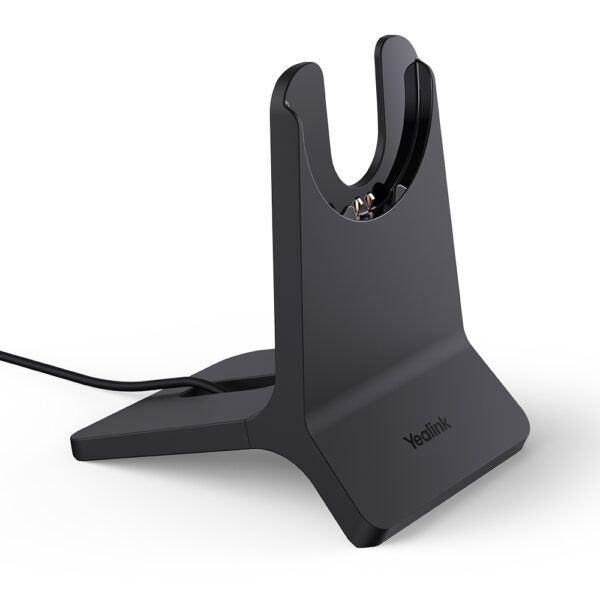
• The Yealink Charging Stand for BH70/WH64 Portable is a convenient accessory designed to charge your device while keeping it secure. • Key features include: • Compact and lightweight design with a weight of 0.63 lb • Dimensions: 8 × 8 × 4 in, perfect for storing in a bag or pocket • Designed specifically for Yealink BH70/WH64 Portable devices
About This Product
This charging stand is purpose-built for owners of the Yealink BH70 and WH64 Bluetooth headsets who want a dedicated, cable-free charging spot on their desk. Instead of plugging a USB cable directly into the headset each night, you simply rest the headset on the stand and charging begins. It’s a small quality-of-life upgrade that keeps your workspace tidy and reduces wear on the headset’s charging port. The stand itself is light and compact enough to toss into a laptop bag if you work between home and a shared office in the GTA.
It pairs naturally with a single headset and a single user. If you’re equipping a call centre or a hot-desking environment where multiple people share headsets, this stand won’t multi-charge or manage multiple devices – it’s purely a one-to-one solution. The stand doesn’t supply its own cable or power adapter; you use the existing USB charging cable that came with your headset and plug it into any standard USB power source. That simplicity is also its main limitation: it has no data connectivity, no switch/hook detection, and no integration with softphone controls.
The fit is specific to the BH70 and WH64 form factor. Other Yealink headsets, even those that look similar, won’t sit securely and may not align with the charging contacts. If you’ve replaced your headset with a different model, the stand becomes redundant. For Canadian offices that have standardized on a single Yealink wireless headset model across a team, keeping a few of these stands on hand can reduce cable clutter around hot desks, but each one serves only a single docking point.
If you need faster top-ups, note that the stand itself doesn’t accelerate charging speed – it relies on the headset’s internal charge rate and the wattage of the USB power supply you connect. For road warriors who charge from a laptop USB port, the stand adds a slight bulk compared to just carrying a short cable, though many find the convenience of drop-and-go charging outweighs the extra item in the bag.
It pairs naturally with a single headset and a single user. If you’re equipping a call centre or a hot-desking environment where multiple people share headsets, this stand won’t multi-charge or manage multiple devices – it’s purely a one-to-one solution. The stand doesn’t supply its own cable or power adapter; you use the existing USB charging cable that came with your headset and plug it into any standard USB power source. That simplicity is also its main limitation: it has no data connectivity, no switch/hook detection, and no integration with softphone controls.
The fit is specific to the BH70 and WH64 form factor. Other Yealink headsets, even those that look similar, won’t sit securely and may not align with the charging contacts. If you’ve replaced your headset with a different model, the stand becomes redundant. For Canadian offices that have standardized on a single Yealink wireless headset model across a team, keeping a few of these stands on hand can reduce cable clutter around hot desks, but each one serves only a single docking point.
If you need faster top-ups, note that the stand itself doesn’t accelerate charging speed – it relies on the headset’s internal charge rate and the wattage of the USB power supply you connect. For road warriors who charge from a laptop USB port, the stand adds a slight bulk compared to just carrying a short cable, though many find the convenience of drop-and-go charging outweighs the extra item in the bag.
Services We Provide
- Professional Installation & Configuration
- Ongoing Maintenance & Support
- Troubleshooting & Repairs
- System Upgrades & Updates



