
Yealink DECT Repeater RT30: Seamless DECT Coverage Extension-1300042

Frequently Asked Questions

First, confirm that the RT30 is powered on and within range of the base station. The LED should be solid or slowly blinking during association. Move the repeater closer to the base initially to rule out distance issues. If it still won't pair, power cycle both the base station and the repeater. If the issue persists, a Toronto-based VoIP support provider can usually resolve this remotely.
Verify that the power adapter is securely connected and that the wall outlet is working. Try using the included USB cable and a different USB power source if available. If the LED remains off, there may be a hardware issue—contact your equipment supplier for a replacement.
This is usually caused by weak overlap between coverage zones. Make sure the repeaters are positioned so their ranges overlap by at least 10–15 metres. Also confirm that all repeaters are registered to the same base station and that automatic handover is enabled in the base station's settings. If needed, adjust the placement of the repeaters.
The RT30 is designed for plug-and-play auto association. Simply power on the repeater within range of the base station. The base will automatically detect and register it. If it does not happen within a few minutes, check the base station's web interface to manually add the repeater by its DECT ID (usually printed on the unit).
No, the RT30 is specifically designed for Yealink W60B and W70B base stations. It uses proprietary pairing and management protocols that are not compatible with other manufacturers' DECT systems. Attempting to use it with a different base will likely not work.
Poor audio often indicates a weak signal between the repeater and the base station. Try moving the repeater closer to the base or away from sources of interference like metal shelves or other wireless devices. Also ensure the repeater is not placed too far from the handset—good call quality depends on both links.
A single Yealink base station supports up to six repeaters in a star configuration. If you need linear coverage, you can cascade two repeaters—one feeding the other. For more than six, you will need to add another base station.
A blinking red LED typically indicates a registration or link error. First, power cycle the repeater. If the red light continues, the repeater may have lost its association with the base. Try re-pairing it by leaving it powered on near the base and checking the base's device list. If that doesn't work, consult your system admin or support team.
No, the RT30 does not support PoE. It must be powered via the included AC adapter or a USB power source. Plan your installation with access to a power outlet nearby.
Yes, the RT30 can be wall-mounted using the built-in mounting slots. It is also suitable for desktop placement. Ensure the mounting location is within the recommended range of the base and has a power outlet nearby.
IP Phones

Yealink DECT Repeater RT30: Seamless DECT Coverage Extension-1300042
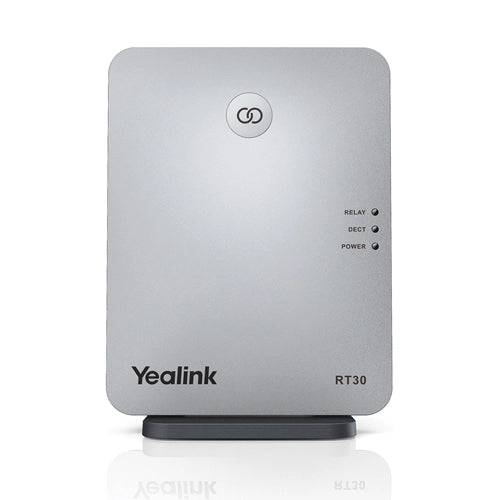
The Yealink DECT Repeater RT30 is an elegantly designed solution for businesses requiring expansive wireless voice coverage. Built to the DECT standard, it extends the wireless range of your Yealink W60B/W70B base station, ensuring staff members can maintain crystal-clear HD voice calls while moving across large offices or multi-floor buildings. Key features: • Exceptional range: Extend your DECT radio coverage up to 50m indoors and 300m outdoors (in ideal conditions) • High scalability: A single Yealink base station supports up to 6 RT30 repeaters arranged in a star connection • Cascading support: Supports two repeaters arranged in cascade, allowing for expanded range in a linear fashion • Call capacity: Each repeater supports up to 4 simultaneous calls and features automatic call handover between units The RT30 is designed for quick integration and reliable, continuous performance in modern business settings. Key benefits include: • Plug & play setup with auto association and simple plug & play installation process • Clear status indicators via LED lights for Power On, DECT Link, and Active Relay status • Flexible installation suitable for desktop placement or wall mounting • Maintains high standard of Yealink's HD voice quality What's included in the package: • Yealink RT30 DECT Repeater Unit • USB Cable • Power Adapter • User Guide

About This Product

The Yealink RT30 is a DECT repeater designed specifically to extend the wireless coverage of Yealink W60B or W70B base stations. It is ideal for medium to large office environments, multi-floor buildings, or any business where staff need reliable cordless phone coverage beyond the range of a single base station. The RT30 shines in open-plan offices or warehouses where mobility is important, but it can also fill gaps in older buildings with thick walls that block DECT signals.

This repeater works best in a star topology with up to six units per base station, or in a cascade configuration for linear coverage such as hallways or corridors. However, each repeater supports only four simultaneous calls, so it may not suit areas with high call density. For small offices where the base station already covers the entire space, adding a repeater would be unnecessary. In very large campuses requiring more than six repeaters, you would need multiple base stations instead.

Pairing is straightforward—plug in the power, and the repeater auto-associates with the base. No complex provisioning is needed. Keep in mind that actual indoor range is typically around 50 metres; concrete or metal obstructions can reduce this significantly. For Canadian businesses, especially in the GTA, the RT30 is a practical way to expand DECT coverage across multiple floors or into annexes without running new cabling for additional base stations.
Services We Provide
  • Professional Installation & Configuration
  • Ongoing Maintenance & Support
  • Troubleshooting & Repairs
  • System Upgrades & Updates



