
Yealink SIP-T88W PRO Smart Business Phone | 7" Touchscreen & Wireless Handset-1301228

Frequently Asked Questions

First, verify that your SIP credentials—username, password, and server address—are correctly entered in the phone's account settings. Ensure the network connection is active; if using Wi-Fi, confirm the password and signal strength. If the issue persists, a Toronto-based VoIP support provider can usually resolve this remotely.
Confirm the handset is charged and within 30 feet of the base. Place the handset in its charger cradle for a few seconds; it should automatically pair. If not, remove and reinsert the handset battery, or try power cycling the base unit by unplugging it for 10 seconds.
The phone supports Power over Ethernet if your network switch provides it. If not, you'll need to purchase the optional 12V 1.25A AC power supply (sold separately). Check your package—some units ship without an adapter, so verify before installing.
A temporarily unresponsive screen can be caused by static or a software glitch. Try cleaning the screen with a dry microfiber cloth and restarting the phone by unplugging the network/power for 10 seconds. If it recurs, verify that you're not pressing multiple points simultaneously, as the screen can lag under heavy use.
One-way audio is often a network issue—check that both parties have proper RTP/RTCP ports open. Try disabling any VPN or firewall that might be blocking audio streams. On the phone, verify the volume levels and ensure the handset is properly seated in its cradle when used.
Yes, the phone has two USB ports. You can connect a USB headset to one port and an EXP55 expansion module to the other. Note that the expansion module draws power over USB, so confirm your headset is compatible with Android 13 and the phone's USB port output.
The phone supports Wi-Fi 6 (802.11ax) with WPA3 security. Ensure your network is broadcasting on 2.4 or 5 GHz (the phone supports both). Check that the SSID is visible and the password is entered correctly. If your network uses enterprise authentication (e.g., PEAP), you'll need to enter your username and domain.
First, ensure the phone has adequate ventilation; overheating can cause instability. Check for pending firmware updates in the settings menu. If the problem persists, disconnect all peripherals (USB devices, expansion modules) to isolate the cause. Avoid performing a factory reset yourself—contact your IT support or supplier first.
The T88W PRO supports zero-touch provisioning via Yealink's YMCS/YDMP platforms. Your IT administrator can set up DHCP options or provisioning URLs so the phone pulls its configuration automatically on boot. Contact your VoIP provider for the correct server URL and login credentials.
IP Phones

Yealink SIP-T88W PRO Smart Business Phone | 7" Touchscreen & Wireless Handset-1301228
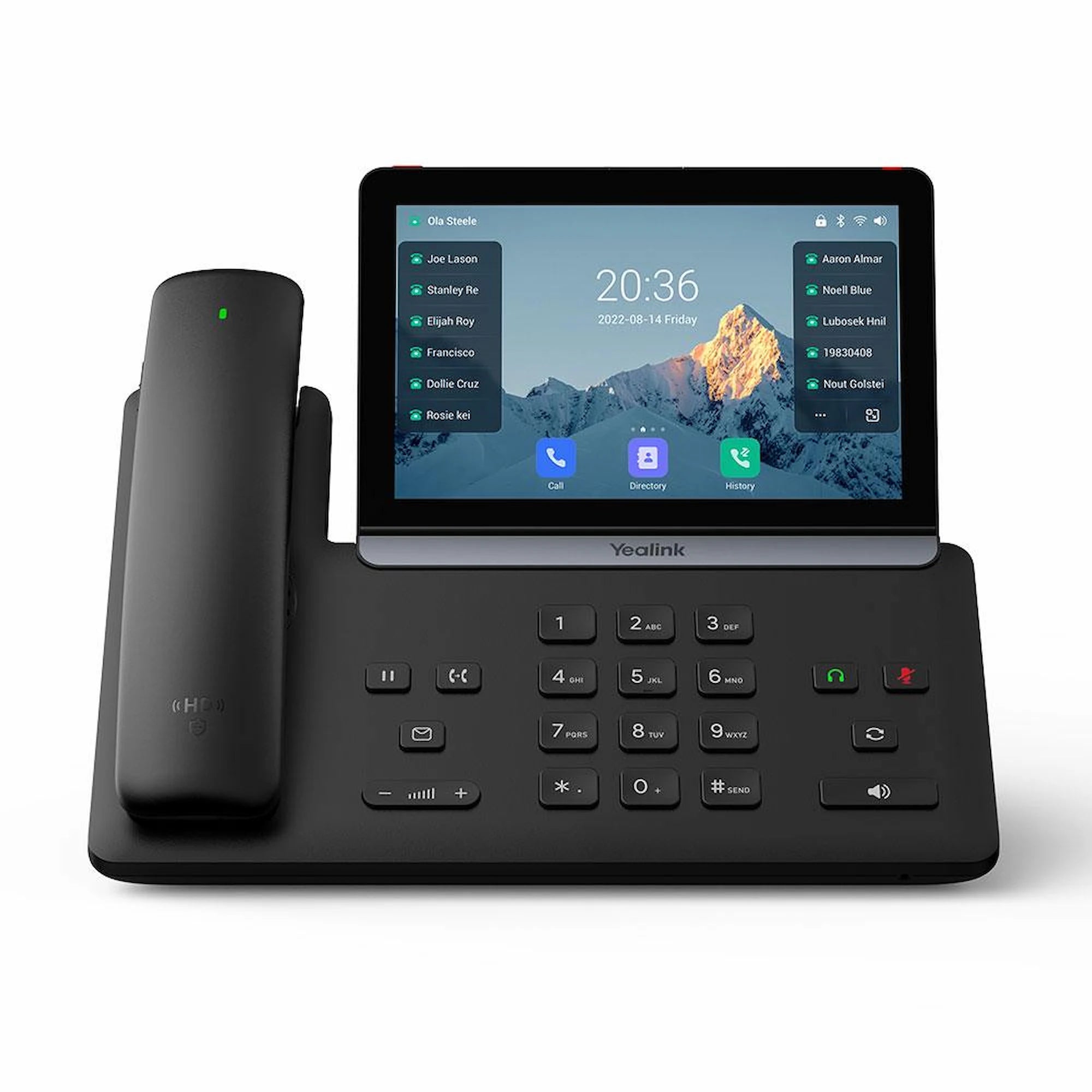
• The Yealink SIP-T88W PRO IP Phone is designed for C-level executives and power users who require maximum visual workspace and effortless control. It combines the powerful Android 13 platform with a new Bluetooth wireless handset to eliminate physical constraints, providing seamless mobility and high-stakes communication. • Key features: • 30-foot roaming range from the base unit • Extended talk time of up to 17 hours • Integrated charging with hall switch for intuitive call answering and ending • 7-inch adjustable multi-touch screen with a 1024 x 600 capacitive display • Android 13 OS with business-oriented system and enhanced third-party app compatibility • Built-in Wi-Fi 6 and Bluetooth 5.0 for enterprise-level speed and WPA3 security • The PRO model supports daisy-chaining up to three EXP55 expansion modules, providing access to over 200 programmable buttons. • Features two versatile USB ports for call recording, media storage, and simultaneous connection of USB headsets or expansion modules. • Compatible with Yealink’s YMCS/YDMP platforms for effortless mass deployment, zero-touch provisioning, and remote troubleshooting. • Includes the Yealink SIP-T88W PRO IP Phone unit, BTH88 Bluetooth Handset, adjustable desk stand, Ethernet cable (2m CAT5E UTP Cable), Quick Start Guide (QSG), and a 12V 1.25A AC Power Supply for T88 Series (sold separately).

About This Product

The Yealink SIP-T88W PRO is engineered for executives and professionals who need the freedom to move during calls without sacrificing call quality. It fits naturally in corner offices, boardrooms, or high-end home offices where mobility is valued—the wireless Bluetooth handset lets you roam up to 30 feet from the base, which is useful for grabbing a document or closing a door while staying connected. This phone is not for the typical cubicle worker; its premium price and advanced features are best reserved for decision-makers and power users who manage high-stakes communication.

The device pairs well with Yealink's EXP55 expansion modules, allowing daisy-chaining up to three for over 200 programmable buttons—a setup that suits executive assistants or receptionists handling many lines. It can replace a traditional corded desk phone, but it's overkill for basic extension users and underpowered for large call centers where simplicity and volume are key. The Android 13 platform opens the door to third-party apps, though not all business apps are optimized for a desk phone interface, so test compatibility before relying on specific software.

Practical tradeoffs include the need to charge the wireless handset regularly—17 hours of talk time is generous, but you must remember to dock it. The phone supports Power over Ethernet, but the AC power supply is sold separately, which adds to the upfront cost. For Canadian businesses, the SIP-T88W PRO works with all major SIP trunk providers and is certified with many Canadian carriers, making it suitable for GTA office deployments. However, its high cost means it's best used sparingly, reserved for key personnel who truly benefit from the visual workspace and mobility.
Services We Provide
  • Professional Installation & Configuration
  • Ongoing Maintenance & Support
  • Troubleshooting & Repairs
  • System Upgrades & Updates



