
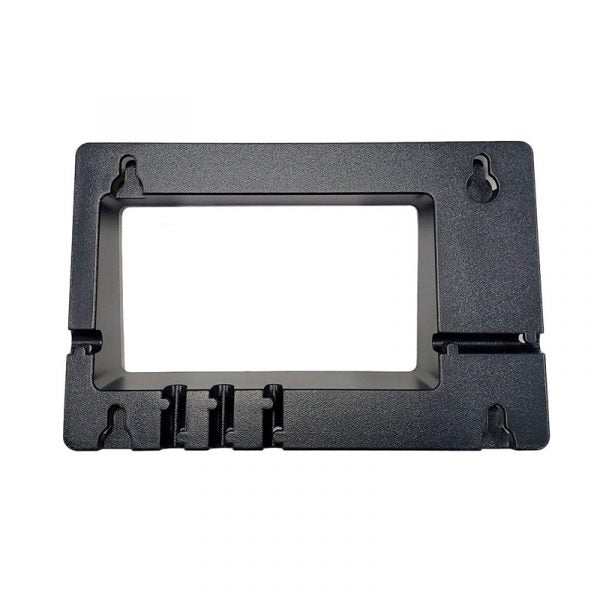
Yealink T46U Wall Mount Bracket
Frequently Asked Questions
Yes, it is designed specifically for the Yealink T46U. It also fits the T46S and older T46 models, as they share the same chassis and mounting holes. Check your phone's label to confirm the model, but if you have a T46 series desk phone, the bracket should align correctly.
Locate a wall stud or use proper drywall anchors rated for at least twice the combined weight of the phone and bracket. Hold the bracket in position, mark the screw holes, drill pilot holes, and fasten securely. Once the bracket is level, attach the phone's base plate according to the bracket's keyhole slots. Avoid excessive force when tightening, as over-tightening can crack the plastic.
On a wall mount, the handset retention tab must be rotated to the wall-mount position. Look for a small plastic tab near the handset hook; pull it out, rotate it 180 degrees, and push it back in. This creates a lip that holds the handset against gravity. If the tab is missing or broken, you can temporarily use a small piece of gaffer tape on the hook until you source a replacement.
Power cycle the phone and check the bracket screws. Often the screws have loosened slightly from vibration or temperature changes. Tighten them gradually, but do not overtighten. If the wobble persists, the wall anchors may not be grabbing properly. Remove the phone, test the anchors with a gentle pull, and replace with heavier-duty anchors if needed.
Yes, the bracket has a channel for the network cable. Route the cable through the opening before you fasten the bracket to the wall. Leave a little slack so the cable isn't under tension. If the cable is thick, test fit it first to ensure it doesn't push the phone away from the wall.
Absolutely. The bracket is purely mechanical and doesn't interfere with power delivery. As long as your Ethernet cable carries PoE, the phone will power up just as it would on a desk. Just make sure the cable doesn't bind against the bracket edge.
The T46U's base plate slides onto the bracket's hooks. If the phone shifts horizontally, check that the hooks are fully engaged in the slots. Sometimes the phone needs a firm push towards the wall until it clicks. Also, ensure the bracket is level; a tilted bracket can cause gravity to pull the phone sideways.
For brick or concrete, use masonry anchors (like sleeve anchors or tapcon screws) sized for the bracket's mounting holes. Drill carefully to avoid cracking the brick, and blow out the dust before inserting anchors. The supplied hardware may not be suitable for masonry, so plan to buy appropriate fasteners from a hardware store.
The bracket is not designed for inverted mounting; the keyhole slots only engage correctly in one orientation. Attempting to flip it may cause the phone to fall. If you need the handset on the opposite side, consider rotating the handset retention tab and using a headset instead.
Accessories
Yealink T46U Wall Mount Bracket
• This Wall mount bracket is designed to fit accurately with Yealink T46 Phones. Key Features: • Weight: 0.5 lbs • Dimensions: 8 × 8 × 4 in • Brand: Yealink • Accessory Type: Wall Mount Brackets
About This Product
This bracket is for workplaces that need to clear desk space or install a Yealink T46-series phone in a common area, hallway, or small office where a desk isn't practical. It replaces the standard desk stand and lets you mount the phone flush against a wall, keeping the handset and keypad accessible without eating up surface real estate. The bracket itself is light and unobtrusive, so it works well in compact GTA office layouts where every square foot counts.
Buyers should understand that wall-mounting changes how the handset sits; the gravity-fed cradle behaves differently compared to a desk orientation. You'll want to test that the handset stays securely in place during use, especially in high-traffic areas where it might be bumped. Cable routing also requires a bit of planning—network and power cords need to exit cleanly, and you may need a recessed wall plate or surface raceway to avoid pinching.
If you're outfitting a single office for a manager who occasionally moves between sitting and standing, this bracket is likely overkill. A simple desk stand or even a headset solution would be more flexible. On the flip side, if you're deploying dozens of phones in a warehouse or healthcare setting where walls are irregular and the phone will face heavy handling, this lightweight bracket may not provide the ruggedness you need without additional reinforcement. It's best matched to standard drywall or plywood backing in controlled indoor environments.
Buyers should understand that wall-mounting changes how the handset sits; the gravity-fed cradle behaves differently compared to a desk orientation. You'll want to test that the handset stays securely in place during use, especially in high-traffic areas where it might be bumped. Cable routing also requires a bit of planning—network and power cords need to exit cleanly, and you may need a recessed wall plate or surface raceway to avoid pinching.
If you're outfitting a single office for a manager who occasionally moves between sitting and standing, this bracket is likely overkill. A simple desk stand or even a headset solution would be more flexible. On the flip side, if you're deploying dozens of phones in a warehouse or healthcare setting where walls are irregular and the phone will face heavy handling, this lightweight bracket may not provide the ruggedness you need without additional reinforcement. It's best matched to standard drywall or plywood backing in controlled indoor environments.
Services We Provide
- Professional Installation & Configuration
- Ongoing Maintenance & Support
- Troubleshooting & Repairs
- System Upgrades & Updates



