
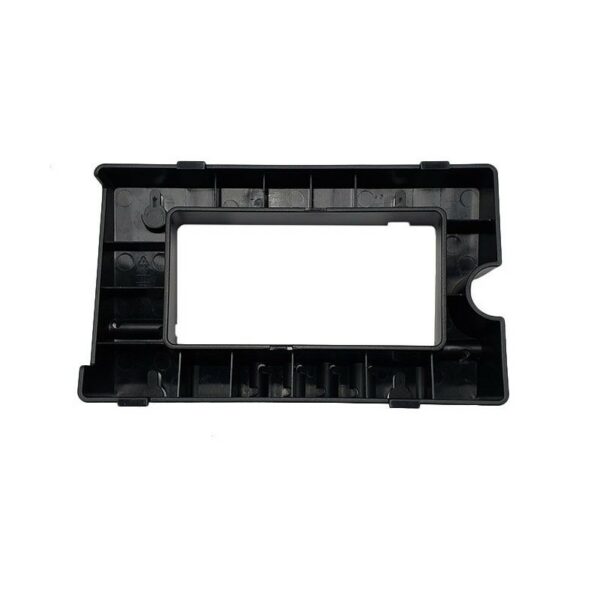
Yealink T48U Wall Mount Bracket
Frequently Asked Questions
First, attach the bracket to the wall using suitable screws and anchors for your wall type (drywall, concrete, etc.). Then, slide the T48U phone onto the bracket until it clicks into place. Make sure the phone is securely locked before releasing it.
The bracket itself typically does not come with wall screws or anchors. You'll need to purchase those separately based on your wall material. The bracket does include the mounting plate and any necessary clips for the phone.
No, this bracket is specifically designed for the T48U model. The T48S and T46U have different shapes and port placements, so using this bracket with those phones may not fit properly or could damage the device.
First, ensure the bracket is firmly attached to the wall and that the screws are tight. Then, check that the phone is fully snapped onto the bracket – you should hear a click. If it's still loose, verify that you are using the correct bracket for the T48U and that the phone's handset cradle or hookswitch isn't interfering with the mount.
Yes, but access will be restricted. The bracket is designed to leave the ports exposed, but you may need to angle the phone or use right-angle Ethernet cables for easier connection. Plan your cable routing before finalizing the mount.
If your wall studs don't line up with the bracket's mounting holes, you can use toggle bolts or heavy-duty drywall anchors rated for the phone's weight (the T48U is about 2.2 lbs, plus the bracket). Alternatively, mount a small piece of plywood to the studs and attach the bracket to that.
No, the mount is designed to hold the phone securely without interfering with the touchscreen, handset cradle, or any buttons. The phone will operate exactly as it does on a desk, just in a vertical orientation.
First, double-check that you have the correct bracket for the T48U. Ensure the bracket's locking tabs are not broken or bent. If the phone still falls, the bracket may not be fully engaged – try pressing firmly until you hear a click. If the issue persists, the bracket might be defective; contact your VoIP support provider for a replacement.
The bracket is designed to be installed with the phone oriented upright. Mounting it upside down could cause the phone to sit incorrectly and might not lock into place. For custom cable routing, consider using a cable management accessory instead of altering the mount's orientation.
The bracket is intended for vertical wall mounting only. It does not support tilting or swiveling. If you need adjustable angles, look for a VESA-compatible mount or a desk stand with articulation. The T48U is not designed for non-vertical mounting with this bracket.
Accessories
Yealink T48U Wall Mount Bracket
• The Yealink T48U Phone Wall Mount Bracket is specifically designed to fit the T48U phone accurately. • Key Features: • Weight: 0.4 lbs • Dimensions: 8 × 8 × 4 in • Brand: Yealink • Accessory Type: Wall Mount Brackets
About This Product
The Yealink T48U Wall Mount Bracket is a practical accessory for anyone who needs to mount their T48U desk phone on a wall, freeing up valuable desk space in a busy office or reception area. It's a straightforward solution for environments where every inch of desktop counts, such as in a compact Toronto cubicle or a retail counter with limited surface area. The bracket is designed specifically for the T48U, so it fits securely without any wobble, but you should be aware that wall-mounting will make it harder to access the phone's rear ports and may require careful cable management to keep things tidy. This bracket is ideal for permanent or semi-permanent installations; it's overkill if you plan to move the phone frequently, and it's unnecessary if you prefer the phone on your desk. For Canadian businesses, it's a simple way to maintain a clean, professional look in a GTA office without sacrificing functionality.
Services We Provide
- Professional Installation & Configuration
- Ongoing Maintenance & Support
- Troubleshooting & Repairs
- System Upgrades & Updates



