
Yealink UH44 Dual UC USB-C/A – 1308187

Frequently Asked Questions

First, try a different USB port directly on the computer, avoiding any USB hubs or docking stations that may not deliver steady power. If the headset still isn't recognized, restart the computer with the headset plugged in and check the sound control panel to see if 'Yealink UH44' appears as a playback device. For persistent detection issues, test the headset on another computer to rule out a faulty USB port on your original machine.
In your computer’s sound settings, make sure the Yealink UH44 is set as the default input device, not the built-in laptop mic. Also verify that the physical mute on the headset isn't engaged—lowering the mic boom completely should unmute the microphone. If the issue occurs only in one application, check that app’s own audio device selection; it may be ignoring the system default.
Echo often comes from speaker sound leaking back into the microphone. Lower the headset speaker volume slightly and, if your softphone has an echo cancellation setting, enable it. Also try keeping the headset earcups firmly against your ears to reduce sound leakage that the mic might pick up.
The lift-to-mute feature is typically handled by the headset itself, not the application, so first confirm that the mute LED on the inline controller or earcup changes state when you raise and lower the boom. If the LED responds but the app still transmits audio, check the app’s audio device list—some softphones can bypass the headset’s built-in mute when they have their own hardware mute control. Try selecting a different audio profile or testing the headset with a basic app like Sound Recorder to isolate the behavior.
Open the sound control panel, find the Yealink UH44 playback device, and check its 'Levels' tab—there may be an additional volume slider there that is set low. Some softphones also have a speaker gain adjustment separate from the system volume. If you still need more level, confirm that the headset’s earcups are positioned comfortably over your ears, as a poor seal can make perceived volume drop.
Intermittent audio often points to a USB connection issue or CPU strain on the computer. Plug the headset directly into a rear USB port on a desktop, or a different port on a laptop, to bypass front-panel or hub wiring. Also, close any unused bandwidth-heavy applications and check if the problem happens in a different softphone, which can help determine if the dropouts are related to system resources or the headset hardware itself.
Yes, the headset is UC certified and works with Teams on both Windows and macOS after a simple plug-and-play connection. On a Mac, you may need to select 'Yealink UH44' as the speaker and microphone inside the Teams device settings the first time you use it. If control buttons don't behave as expected, install the latest version of the Teams app, as older builds sometimes misinterpret USB headset commands.
The headset has a USB-C connector and comes with a USB-A adapter, so it can physically plug into a smartphone that has a USB-C port and supports USB audio devices. However, call control features like answer/end buttons are primarily designed for desktop softphone integration and may not function on a phone. For a mobile-first workflow, a dedicated Bluetooth headset is often more convenient, but the UH44 will deliver high-quality wired audio if your phone can host it.
The headset cable terminates in a USB-C plug, and a USB-A adapter is included in the box. To use a traditional rectangular USB-A port, simply slide the adapter over the USB-C tip until it clicks. No additional drivers or settings changes are required—the headset is recognized the same way on both port types.
The UH44 Dual is a class-compliant USB audio device, so Windows, macOS, and ChromeOS will detect it automatically without any driver installation. For optimal integration with leading UC platforms, you may install the Yealink USB Connect companion software to adjust sidetone or enable firmware updates, but basic call audio functions perfectly without it. If you encounter an issue on a locked-down corporate computer, a Toronto-based VoIP support provider can usually validate the device configuration remotely.
Headsets

Yealink UH44 Dual UC USB-C/A – 1308187
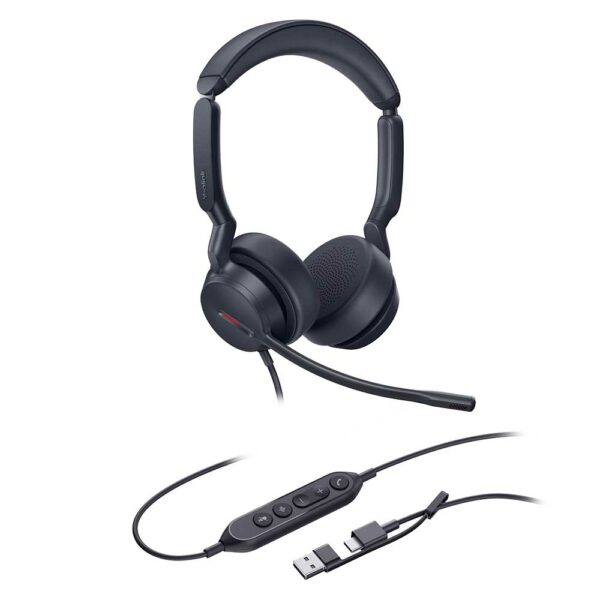
<p>The Yealink UH44 Dual UC USB-C/A is a professional USB-wired headset that delivers outstanding audio performance and noise canceling capabilities. Its superior design and comfortable materials ensure all-day comfort, whether you're working in the office or at home.</p> <ul> <li>• 2-Mic & AI Noise Cancellation</li> <li>• All-Day-Wearing Comfort</li> <li>• Flexible and Fast Plug-and-Play with USB-C/A Cord</li> <li>• High-Quality Audio (Professional-Grade 35mm Speakers)</li> <li>• Lift Mic-Boom to Mute</li> <li>• UC Certified</li> </ul> <h3>Technical Specifications:</h3> <p>Audio:</p> <ul> <li>Microphone quantity: 2</li> <li>Microphone frequency response range: 100Hz-14kHz</li> <li>Speaker size: Ø 35mm</li> <li>Speaker sensitivity: 113.8±3dB 0.980V</li> <li>Speaker frequency response range: 20Hz-20kHz</li> <li>Speaker bandwidth: <ul> <li>Music mode: 20Hz-20kHz</li> <li>Talk mode: 100Hz-20kHz</li> </ul> </li> <li>Hearing Protection:</li> <ul> <li>Peak Block Protection (EN50332)</li> <li>Australian G616 Protection (AU G616)</li> <li>Daily Noise Exposure Protection</li> </ul> </ul> <p>For a full list of specifications, please refer to the product datasheet.</p>

About This Product

The Yealink UH44 Dual is a wired USB headset built for professionals who spend their day on softphone calls and need reliable, clear audio without the fuss of batteries or Bluetooth pairing. It fits naturally into a modern desk setup—whether in a downtown Toronto office tower or a home workspace—and caters to users who value plug-and-play simplicity and certified UC platform compatibility. With dual microphones and AI-driven noise cancellation, it aims to cut through background chatter so your voice comes through cleanly, making it a solid choice for open-plan environments or busy households.

Compared to a basic laptop mic and speakers or an entry-level single-ear headset, the UH44 Dual offers a meaningful step up in both microphone clarity and wearing comfort. It’s not a replacement for a traditional desk phone handset unless you’ve already moved to a fully softphone-based workflow. The unit connects exclusively via USB, so it won’t directly plug into a standard RJ9 phone port or a mobile device’s 3.5mm jack unless you add adapters, which is something to keep in mind if your setup still spans multiple device types.

A trade-off inherent to any wired USB headset is the tether. You’re free from charging cycles but tied to your computer’s reach. For a desk-bound worker in a GTA call centre, that’s rarely an issue, but if you frequently need to step away mid-call or pace while talking, a wireless model might suit you better. The 35mm speakers deliver respectable audio quality for voice, though they aren’t tuned for immersive music listening. The hearing protection features are a thoughtful addition for those who wear a headset for extended periods, helping guard against sudden loud peaks.

This headset is overkill for someone who only occasionally takes a five-minute call and would do fine with their laptop’s built-in hardware. At the same time, it may feel underpowered if your work demands active noise cancellation on the listening side (for noisy environments like a server room) or if you need to connect to a traditional desk phone without a PC in the loop. For a standard office deployment—especially one running Microsoft Teams, Zoom, or similar platforms across a fleet of Windows machines—the UH44 Dual hits a sensible balance of cost, comfort, and UC-ready performance.
Services We Provide
  • Professional Installation & Configuration
  • Ongoing Maintenance & Support
  • Troubleshooting & Repairs
  • System Upgrades & Updates



