
Yealink UH46 Dual UC USB-C/A – 1308183

Frequently Asked Questions

First, check that the connector is fully seated and test the other USB connector type (e.g., USB-A if USB-C isn’t recognized). Avoid USB hubs for the initial test and go straight into a port on the computer. Open your Sound settings to see if the headset appears as a playback device; a simple restart often resolves recognition glitches. If the problem continues, a Toronto-based VoIP support provider can usually diagnose this remotely.
Position the microphone boom about two finger-widths from the corner of your mouth and make sure it isn’t twisted away. In your softphone’s audio settings, confirm the UH46 is selected as the input device and set the microphone level to roughly 80–100. If you work in a very loud environment, the AI noise cancellation might be reducing volume—try disabling any extra software audio enhancements to see if clarity improves.
Echo can happen when sidetone is too high or the speaker volume is cranked up. Open your UC client and look for sidetone controls; lower or mute sidetone to reduce the delayed feedback. Also reduce the headset’s speaker volume a notch so the microphone isn’t picking up the output. If the echo only occurs in one application, that app’s audio settings likely need adjustment rather than the headset itself.
Start by plugging the headset directly into a different USB port—ideally a USB 3.0 port on the computer itself, not a hub. A loose connection or low USB power can cause crackling. Turn down the playback volume both on the headset and in your software, then test with another laptop or desktop to isolate whether the issue follows the headset.
The three-mic system works best on steady, predictable sounds like HVAC hum or keyboard typing. Sudden sharp noises—a door slam or a dog bark—may still get through. Make sure the AI noise cancellation is enabled in the Yealink USB Connect desktop app and that your UC client isn’t applying a second layer of processing that conflicts. Firmware updates through the same app can sometimes improve noise handling.
Inspect the USB-C port for lint or debris and clean it gently. Switch to the USB-A adapter and test a USB-A port; if the connection stabilizes, the issue may be with your computer’s USB-C port. Avoid bending the cable sharply near the connector. If the problem persists across different machines, the cable or connector could be defective—in that case, a Toronto-based VoIP support provider can usually help arrange a replacement.
Yes, the Dual UC certification means the headset is optimized for both Microsoft Teams and Zoom, and it works as a standard USB audio device with other platforms like RingCentral and 8x8. You’ll get plug-and-play audio without any extra configuration. For advanced controls such as call answer/end from the inline remote, install the Yealink USB Connect software.
The UH46 is USB-only and doesn’t include a 3.5 mm or RJ9 jack, so it cannot plug directly into a traditional desk phone. It’s designed exclusively for computers, laptops, and select USB-enabled conference devices. If you need one headset for both a desk phone and softphone, consider a USB/DECT hybrid model instead.
No, the headset is plug-and-play on Windows, macOS, and Linux – basic audio will work the moment you connect it. To access firmware updates, sidetone control, and AI noise cancellation settings, you can download the free Yealink USB Connect application from Yealink’s support page. This utility is optional but recommended if you want to fine‑tune the headset’s performance.
The headset automatically adjusts its audio bandwidth depending on the active application. When a softphone call starts, it switches to Talk mode (100Hz–20kHz) for voice clarity; media players use the wider Music mode (20Hz–20kHz). There’s no manual switch, and this behaviour works seamlessly in most setups. If you ever hear restricted audio outside of calls, closing the communication app usually reverts the headset to full music bandwidth.
Headsets

Yealink UH46 Dual UC USB-C/A – 1308183
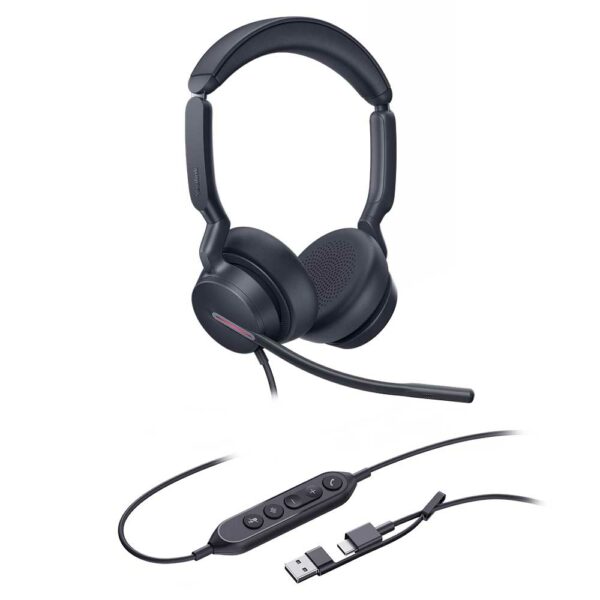
The Yealink UH46 Dual UC USB-C/A is a professional USB wired headset designed with excellent craftsmanship and comfortable materials, ensuring all-day comfort. The headset features advanced three-microphone noise-canceling technology, delivering exceptional noise reduction performance. Key Features: • 3-Mic & AI Noise Cancellation • All-Day-Wearing Comfort • Plug-and-Play with USB-C/A Cord • High-Quality Audio Experience • Wearable on both sides • UC Certified Technical Specifications: Audio: Microphone quantity: 3 Microphone frequency response range: 100Hz-14kHz Speaker size: Ø 35mm Speaker sensitivity: 113.8±3dB 0.980V Speaker frequency response range: 20Hz-20kHz Speaker bandwidth: • Music mode: 20Hz-20kHz • Talk mode: 100Hz-20kHz Hearing Protection: Peak Block Protection (EN50332) Australian G616 Protection (AU G616) Daily Noise Exposure Protection

About This Product

The Yealink UH46 Dual UC is built for the desk-bound professional who lives on voice and video calls. Its lightweight, cushioned design and dual-sided wearability make it a solid fit for open-plan offices, home workstations, and contact centres where all-day comfort matters. You’ll notice the three-microphone AI noise cancellation cutting through the background hum of an air conditioner or keyboard chatter, which is a real asset in a busy Toronto loft office or shared workspace.

This headset plugs straight into a USB-C or USB-A port and works immediately with softphones, making it a natural companion for Microsoft Teams, Zoom, RingCentral, and other UC platforms commonly adopted by Canadian businesses. There’s no battery to charge and no dongle to lose, so it suits hot-desking setups or IT fleets where simplicity and low maintenance are priorities. Just connect and talk.

The trade-off is mobility. You’re tethered to your computer by the USB cable, so stepping away from the desk during a call isn’t an option. It also has no interface for traditional desk phones, so hybrid environments that still rely on analog lines will need a different solution. While the AI noise reduction handles typical office noise well, extremely loud or unpredictable sounds—like construction or a nearby toddler—can still bleed through.

If your team is largely stationary and working inside cloud-based communication tools, the UH46 hits a sweet spot of audio quality and convenience. For a downtown Toronto startup or a GTA insurance office running virtual queues, it’s a dependable daily driver. It would be overkill for someone who joins only an occasional call, and underpowered if your workflow demands true wireless freedom—in that case, a DECT or Bluetooth headset from Yealink’s lineup would be a better match.
Services We Provide
  • Professional Installation & Configuration
  • Ongoing Maintenance & Support
  • Troubleshooting & Repairs
  • System Upgrades & Updates



