
Yealink UH48 Dual UC USB-C/A – 1308152

Frequently Asked Questions

First, ensure the USB cable is firmly connected to both the headset and your computer. Try a different USB port, preferably one directly on the motherboard (not a hub). If it still isn’t detected, restart your computer with the headset plugged in. For most Windows systems, the headset should appear as both a speaker and microphone device in sound settings.
Verify that the microphone boom arm is fully extended and not in the up (muted) position. The UH48 mutes the mic when the boom is raised. Also check your computer’s sound settings to ensure the Yealink UH48 is selected as the default input device, and that the input volume is not muted or turned down.
Press the ANC button on the headset control module to cycle through modes: noise canceling on, ambient sound pass-through, or off. Make sure the headset is powered (connected via USB) as ANC requires power. If you’re in a very quiet room, the effect may be subtle; try it near a fan or air conditioner to confirm it’s active.
First, check the headset’s physical volume rocker and ensure it isn’t turned all the way down. In your computer’s sound settings, increase the Yealink UH48’s volume level and disable any audio enhancements that might compress the signal. If the issue persists, try the headset on another device to rule out a software issue.
The busy lights activate when you are on a call. Ensure the headset is properly recognized by your softphone; it relies on the software to signal a call state. If the lights remain off during calls, check that your softphone is correctly routing audio through the Yealink UH48. Restarting the softphone or the computer often resolves this.
The UH48 uses a USB connection, so it requires an OTG adapter for most smartphones. If your device supports USB audio and you have the proper adapter, it should work for calls. However, the headset is optimized for computers and desk phones, so you may experience limited call control functionality on mobile.
Firmware updates for Yealink headsets are typically managed through Yealink’s Device Manager or USB Connect software. Download the latest firmware from Yealink’s support page, then follow their instructions to install it via a connected computer. Do not disconnect the headset during the update. If you are unsure, contact your VoIP support provider for guidance.
Echo often occurs when the headset microphone picks up sound from the speakers or room. First, lower the headset volume slightly and ensure the microphone boom is positioned close to your mouth but not directly in front of it. If you are using a softphone, adjust its echo cancellation settings. Also, check that no other audio devices are active simultaneously.
Because this is a wired headset, disconnections are usually due to a loose USB connection or a failing USB port. Try a different port and check the cable for damage. If the issue is specific to one computer, update your USB drivers. For persistent problems on multiple devices, the cable may need replacement.
Headsets

Yealink UH48 Dual UC USB-C/A – 1308152
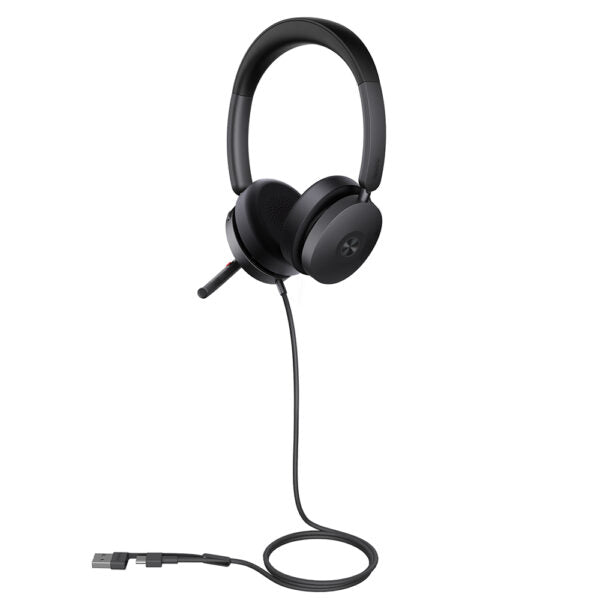
• Yealink UH48 is a high-quality wired headset with ANC (Active Noise Cancellation) functionality, providing an immersive work experience in various office environments. Key Features: • Four-Microphone Noise Cancellation • Hybrid ANC for optimal sound quality • All-Day-Wearing Comfort for extended use • Flexible and Fast Plug-and-Play with USB-C/A • Brilliant Audio Performance with clear calls • Dual Busy lights for easy call management • Adaptive EQ for personalized audio experience Technical Specifications: Package Content: • UH48 Dual UC USB-C/A Headset • Waterproof Zipper Bag • Quick Start Guide Audio: • Microphone quantity: 6 • Microphone frequency response range: 100Hz-10kHz • Speaker size: Ø 30mm • Speaker sensitivity: 129±3dB 0.980V • Speaker frequency response range: 20Hz-20kHz • Music mode: 20Hz-20kHz • Talk mode: 100Hz-8kHz Active Noise Cancellation: ✔ Hearing Protection: • Peak Block Protection (EN50332) • Australian G616 Protection (AU G616) • Daily Noise Exposure Protection Headset Control and Lights: • Answer/End/Reject a call • Volume up/down • Play/Pause • Microphone mute/unmute • Move the microphone boom arm up to mute, or down to unmute • Ambient sound/Noise canceling/off • Dual busy lights Packing: • Product net weight: 169 g • Product size: 183 mm x 162 mm x 63 mm • Giftbox size: 177 mm x 207 mm x 53 mm • Carton size: 550 mm x 182 mm x 220 mm • Qty/CTN: 10 PCS • N.W/CTN: 3.06 kg

About This Product

The Yealink UH48 is a wired headset designed for professionals who require consistent audio quality and effective noise cancellation in busy environments. It is well-suited for open-plan offices, home offices, or any setting where background noise can disrupt focus. With its plug-and-play USB-C and USB-A connectivity, the UH48 works seamlessly with most desktop computers, laptops, and VoIP desk phones, making it a flexible choice for unified communications platforms like Microsoft Teams and Zoom. This headset is a practical upgrade for users who rely on clear, uninterrupted calls throughout the day, such as customer support agents or remote team members.

The UH48’s all-day comfort and hybrid active noise cancellation (ANC) address the common pain points of extended headset use: ear fatigue and ambient distractions. The dual busy lights and intuitive mute boom arm help manage call visibility without accessible hardware controls. However, because this is a wired headset, mobility is limited compared to wireless options, and it is not ideal for use with mobile phones unless an adapter is used. For users who take calls on the go or frequently move away from their desk, a wireless model may be a better fit.

In a Canadian business context, the UH48 pairs well with standard VoIP carriers and is suitable for GTA-based teams that need reliable performance in shared workspaces. It is overkill for occasional callers who do not require active noise cancellation, and it may be underpowered for users who need wireless range or team-specific fleet management software. Overall, it is a solid choice for dedicated desk-based voice work where audio clarity and comfort are priorities.
Services We Provide
  • Professional Installation & Configuration
  • Ongoing Maintenance & Support
  • Troubleshooting & Repairs
  • System Upgrades & Updates



