
Yealink W78H VoIP SIP DECT Handset

Frequently Asked Questions

First, ensure the handset is within range of the base station (typically up to 50 metres indoors) and that the base is powered on and connected to the network. Check that the handset has been paired to the base by following the registration procedure in the base's manual. If the issue persists, a Toronto-based VoIP support provider can usually resolve this remotely.
Try power cycling both the handset (remove and reinsert the battery) and the DECT base station (unplug power for 10 seconds). This often re-establishes the wireless link. If the problem continues, verify that the base's DECT radio is enabled and that no other devices are causing interference.
Check that the handset's microphone is not blocked by a case or your hand, and ensure you are speaking into the earpiece's microphone hole at the bottom. Also, confirm that noise cancellation is enabled in the handset's audio settings. If the issue persists, test with a Bluetooth headset to isolate the handset's built-in mic.
First, check if the handset is constantly searching for the base (e.g., if it's out of range), as this drains the battery faster. Reduce the screen brightness or backlight timeout in the settings. If the battery is old, it may need replacement; Yealink recommends using only approved batteries.
Go to the handset's menu, select 'Bluetooth', then 'Add Device'. Put your Bluetooth headset into pairing mode. The handset will scan and list available devices; select yours and confirm the pairing. Note that the W78H supports only one Bluetooth connection at a time.
Ensure the handset is registered and in range of the base. If you are using a wired headset, check that it is fully inserted into the 3.5 mm jack. Try a different headset or remove the headset to test the handset's earpiece. If the issue persists, the handset may need a firmware update.
The W78H is a DECT handset that works with a compatible Yealink DECT base station, which then connects to your VoIP system via SIP. It does not natively support Teams or other proprietary protocols. For Canadian business use, ensure your base station is provisioned for your SIP provider's settings.
First, try a power cycle by removing the battery for 30 seconds and reinserting it. If the screen remains blank, check that the battery contacts are clean and making good contact. If flickering continues, the display may be faulty and the handset should be inspected by a technician.
Go to the handset's menu, select 'Features', then 'Speed Dial'. Choose an unassigned key (1-9) and enter the extension or phone number. You can also assign a contact from the phonebook. Once set, press and hold that key on the idle screen to dial.
Check the ringtone volume and ensure the handset is not set to silent or vibrate-only mode. Go to 'Settings' > 'Sounds' > 'Ring Volume' and adjust it. Also verify that the 'Vibration' setting is not overriding the ringer; you can set it to vibrate and ring simultaneously.
IP Phones

Yealink W78H VoIP SIP DECT Handset
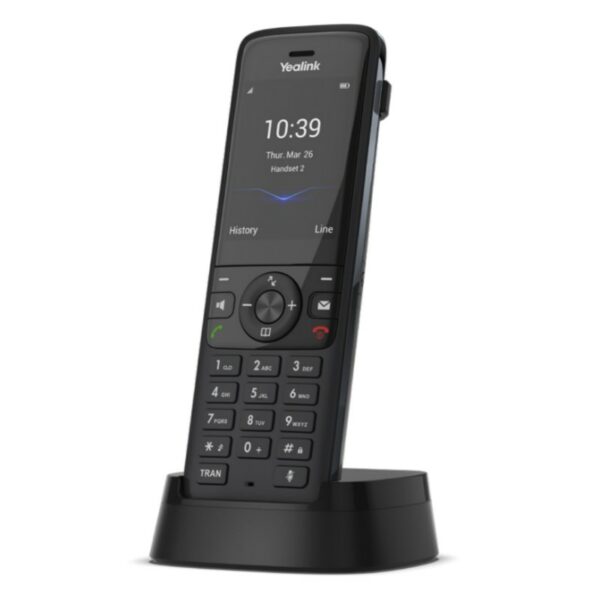
• Yealink W78H is a high-end, stylish modern wireless handset designed for business use, featuring a sleek and compact design with a 2.4” screen. • Key features include: • • Crystal-clear audio experience • • Bluetooth 5.1 connectivity with option to choose between Bluetooth headset or wired headset • • Vibration alarm ensures you never miss an important call • • Quick charging: 10-min charge time for 2-hour talk time • • HD voice and noise cancellation • • Headset connection via Bluetooth or 3.5 mm jack • • Sturdy and reliable belt clip for added convenience • Additional information: • Weight: 0.75 lbs • Dimensions: 7.12 × 4.09 × 3.54 in • Phone Type: DECT Technical Specifications: • Display: 1.8’’ 128×160 TFT color screen with intuitive user interface, caller ID, notification light, and screen saver • Phone Features: • • Up to 2 simultaneous calls per handset • • Handset select for receiving call and making call • • Auto intercom, auto answer, and 3-way conference capabilities • • Call forward, DND, call waiting, mute, hold, transfer, swap between calls, redial, speed dial, and voice mail features

About This Product

The Yealink W78H is a DECT wireless handset designed for business environments where mobility within the office is important but a full smartphone-based softphone solution isn't practical. It's a strong fit for desk workers who need to move around a warehouse, retail floor, or open-plan office while staying reachable on the company phone system. The handset pairs naturally with a Yealink DECT base station (such as the W80B or W70B) and replaces a traditional desk phone cord or a basic cordless home phone. A key tradeoff is that it requires a compatible DECT base and is not a standalone VoIP phone; it also relies on the base for registration and feature support, so the base's capabilities define what the handset can do. For a small GTA office with fewer than ten users, this handset offers good audio quality and Bluetooth headset support, but for a large deployment with complex call routing or advanced integrations, a dedicated IP desk phone or a softphone on a mobile device may be more appropriate.
Services We Provide
  • Professional Installation & Configuration
  • Ongoing Maintenance & Support
  • Troubleshooting & Repairs
  • System Upgrades & Updates



