
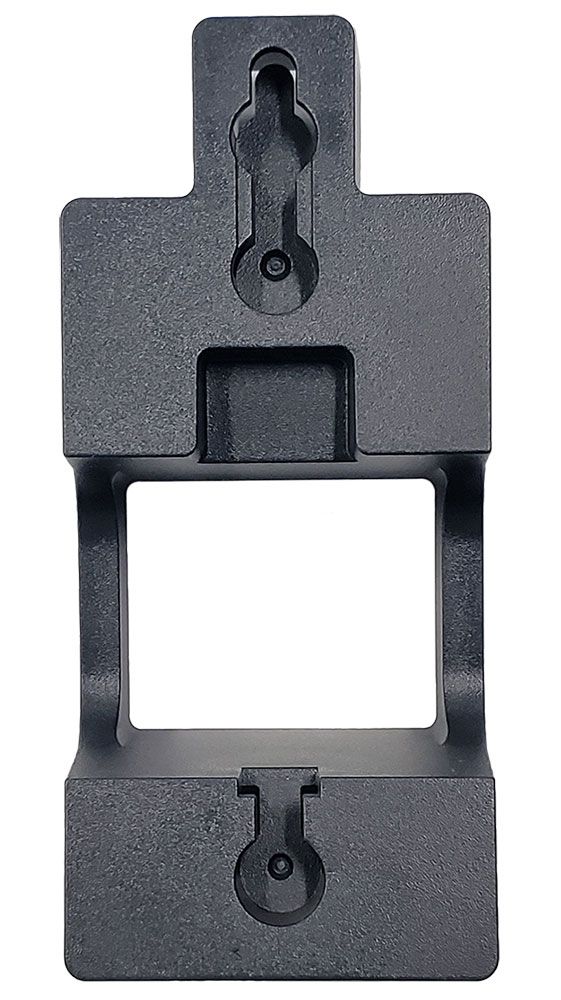
Yealink Wall Mount Bracket for EXP43
Frequently Asked Questions
First, check that the mounting surface is flat and that no debris or baseboard trim is interfering with the bracket’s edges. Also confirm you are using the correct orientation—the bracket’s tabs should face outward where the module slides on. If the wall has a textured finish, sometimes a slight gap is normal; just ensure the bracket is firmly anchored so it won’t pull away when the module is attached.
Wobble usually points to a loose bracket or uneven mounting. Remove the module and tighten the wall screws gently but fully, being careful not to strip them. If the bracket still flexes, the wall anchors may be too small for the screw gauge or the wall material; swapping to a correctly sized expanding anchor often resolves this.
Any wall mount can leave small holes. If you use standard #6 or #8 anchors, the marks will be minor and easily patched later. For temporary setups, consider low-profile adhesive strips rated for the combined weight, though the manufacturer recommends mechanical fasteners. In leased GTA office spaces, check with facilities before drilling.
The bracket typically uses small pan-head screws suitable for wall anchors. You can pick up a #6 x 1-inch screw-and-anchor kit from any hardware store. Avoid countersunk screws, as the head needs to sit flat against the bracket. Drywall-only anchors are fine for standard installations.
It is designed specifically for the EXP43 and will not correctly fit an EXP40 or any other expansion module. The mounting tab pattern and shape match the EXP43 housing only. Using it with a different module could lead to an insecure hold or damage.
Yes, but you’ll need toggle bolts or self-drilling drywall anchors rated for metal studs. Standard plastic expansion anchors won’t grip metal. If the stud is positioned exactly where you need the module, you can drill directly into it with a fine-thread screw, but most installations will catch the stud on only one side—good anchors on the other side will keep the bracket stable.
A short extension or a coiled cord can relieve tension. Make sure the cable doesn’t pull the module sideways; a small cable clip on the baseboard or wall can route it cleanly. The weight of the module is light, so strain relief is more about preventing connector wear over time.
The bracket is intended for a horizontal orientation that matches the EXP43’s natural display layout. Attempting a vertical mount would misalign the locking tabs and leave the module unsupported. If your space requires a vertical layout, you would need a custom or third-party cradle—this bracket won’t safely do the job.
Accessories
Yealink Wall Mount Bracket for EXP43
The Yealink Wallmount Bracket is specifically designed to fit accurately with the EXP43. Key features include: • Weight: 0.1 lbs • Dimensions: 8 × 8 × 4 in • Brand: Yealink • Accessory Type: Wall Mount Brackets
About This Product
The Yealink Wall Mount Bracket for the EXP43 is a straightforward accessory for offices that need a tidy, fixed location for an expansion module. It suits workstations where desk space is at a premium, or wall-mounted phone deployments that require the extra line keys and screen at eye level. In a Toronto corporate environment, this can be a clean solution for a reception area or a shared hot-desk pod where the module should remain anchored and visible.
This bracket pairs solely with the EXP43; it has no versatility for other Yealink modules. That simplicity is a strength if your expansion strategy is built around that specific model, but a buyer should confirm their module model before purchase. The bracket itself is lightweight and unobtrusive, so it adds almost no bulk to the installation.
A practical limit is that wall mounting requires proper anchoring. The bracket is small and light, but it still needs to carry the weight of the EXP43 and any tension from the connecting cable. In a drywall office, you must supply appropriate anchors—something easily handled by most facility teams. For solid masonry or steel stud partitions common in some GTA commercial buildings, the mounting hardware may differ from what you have on hand.
For a single-desk deployment where the EXP43 lives next to a phone on a stand, this wall bracket is overkill. It is best reserved for intentional wall-oriented setups where the module needs to be off the desk or permanently positioned. If your environment relies purely on softphone clients or you have no wall-mounting plans, this accessory is simply not needed.
This bracket pairs solely with the EXP43; it has no versatility for other Yealink modules. That simplicity is a strength if your expansion strategy is built around that specific model, but a buyer should confirm their module model before purchase. The bracket itself is lightweight and unobtrusive, so it adds almost no bulk to the installation.
A practical limit is that wall mounting requires proper anchoring. The bracket is small and light, but it still needs to carry the weight of the EXP43 and any tension from the connecting cable. In a drywall office, you must supply appropriate anchors—something easily handled by most facility teams. For solid masonry or steel stud partitions common in some GTA commercial buildings, the mounting hardware may differ from what you have on hand.
For a single-desk deployment where the EXP43 lives next to a phone on a stand, this wall bracket is overkill. It is best reserved for intentional wall-oriented setups where the module needs to be off the desk or permanently positioned. If your environment relies purely on softphone clients or you have no wall-mounting plans, this accessory is simply not needed.
Services We Provide
- Professional Installation & Configuration
- Ongoing Maintenance & Support
- Troubleshooting & Repairs
- System Upgrades & Updates



