
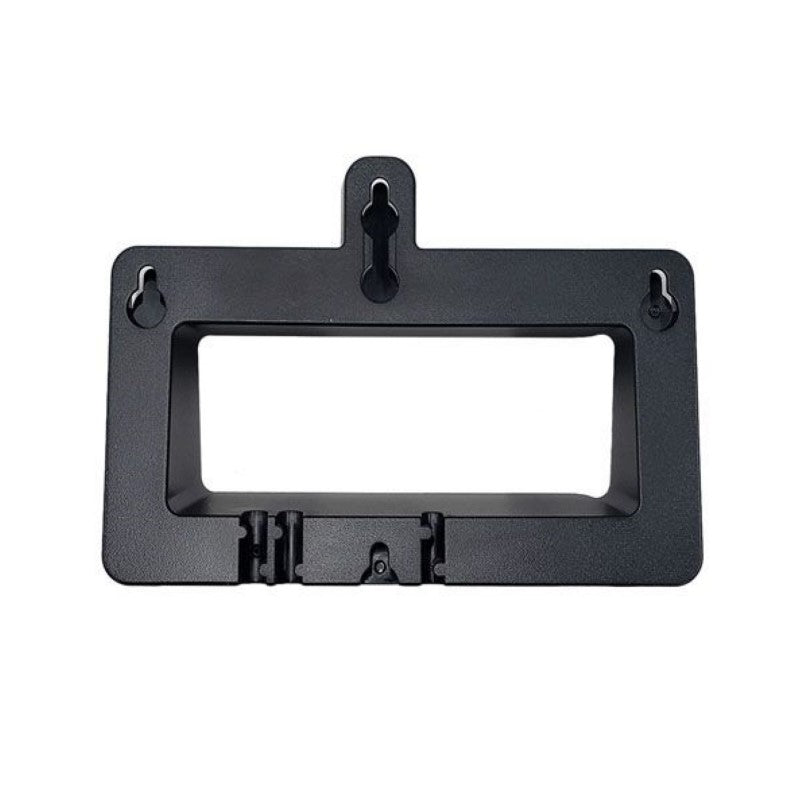
Yealink Wall Mount Bracket for MP56
Frequently Asked Questions
The bracket typically includes basic metal screws; drywall anchors may not be in the box. For a secure mount on hollow drywall, pick up #8 or #10 self-drilling anchors from a hardware store. If you’re uncertain about wall composition, a quick test with a stud finder helps avoid surprises.
The bracket itself is purely mechanical—it cannot affect power. If you’re using Power over Ethernet, verify that the Ethernet cable is firmly seated in the phone’s LAN port and that the switch port is supplying PoE. If you’re using a separate power adapter, check its connection and the outlet. Re-seat the phone on the bracket to ensure nothing is pinching the cables.
Make sure the two locking tabs on the bracket are fully seated into the slots on the back of the MP56. Gently press the phone downward until you hear or feel a click. If there’s still play, the mounting screws may not be fully tightened against the wall plate; a quarter-turn with a screwdriver can take up that slack.
Yes, the handset rest groove is designed to hold the receiver securely even when the phone is vertical. For wired headsets, route the cable so it doesn’t pull the phone away from the bracket. If you’re using a wireless headset or Bluetooth, wall-mounting doesn’t change anything functionally.
The bracket has an open-back design that lets you feed a cable from inside the wall if you’ve got a low-voltage gang box or a brush plate. There’s no specific punch-out, so you’ll just route the cable through the opening and connect it to the phone before hanging it on the bracket.
The physical chassis is identical across the MP56 Teams and Zoom variants, so the bracket works with both. No extra adapter is needed. The mounting points and handset cradle placement are the same.
Remove the screw and install a suitable drywall anchor, or relocate the bracket slightly up or down and use a fresh set of anchors. A plastic toggle anchor rated for at least 10 lbs is a good choice. Avoid over-tightening when you reinstall. If you keep stripping holes, a local IT installer in the GTA can often handle it quickly.
The bracket does not offer tilt or swivel adjustment. The phone’s built-in kickstand is not usable once wall-mounted. If you require a viewing angle other than flat vertical, you would need a third-party articulating mount designed for the MP56. The factory bracket prioritizes a slim, secure profile over adjustability.
Yes, but you’ll need appropriate masonry anchors and a drill with a masonry bit. The bracket’s mounting holes accept standard #8 or M4 screws. Pre-drill, insert plastic sleeve anchors, and then attach the bracket. As long as the wall is flat, the phone will mount securely.
The bracket doesn’t house a PoE injector. You can either place the injector near your switch and run a single cable to the wall drop, or mount a small shelf beside the phone if you must have the injector close by. The Ethernet port on the MP56 accepts standard PoE, so no special wiring is needed on the bracket side.
Accessories
Yealink Wall Mount Bracket for MP56
Weight: 0.5 lbs Dimensions: 8 × 8 × 4 in Brand: Yealink Key Features: • Wall mount bracket for MP56 Teams/Zoom Phone • Durable and reliable construction for long-lasting use • Easy to install and adjust for a secure fit
About This Product
The Yealink wall mount bracket is a straightforward accessory for anyone who needs to free up desk space by securing their MP56 desk phone to a wall. It’s best suited for compact offices, shared touch-down spots, or meeting rooms where a clean, fixed installation beats a cluttered desktop. The bracket is specific to the MP56 model (both Teams and Zoom editions), so there is no guesswork about fit.
Installation is designed to be simple, but the bracket itself is a passive metal piece—it does not include network or power passthrough, so you’ll still need to manage a separate cable run for Ethernet and, if you aren’t using PoE, the power adapter. This means you should plan for cable routing and ensure your wall location has accessible network connectivity. In a Canadian business setting, particularly in GTA offices where every square foot counts, going vertical can make a small workspace feel significantly more organized.
For what it is, the bracket is durable and does its job without complication. It’s not intended for setups where the phone needs to be frequently repositioned or tilted; you mount it once and the angle stays fixed. If you’re evaluating this alongside a more flexible articulating arm, know that this is a static solution—reliable, but no frills. It’s overkill only if you don’t actually need to wall-mount, and underpowered if you need adjustable viewing angles or built-in cable concealment.
Installation is designed to be simple, but the bracket itself is a passive metal piece—it does not include network or power passthrough, so you’ll still need to manage a separate cable run for Ethernet and, if you aren’t using PoE, the power adapter. This means you should plan for cable routing and ensure your wall location has accessible network connectivity. In a Canadian business setting, particularly in GTA offices where every square foot counts, going vertical can make a small workspace feel significantly more organized.
For what it is, the bracket is durable and does its job without complication. It’s not intended for setups where the phone needs to be frequently repositioned or tilted; you mount it once and the angle stays fixed. If you’re evaluating this alongside a more flexible articulating arm, know that this is a static solution—reliable, but no frills. It’s overkill only if you don’t actually need to wall-mount, and underpowered if you need adjustable viewing angles or built-in cable concealment.
Services We Provide
- Professional Installation & Configuration
- Ongoing Maintenance & Support
- Troubleshooting & Repairs
- System Upgrades & Updates



